 EM: Databases/SQL > Table Analysis Queue
Description
The  Table Analysis Queue pane displays all queued and running table analysis jobs, provides performance pause controls, and shows database, table, status, user information, and job count for monitoring progress.
Location
EM Navigator →  Databases/SQL → Table Analysis Queue
Toolbar
| Button | Function |
|---|---|

|
Removes/deletes the selected Table Analysis Job(s). |

|
Refreshes the Table Analysis Jobs list. |
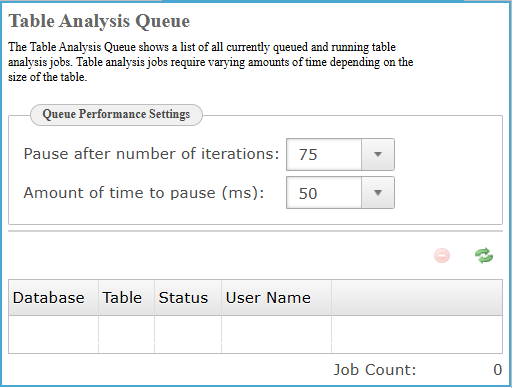
Queue Performance Settings
The Queue Performance Settings section controls how table analysis jobs pause during processing, allowing administrators to balance performance and system load by defining iteration intervals and pause durations between processing cycles.
Queue Performance Settings
| Settings | Description |
|---|---|
|
The exact iteration count threshold from predefined numeric options, determining when table analysis processing pauses before resuming to control execution pacing. |
|
|
Specifies the duration, in milliseconds, that table analysis processing pauses between iteration cycles to regulate workload intensity and system performance. |
Table Analysis Queue
Displays queued and running table analysis jobs, showing database, table, status, and user information to help administrators monitor progress and identify active or pending Jobs.
| Settings | Description |
|---|---|
|
The name of the database containing the table currently queued or running in analysis processing. |
|
|
The name of the table that is currently queued or actively undergoing table analysis processing. |
|
|
The current processing state of the table analysis job, such as queued, running, or completed. |
|
|
The user account that initiated or is associated with the table analysis job execution. |
Job Count
The total number of table analysis jobs currently queued and running in the system overall.