Enterprise Manager logoEM: Databases/SQL: Databases > Settings

Description

The Databases, Settings provides a centralized location for managing general database properties, allowing administrators to configure categorized options controlling data handling, access behavior, character rules, table creation behavior, miscellaneous settings, and custom functionality that define database operation within Enterprise Manager.

Note: selecting a database from Databases name list, opens its configuration interface, enabling access to Settings and other databases.

Location

Enterprise Manager logoEM NavigatorDatabases/SQLDatabasesSettings

Toolbar

Button Function
Adds new user property.

Refreshes the Directory Name field.

Deletes a selected directory.

file/directory button Allows the selection of file(s) from the local system.
Allows to create new file/folder.

Database Properties Header Panel

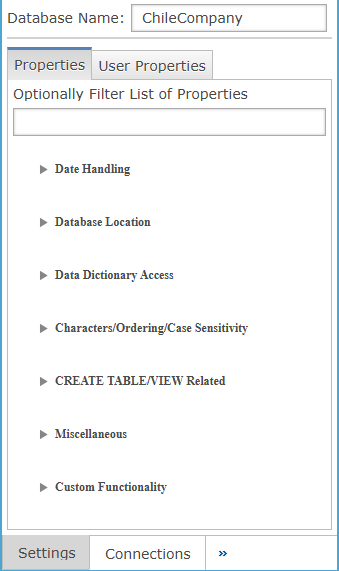
This panel shows which database is currently selected and serves as the entry point for accessing and managing its available configuration sections and related settings.

Settings Description
Database Name The name of the currently selected database being configured.
Properties Opens the main database configuration panel displaying categorized system properties for the selected database.
User Properties When selected it opens the User Properties workspace, where administrators manage database specific custom properties, and clicking to launch the Add User Property dialog for defining, categorizing, and configuring new metadata fields.
Optionally Filter List of Properties Filters visible database properties by entered text, helping users quickly locate specific configuration entries.

Add User Property

The User Props sub-tab allows the user to define properties and values for those properties. Access these properties from SQL statements using the GLOBAL scalar function (see SQL - Custom Functions). These properties can also specify additional directories that data files can be found in (i.e. DATA1, DATA_NM, etc.). The Add User Property pane opens after clicking the button in the User Properties pane, allowing administrators to define custom database properties with names, categories, data types, validation rules, and selection behavior.

Add User Property Settings

Settings Description
Category

The user property to a grouping that organizes properties within database settings.

Value Description
CREATE TABLE/VIEW Related Behaviors that control how database tables and views are created, structured, and validated during generation.
Characters/Ordering/Case Sensitivity Controls arrangement , sorting, character handling, and case-sensitivity rules applied during database operations.
Custom Functionality The application-specific extensions and custom behaviors that fall outside standard database configuration categories.
Data Dictionary Access Controls how the database reads, validates, and interacts with metadata stored in the data dictionary.
Database Location The file system paths and directory references used to locate database and dictionary resources.
Date Handling The formatting, parsing, storage, and interpretation rules for date values across database operations.
Miscellaneous Contains general configuration settings that do not fit within other defined categories.
Property Name The unique identifier for the custom property used internally to reference and store values.
Display Name The name for the property.
Description The explanatory text describing the property’s purpose, usage context, and behavior for administrative reference.
Type

The data type used to store and validate the custom property value.

Value Description
String The text-based property values without numeric or logical interpretation
Booloen Stores true or false values for properties requiring binary state representation.
Integer Stores whole number values without decimals for numeric configuration or counting purposes.
Long Large whole numbers exceeding integer range for extended numeric value storage.
Double Stores decimal numeric values for properties requiring precise numerical data.
Valid Values Clicking the icon opens the Valid Values window, then click the icon to create a new entry, which appears as New Value 0, by clicking the type, in dropdown, any displayed data can be selected, then editing the Display Name and Value fields user can define custom naming and values credentials. As last step, clicking OK to save and populate the Valid Values field.
Max Value Count The maximum number of values allowed to be assigned to this property.
Chooser Type

The selection interface used when users choose values for this property.

Value Description
None Disables any chooser behavior, requiring users to manually enter value.
File File browser allowing users to select a file path as property value.
Directory Folder browser allowing users to select a directory path as property value.
User Prompts selection of a system or application user as the property value source.
Password Hides the entered value and securely stores it for authentication and protected configuration purposes.
Upper Case Converts entered values to uppercase before storing or applying property configuration.
List Predefined selectable list of valid values for controlled user selection.

Date Handling

Since BBj string templates do not have a date type field, BBj uses date suffixes to determine if a field should be treated as a date value. Use this section to specify one or more date suffixes and the format that should be used to evaluate the date data. Specify multiple date suffixes by separating each suffix with a comma. If multiple date formats are used within a single database (not advisable), up to three different formats can be specified.

Date Handling Settings

Settings Description
Date Format

Conversion class to use to convert the raw data in the column to a usable date. The list displayed in the combo box is a list of all date formats available on this BASIS DBMS (including custom date formats).

Value Description
ADP Converts ADP proprietary date strings into usable DATE values using ADP formatting rules.
AON Formats AON system date strings into DATE values using AON defined conversion class rules
AON3_CYYMMDD Implements CYYMMDD formatted AON3 date strings into DATE values using century-based parsing rules.
CITI Parses Citi system formatted date strings into usable DATE values using Citi conversion rules.
CYYMMDD Converts CYYMMDD formatted date strings into DATE values using century-based numeric parsing rules.
CalendarWeek Converts calendar week formatted date strings into DATE values based on ISO week definitions.
DIAMOND The system formatted date strings into DATE values using Diamond conversion class rules.
DISC Formatted date strings into DATE values using DISC system date interpretation rules.
DayMonthYear Converts Day-Month-Year formatted date strings into DATE values using numeric positional parsing rules.
Julian Converts Julian day numeric values into DATE values using Julian calendar conversion rules.
Julian_Time Converts Julian date and time numeric values into DATE values including time component interpretation.
Julian_Time_Zero_As_Null Julian date and time, treating zero values as NULL instead of dates.
Julian_Zero_As_Null

Julian numeric dates, treating zero values as NULL instead of valid dates.

MAI System formatted date strings into DATE values using MAI conversion class rules.
MAI_2K MAI two-digit year dates into DATE values using Y2K century window logic.
Milisecond Converts millisecond timestamp numeric values into DATE values using epoch-based time conversion rules.
MonthDayYear Converts Month-Day-Year formatted date strings into DATE values using numeric positional parsing rules.
PBS The PBS system formatted date strings into DATE values using PBS conversion class rules.
SOA Converts SOA formatted date strings into DATE values using SOA system conversion rules.
SQLDate Converts SQL standard date formatted strings into DATE values using SQL compliant parsing rules.
SSI The system formatted date strings into DATE values using SSI conversion class rules.
SSIJ The SSI Julian formatted date strings into DATE values using SSI Julian conversion rules.
Timestamp Converts timestamp formatted date-time strings into DATE values including time portion interpretation rules.
YMD8 Formats YMD8 numeric date strings into DATE values using fixed eight-digit parsing rules.
Date Column Suffix Column suffix to use to determine if a column should be treated as a DATE type. This means that any column whose name ends with the date suffix will be considered a DATE type and apply the specified date format before evaluation.
Y2K Window Used by date formats that store dates as 2 digit years. These date formats add 1900 to those that are greater than the Y2K window value, and add 2000 to those less than the value.

Database Location

The Database Location section specifies the database’s DATA and DICTIONARY file locations, linking the database definition to the correct paths used for accessing tables and data dictionary files.

Database Location Settings

Settings Description
DATA Location Location of the data files that this database is to link with once selected. For BASIS ODBC Driver version 3.0x and below, this corresponds to the DATA field in the config.tpm file.
DICTIONARY Location Location of the data dictionary files that this database is to link with once selected. For BASIS ODBC Driver version 3.0x and below, this corresponds to the DICTIONARY field in the config.tpm file.

Data Dictionary Access

The Data Dictionary Access section defines which user credentials are used to access data dictionary files, supporting service, connected, or specific users for controlled database dictionary operations.

Settings Description
Data Access User Type

Type of access to use when accessing the data dictionary files.

Value Description
BBjServices User Uses the BBjServices service account to access data dictionary files for database operations.
Connected User Applies the currently authenticated Enterprise Manager user credentials when accessing associated data dictionary files.
Specific User Allows administrators to define a user account for controlled data dictionary file access.
Dictionary Access User Specific user to use when accessing the data dictionary files(optional).

Characters/Ordering/Case Sensitivity

The Characters/Ordering/Case Sensitivity section configures encoding, sorting behavior, case handling, and collation options, controlling how text values are interpreted, indexed, compared, and ordered during SQL processing and query execution.

Characters/Ordering/Case Sensitivity Settings

Settings Description
Encoding Character Set Character set to use for encoding/decoding values in the database. The dropdown provides supported BASIS and standard encodings such as Big5, CESU-8, EUC-JP, and x-BASIS variants.
Ordering Type

Keys on non-ESQL BBj data files order character values based on byte (ASCII) value instead of “collation” order based on the alphabetizing rules of the English language. Because of this, lower case letters sort after all capital letters. This option allows user to specify the way ordering should be handled by ORDER BY. With collation order enabled, ORDER BY sorts values according to alphabetizing rules. With byte order enabled, it sorts according to ASCII character values. With collation order enabled, the SQL engine cannot rely on the key order for optimization purposes on sorting operations. However, this may not impact any of your queries since the SQL engine can still optimize on WHERE clauses and always chooses WHERE clause optimization over ORDER BY optimization when it has a choice between to the two.

Value Description
Byte Ordering Orders character values by ASCII byte sequence rather than linguistic rules, typically sorting lowercase characters after all uppercase letters during comparisons.
Collation Ordering Orders character values using language-based alphabetic collation rules, enabling ORDER BY sorting according to linguistic character relationships instead of ASCII byte values.
Case Insensitive Keys
  • When unchecked, the SQL engine uses case-sensitive keys for indexes and tables, preserving original character casing during sorting and comparison operations.

  • When checked, the SQL engine enforces case-insensitive keys on XKEYED and VKEYED files, requiring file recreation to apply updated index behavior.

ESQL Collation
  • When unchecked, ESQL tables use default byte ordering, ignoring collation rules during character comparison operations.

  • When checked, ESQL tables apply collation ordering rules to evaluate character comparisons consistently across queries.

CREATE TABLE/VIEW Related

The CREATE TABLE/VIEW Related section defines default table types, key enforcement, date handling, and view capabilities, controlling how new database objects are created and structured.

CREATE TABLE/VIEW Related Settings

Settings Description
CREATE TABLE Type

Specifies the default type of data file to create when executing a CREATE TABLE statement.

Value Description
Indexed Uses indexed file structure supporting keyed access, optimized searches, and traditional BBj data storage.
Serial Creates sequential record storage optimized for append operations without indexed key access support.
Direct/Sort Stores records in direct access format, enabling sorted retrieval using external indexing mechanisms.
String Creates a string-based table format optimized for variable-length text record storage operations.
Program Associates table operations with program logic, enabling procedural control instead of physical storage.
Directory Defines directory based table storage, linking database objects to file system folder structures.
MKeyed Implements multi-key indexed table engine supporting multiple keys with optimized lookup performance.
MKeyed:Recoverable Enables multi-key indexed storage with transactional recovery support for protected database operations.
MKeyed:64bit Uses 64-bit multi-key indexed engine supporting large file sizes and expanded record addressing.
MKeyed:64bit:Recoverable Combines 64-bit multi-key indexing with transactional recovery for large, fault-tolerant database tables.
XKeyed Provides extended indexed file format supporting advanced key definitions and enhanced access behaviors.
XKeyed:Recoverable Adds recovery logging to extended indexed tables, enabling rollback and crash-safe data protection.
VKeyed Uses variable-key indexed engine allowing flexible key definitions and dynamic record indexing support.
ESQL Creates tables using ESQL engine, enabling SQL storage, indexing, and optimized relational query processing.
Full-Featured CREATE VIEW
  • When unchecked, new or modified views are created using legacy format, remaining compatible with PRO/5 environments.

  • When checked, any new views or modified views will be stored as full-featured views.See BASIS SQL Gets Even Better

Strict Key Checking
  • When unchecked, primary keys are not required in CREATE TABLE statements. The SQL engine automatically assigns a primary key using the first 120 bytes of the record.

  • When checked, CREATE TABLE statements must explicitly specify a primary key on one or more columns. This enforces defined keys during table creation and is strongly recommended for data integrity.

Default Date Type Definition

If a type definition is selected here, CREATE TABLE statements will assign this type definition as the underlying data type for all DATE type columns.

Value Description
NUM_DATE Defines numeric date storage, applying default date conversion when creating tables without explicit type.
TIMESTAMP Specifies timestamp-based date storage, enabling automatic temporal formatting for new date columns during creation.
Default Date Format

The date format to use when creating a table and specifying a DATE type column. Used in conjunction with Default Date Type Definition.

Value Description
ADP Converts ADP proprietary date strings into usable DATE values using ADP formatting rules.
AON Formats AON system date strings into DATE values using AON defined conversion class rules
AON3_CYYMMDD Implements CYYMMDD formatted AON3 date strings into DATE values using century-based parsing rules.
CITI Parses Citi system formatted date strings into usable DATE values using Citi conversion rules.
CYYMMDD Converts CYYMMDD formatted date strings into DATE values using century-based numeric parsing rules.
CalendarWeek Converts calendar week formatted date strings into DATE values based on ISO week definitions.
DIAMOND The system formatted date strings into DATE values using Diamond conversion class rules.
DISC Formatted date strings into DATE values using DISC system date interpretation rules.
DayMonthYear Converts Day-Month-Year formatted date strings into DATE values using numeric positional parsing rules.
Julian Converts Julian day numeric values into DATE values using Julian calendar conversion rules.
Julian_Time Converts Julian date and time numeric values into DATE values including time component interpretation.
Julian_Time_Zero_As_Null Julian date and time, treating zero values as NULL instead of dates.
Julian_Zero_As_Null

Julian numeric dates, treating zero values as NULL instead of valid dates.

MAI System formatted date strings into DATE values using MAI conversion class rules.
MAI_2K MAI two-digit year dates into DATE values using Y2K century window logic.
Milisecond Converts millisecond timestamp numeric values into DATE values using epoch-based time conversion rules.
MonthDayYear Converts Month-Day-Year formatted date strings into DATE values using numeric positional parsing rules.
PBS The PBS system formatted date strings into DATE values using PBS conversion class rules.
SOA Converts SOA formatted date strings into DATE values using SOA system conversion rules.
SQLDate Converts SQL standard date formatted strings into DATE values using SQL compliant parsing rules.
SSI The system formatted date strings into DATE values using SSI conversion class rules.
SSIJ The SSI Julian formatted date strings into DATE values using SSI Julian conversion rules.
Timestamp Converts timestamp formatted date-time strings into DATE values including time portion interpretation rules.
YMD8 Formats YMD8 numeric date strings into DATE values using fixed eight-digit parsing rules.

Miscellaneous

The Miscellaneous section contains additional database configuration options that affect runtime behavior, compatibility, and performance. Administrators should review each setting carefully, even if not currently required, to understand the full range of capabilities available for BBj database environments.

Miscellaneous Settings

Settings Description
Default Numeric Scale The scale used for NUMERIC columns in Legacy and Barista format databases. These formats do not support a scale attribute on column definitions so BBj uses this default scale when returning column information to JDBC and ODBC API calls.
SPROC Debugging
  • When unchecked, In BBj 10.00 and higher, interactive debugging for stored procedures is disabled, and SPROC execution runs normally without opening a server-side WinConsole.

  • Enables interactive debugging of stored procedures on the database. A server side WinConsole opens whenever the SPROC executes, allowing step through debugging. See: Debugging SPROCs and Triggers for details on interactively debugging stored procedures.

Legacy Handle Variable Right-Padded
  • When unchecked, BBj SQL does not assume variable length terminated column values right-padded with spaces are equivalent to those without the padding.

  • When checked, BBj SQL assumes variable length terminated column values right-padded with spaces are equivalent to those without the padding.

Consistent Fixed Length Padding
  • When unchecked, VARCHAR values are not padded to the table-defined length using the VARCHAR Pad Character.

  • When checked, VARCHAR values with VARCHAR Pad Character to the length defined in the table definition.

Pad Character If the Consistent Fixed Length Padding setting is enabled, this is the pad character that will be used for padding
Truncate If Too Long
  • When unchecked, values are not truncated, even if they exceed the length defined in the dictionary.

  • When checked, truncates values inserted or returned to the length specified in the dictionary when longer than defined.

Auto Analyze Tables
  • When unchecked, automatic table analysis is disabled. Table analysis must be started manually, even when table structure changes that would benefit from analysis.

  • When checked, in BBj 10.0 and higher, enables automatic table analysis so tables are analyzed when structural changes occur that benefit SQL query optimization.

Equality Optimize NUMERICs
  • When unchecked, BBj NUMERIC type columns are not optimized for equality comparisons. Because values are stored and sorted as strings, left-padding prevents correct ordering, and the SQL engine does not include them for optimization by default.

  • When checked, Enables equality optimization when NUMERIC values contain no left-padding and digits are left-aligned in the record field. This defines behavior for the entire database. In version 20.20+, the global setting may be overridden per column when structures are inconsistent.

NUMERIC Empty String as Zero
  • When unchecked, returns a NULL value for any empty strings returned in type NUMERIC columns.

  • When checked, returns a zero for any empty strings returned in type NUMERIC columns.

Read Only
  • When unchecked, the database is not set to read only and does not override user permissions set elsewhere.

  • When checked, sets the database to read only. This overrides all user permissions set elsewhere, including administrators. However, databases can still be administered from The Enterprise Manager.

Type Read-only indication of the type of the database.
Enforce VARCHAR Length
  • When unchecked, by default, the length in variable length fields is only a “guideline.” This was legacy behavior for string templates.

  • When checked, variable length fields will give an error if you attempt to set a value that exceeds their defined length.

SPROC Run As User
  • When unchecked, stored procedures run as the user running BBjServices. See:  BBjServices.

  • When checked, stored procedures execute in an interpreter as the user who established the database connection.

Optimize Date Columns
  • When unchecked, normally, the SQL engine will not do any optimization with SQL queries using date type columns due to the fact that many date formats do not work properly when used in keys. Incorrect use of these columns in optimizing queries can result in incorrect data being returned.

  • When checked, however, if you know for certain that your date format (when sorted by ASCII character values) works properly in keys, then selecting this option can improve the performance of some queries by telling the SQL engine to optimize on them if possible.

Advisory Locking
  • When unchecked, the SQL engine does not use advisory locking for file access when accessing this database.

  • When checked, sets the SQL engine to use advisory locking for its file access when accessing this database.

Auto Commit
  • When unchecked, ESQL table operations do not use autocommit by default; this only applies to ESQL tables since they are the only file types supporting transactions.

  • When checked, any ESQL table operations will use autocommit by default; this only applies to ESQL tables since they are the only file types supporting transactions.

Timeout(ms) The number of ms to wait for file access operations to complete if necessary. If the timeout is reached before completing the file operations, an error will occur.
Statement Timeout(sec) Timeout in seconds for file access operations that occur inside SQL statements such as write, remove, and read.
SPROC Classpath

Select a specific configured classpath to use when executing stored procedures. If none is specified, stored procedures will execute using the default classpath for BBjServices.

Value Description
webservices.bus Routes stored procedure execution through the webservices.bus classpath for business service components resolution.
graffiti Targets stored procedures to run using the graffiti classpath for application-specific service dependencies resolution.
bbj_default Defaults stored procedure execution to the standard BBjServices classpath when no custom classpath is selected.
barista Directs stored procedures to use the Barista framework classpath for resolving application business logic.
webservices.ccos Configures stored procedures to execute using the webservices.ccos classpath for CCOS service integrations.
basisdemos Assigns stored procedure execution to the basisdemos classpath for accessing demonstration application libraries.
addon Enables stored procedures to run using the addon classpath for custom extension component resolution.

Custom Functionality

The Custom Functionality section configures advanced SQL behavior, including factory implementations and optional scalar or group function classpaths, enabling database extensions through custom logic components.

Custom Functionality Settings

Settings Description
BBjSQLFactory Implementation Specifies the SQL factory implementation used by the database to resolve and execute custom SQL functionality.
Scalar/Group Function SSCP

Selects the classpath source containing custom scalar or group SQL functions available to the database.

Value Description
<none> Disables custom scalar or group SQL functions, using only built-in database function behavior exclusively.
webservices.bus Routes stored procedure execution through the webservices.bus classpath for business service components resolution.
graffiti Targets stored procedures to run using the graffiti classpath for application-specific service dependencies resolution.
bbj_default Defaults stored procedure execution to the standard BBjServices classpath when no custom classpath is selected.
barista Directs stored procedures to use the Barista framework classpath for resolving application business logic.
webservices.ccos Configures stored procedures to execute using the webservices.ccos classpath for CCOS service integrations.
basisdemos Assigns stored procedure execution to the basisdemos classpath for accessing demonstration application libraries.
addon Enables stored procedures to run using the addon classpath for custom extension component resolution.

See Also

BBjAdminBase

Databases

Connections

JDBC How-To

SQL

Tables

Views

Procedures

Types

Security

Query Analysis

Permissions

Connection Pools

SQL/SELECT Connections

Table Analysis Queue

Index Builders