 EM: Databases/SQL: Databases > Query Analysis
Description
The  Databases, Query Analysis tab provides an interface for the administrator to
analyze information about all of the queries run on the selected database.
This information can be used to help determine if the database tables
are indexed in a way that allows the SQL engine to effectively optimize
the most common queries run against the database.
Databases, Query Analysis tab provides an interface for the administrator to
analyze information about all of the queries run on the selected database.
This information can be used to help determine if the database tables
are indexed in a way that allows the SQL engine to effectively optimize
the most common queries run against the database.
Note: selecting a database from Databases name list, opens its configuration interface, and enabling access to Query Analysis.
Location
EM Navigator →  Databases/SQL → Databases → Query Analysis
In BBj 12.0 and higher, the administrator determines that it would be beneficial to add or remove an index on a particular combination of columns in the list, this can be done right from the user interface.
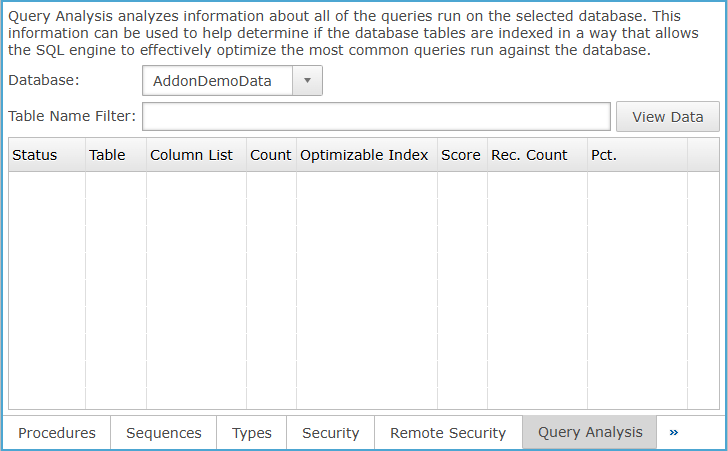
Database Query Analysis
Query Analysis analyzes information about all of the queries run on the selected database. This information can be used to help determine if the database tables are indexed in a way that allows the SQL engine to effectively optimize the most common queries run against the database.
Query Analysis Settings
| Settings |
Description |
| Database |
Choose the database from the dropdown and click View Data to load the selected database’s data in the column section. |
| Table Name Filter |
Filters tables by name before applying the filter criteria to query analysis results. |
| View Data |
When clicked, loads the selected database’s query analysis data into the results table. |
Query Analysis Column Section
Lists query analysis results by status, table, columns, counts, index optimization, score, and percentages.
Query Analysis Settings
| Settings |
Description |
|
Status
|
Displays the status of query analysis
on a specific table.
| Icon |
Status |
|

|
Indicates
there is no table analysis data available for the table.
|
|

|
Indicates
table analysis was successfully run on this table and no alerts
were discovered.
|
|

|
Indicates
table analysis was successful, but there is some information available
that may be useful to the administrator or developers about the
table.
|
|

|
Indicates
warning alerts generated for the table or that table analysis
should be run again because there are new analysis features available
in the current version of BBj installed.
|
|

|
Indicates
a critical problem of some kind. The table may still function
in queries, but analysis either failed to run due to an error
or there were critical alerts discovered with the data in the
file during table analysis.
|

|
Indicates a FULLTEXT index is defined for the table to support text-based search operations on character data fields. |

|
Indicates the table data file is encrypted and requires proper access configuration. |
|
| Table |
Name of the table. |
| Column List |
List of columns (in index segment order) that
were included in the WHERE clause that could have possibly been
used for optimization if they were indexed. |
| Count |
Number of times Query Analysis has been run on
that table. |
| Optimizable Index |
Whether this combination of columns has an index
on them or not.
|
| Score |
Is the number of queries
that have been run that used that combination of columns in their
WHERE clause. |
| Rec. Count |
Record count. |
| Pct. (Percentage) |
A score that relates to the how often this combination
of columns was used. |
When a statement is executed that includes a WHERE clause, it updates
the underlying information used to populate this table. For example, the
following statement will update information for the "LAST_NAME, FIRST_NAME",
"FIRST_NAME, LAST_NAME", "FIRST_NAME", and "LAST_NAME"
items in the list:
SELECT * FROM customer WHERE last_name = 'Doe' and first_name
= 'John'
See Also
BBjAdminBase
Databases
Connections
JDBC How-To
SQL
Tables
Views
Procedures
Types
Security
Query Analysis
Permissions
Connection Pools
SQL/SELECT Connections
Table Analysis Queue
Index Builders