Enterprise Manager logoEM: Databases/SQL > Connection Pools

Description

Connection Pools consist of zero or more open connections. When an application asks the pool for a connection, the pool may give the application a brand new connection (such as when the pool is empty or does not have any free connections available), or it may return an existing connection. The application does not care what kind of connection it receives, the pool manages the creation and distribution of connections.

Some applications require connection pooling when connecting to third-party JDBC/ODBC databases. Common use cases include:

  • There is a limited number of licenses available on the third party database but you have a larger number of users that need to use the system.

  • The application opens and closes a large number of connections and the third party database has problems cleaning up the closed connections fast enough.

  • Opening a new connection to the third party database takes too much time for a particular application.

A connection pool is an interface that sits between the application and the JDBC or ODBC Driver that actually communicates with the database. This allows an application to use a connection pool without making any changes to the application or the user experience.

Location

Enterprise Manager logoEM NavigatorDatabases/SQLConnection Pools

Toolbar

Button Function
Adds new pool, and accesses the Connection Pool editor.
Removes/deletes the selected Connection Pool(s).
refresh button Refreshes the list of Connection Pool(s).

Connection Pools Main Pane

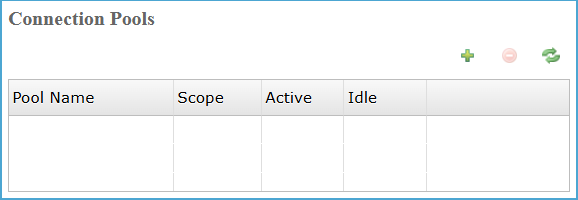
The Connection Pools pane lists defined database connection pools, showing scope and current usage, while providing controls to create, remove, or refresh pools used by applications.

Connection Pools Main Pane Settings

Column Description
Pool Name The unique name assigned to each configured database connection pool entry.
Scope Indicates whether the connection pool is defined globally or limited to a user.
Active The current number of active connections currently in use by pool.
Idle The number of pooled connections currently idle and available for immediate reuse.

Creating and Configuring a Connection Pool

Clicking the icon on the Connection Pools pane opens the Connection Pool configuration view, where users define a pool name, JDBC connection details, pool behavior limits, transaction settings, and validation options to control how database connections are created, managed, reused, and verified.

JDBC Connection Settings

JDBC Connection Settings defines JDBC driver class, connection URL, and optional properties required to establish authenticated, reliable connections between the application and target databases servers.

JDBC Connection Settings List

Settings Description
Name The name is a case-sensitive identifier for the connection pool. This is the name that the application uses in a call to SQLOPEN to acquire a connection from the pool.
JDBC Driver Class The fully qualified JDBC driver class name used by the pool to establish database connections. The value must match the selected JDBC driver implementation available on the system.
JDBC Connect URL This is the JDBC connection string that the pool should use when opening new connections to the database. The URL format is JDBC driver specific, so consult the third party JDBC driver documentation for details.
JDBC Connect Properties Specify any properties that the JDBC driver should use when establishing a new connection. Each property value consists of a name and value in the format, NAME=VALUE. Separate each property with a comma.

Pool Configuration

The Pool Configuration section defines connection pool behavior, including scope, limits, exhaustion handling, wait timing, idle management, eviction intervals, transaction settings, and commit behavior controlling database connection life-cycle and concurrency.

Pool Configuration Settings List

Settings Description
Scope

There are two types of pools - global and user. The scope of a Global pool is the entire JVM, while the scope of a User pool is a particular user and password. For example, any application running within the BBjServices installation can access any Global connection pool with a simple SQLOPEN call taking no extra parameters. On the other hand, a User pool requires a user name and password that must be validated before the pool returns a connection.

Note: this is how to specify a user name and password on global pools. user=myself, password=mypass

Maximum Active Controls the maximum number of objects that can be borrowed from the pool at one time. When negative, there is no limit to the number of objects that may be active at one time. An active connection is one that is currently being used by the application. Max. Active is exceeded, the pool is said to be exhausted. See the description of the When Exhausted option for specific details on application behavior when the maximum number of active connections is exceeded.
When Exhausted Action

Specifies the behavior when the pool is exhausted or full.

Value Description
Fail If the number of active connections in the pool is equal to the value in Max. Active and the application requests a connection from the pool, an error will occur.
Block If the number of active connections in the pool reaches the value in Max. Active and the application requests a connection from the pool, the application will wait until a new or idle connection is available. If a positive Max. Wait value is supplied, the application will block for at most that many milliseconds, after which an error will occur. If Max. Wait is negative, the application will wait indefinitely.
Grow If the number of active connections in the pool reaches the value in Max. Active and the application requests a connection from the pool, a new connection will be returned and the pool will grow in size.
Maximum Wait Time(ms) The maximum amount of time (in milliseconds) that the application should wait for a connection to be made available from the pool. See the description of the When Exhausted option for specific details on application behavior when the maximum number of active connections is exceeded.
Maximum Idle Controls the maximum number of connections that can sit idle in the pool at any time. An idle connection is one that is not currently being used by the application. When negative, there is no limit to the number of objects that may be idle at one time.
Time Between Eviction(ms) Indicates how long (in milliseconds) the eviction thread should sleep before runs of examining idle objects. When non-positive, no eviction thread will be launched.
Read Only
  • When unchecked: Opens new connections permitting read and write database operations.

  • When checked: Opens new connections restricted to read-only database operations only.

Auto Commit
  • When unchecked: Opens new connections requiring explicit commit and rollback for each transaction.

  • When checked: Opens new connections automatically committing each statement upon successful execution.

Transaction Isolation Level

The JDBC transaction isolation level that the pool should use when opening new connections.

Value Description
None Applies database default isolation behavior without explicitly enforcing a transaction isolation level.
Read Uncommitted Allows transactions to read uncommitted changes, permitting dirty reads and inconsistencies.
Read Committed Allows transactions to read uncommitted changes, potentially producing inconsistent data
Repeatable Read Ensures repeated reads return consistent data, preventing non-repeatable reads during transactions.
Serializable Enforces strict transaction isolation, fully serializing access to prevent all concurrency anomalies.

Validation

It defines connection validation behavior using a test query and execution timing options, ensuring pooled JDBC connections remain valid during borrowing, returning, or idle periods operations.

Validation Settings List

Settings Description
Validation Query The SQL query that the pool should run when it needs to check the validity of a connection in the pool.
Test On Borrow
  • When unchecked, the pool does not run the Validation Query before making an idle connection active.

  • When checked, The pool runs the Validation Query before activating a connection and evicts it if invalid, then tries another connection.

Test On Return
  • When unchecked, the pool does not run the Validation Query when connections are returned by SQLCLOSE.

  • When checked, the pool runs the Validation Query on SQLCLOSE and evicts connections that are not valid.

Test While Idle
  • When unchecked, the pool does not run the Validation Query to test idle connections.

  • When checked, the pool runs the Validation Query to test idle connections and evicts any connections that are no longer valid.

Opening a Connection in a Global Pool

To open a connection from a Global connection pool, use code similar to the following:

SQLOPEN(chan)"MyGlobalPool"

All connections will have the same connection properties and user credentials when using Global pools. If this is a security issue for the application, use User pools.

Opening a Connection in a User Pool

To open a connection from a User connection pool, use code similar to the following:

SQLOPEN(chan, MODE="user=admin, password=admin123")"MyUserPool"

Note: notice that the User pool requires a user name and password if the third party database requires them. Each connection will be validated using the user and password so that the application can control access to the various connections in the pool.

See Also

BBjAdminBase

Settings

JDBC How-To

SQL

Tables

Views

Procedures

Types

Security

Query Analysis