 EM: Databases/SQL > Databases
Description
The  Databases pane lists all configured databases in Enterprise Manager, showing database name, type, and dictionary location, and provides controls to create, remove, convert, update, refresh, search, and export database configurations.
Location
EM Navigator →  Databases/SQL → Databases
Toolbar
| Button | Function |
|---|---|

|
Attaches to an existing data dictionary or creates entirely new database. |

|
Removes/deletes the selected databases from the list. |

|
Opens a connection for running SQL statements. |

|
Refreshes the database list. |

|
Analyzes all the tables in selected database(s). |
| Convert To Enhanced | Launches the Convert Database Wizard to create an enhanced-format dictionary from a selected legacy database. |
| Update Wizard | Opens the Database Update Wizard to build updated data files from dictionaries. |
| Export | Opens the Database Export Wizard to export dictionary data to selectable formats. |
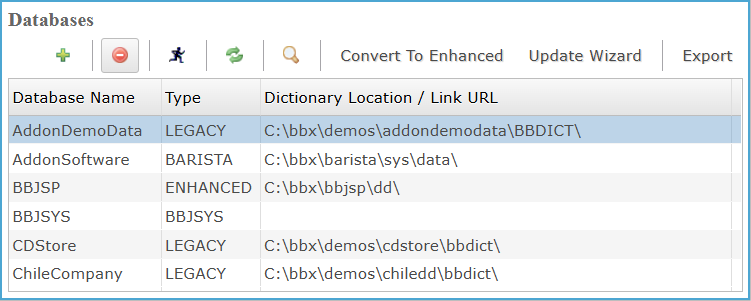
Databases: Column Section Settings
Display all configured databases, showing database name, type, and dictionary location or link URL, enabling administrators to review database configurations and identify legacy, enhanced, or system databases.
Column Section Settings
| Column | Description |
|---|---|
| Database Name | Identifies each configured database by its defined name as registered within Enterprise Manager. |
| Type | The database format classification, such as legacy, Barista, enhanced, or system-defined database types. |
| Dictionary Location/Link URL | The file system path or link location where the database dictionary is stored. |