 EM: Databases/SQL: Databases > SQL
Description
The  Databases SQL tab in Enterprise Manager provides an interactive interface for executing SQL statements against the selected database. Administrators can enter and format queries, enable or disable autocommit, limit returned rows, and execute statements directly from the editor. Authentication credentials or an authentication token may be supplied for secure access. Query results and execution status are displayed in the Messages panel.
Note: selecting a database from Databases name list, opens its configuration interface, and enabling access to SQL.
Toolbar


Location
EM Navigator →  Databases/SQL → Databases → SQL
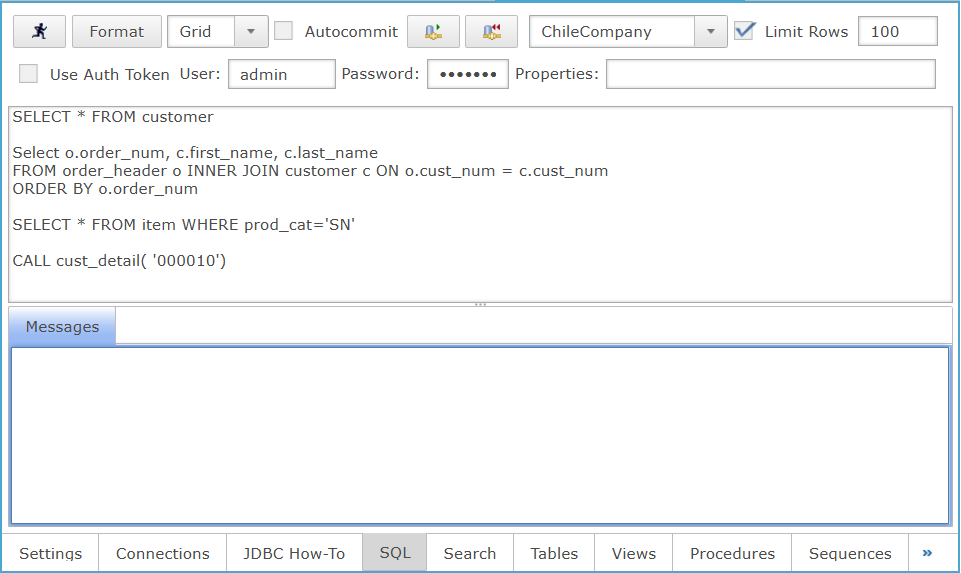
SQL Editor Panel
The SQL Editor allows administrators to enter, execute, and manage SQL statements against the selected database, displaying results and execution messages within the interface.
Messages Panel
Displays execution status, informational messages, and errors generated by SQL statements.