 EM: Databases/SQL > SQL/SELECT Connections
Description
The  SQL/SELECT Connections page displays all active SQL/SELECT database connections in real time, providing refresh controls, advanced filtering by user and database, and a detailed grid showing connection type, user name, database, connect time, client host, and total connection count.
Location
EM Navigator →  Databases/SQL → SQL/SELECT Connections
Toolbar
| Button | Function |
|---|---|

|
Removes/deletes the selected Active Database Connection(s). |

|
Refreshes the Active Database Connection list. |
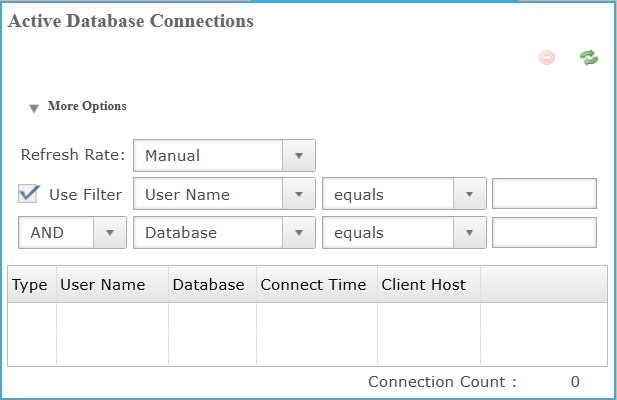
Active Database Connections: More Options
The More Options section controls how connection data is refreshed and filtered, allowing manual refresh selection and conditional filtering by user name and database using logical operators to narrow results displayed in the connections grid.
More Options Settings List
Active Database Connections: Column Settings
The column section contains tabular list of active SQL/SELECT connections, showing type, user name, database, connect time, client host, and the current total connection count.
Column Settings List
| Value | Description |
|---|---|
| Type | The connection type indicating whether the session uses SQL, SELECT, or other supported connections. |
| User Name | The user account associated with the active database connection session currently established in the system. |
| Database | The database name to which the active connection is currently established for access by session. |
| Connect Time | The date and time when the database connection session was established for tracking and auditing. |
| Client Host | The host name or address of the client machine initiating the database connection request source. |
Connection Count
Displays the total number of active SQL/SELECT database connections currently listed in the connections grid.