 EM: Databases/SQL: Databases > Security
Introduction
Security is, or should be, a major consideration for any database administrator. Depending on the requirements of each company, this could be as simple as requiring a user name and password to connect to the system, or as complex as different permissions for different types of SQL operations on various objects in the database for each individual user. Standard permissions have been available in BBj since version 1.0. These permissions give the administrator the ability to assign read-only or read/write access to an entire database. However, standard permissions did not permit assigning different permissions to different objects (tables, views, etc.) in the database – it is all or nothing. While this is very easy to manage, it limits the control that the administrator has over access to sensitive data. This in turn could limit the ability for users to have easy desktop data query access to subsets of the company production database. Workarounds are possible but they require far more maintenance and structuring of the database by the database administrator.
BBj 11.0 and higher provides a complete feature set for managing user permissions in a powerful new feature called “Object Level Permissions.” This new feature will, for many customers, unlock meaningful desktop data query access to corporate data for all the users within a company with appropriate restrictions that are easy to structure and maintain. For an in-depth look at permissions and roles, see The BASIS International Advantage article DB Security That You Have Always Dreamed About.
Description
The  Databases Security tab configures database access by security model. It supports Legacy Permissions for database-level access and Object Level Permissions for per-user privileges and roles. In the current UI, administrators can set default permissions, review user assignments, and manage privilege and role settings for the selected database. See: Permissions.
Note: selecting a database from Databases name list, opens its configuration interface, and enabling access to Security.
Location
EM Navigator →  Databases/SQL → Databases → Security
Toolbar

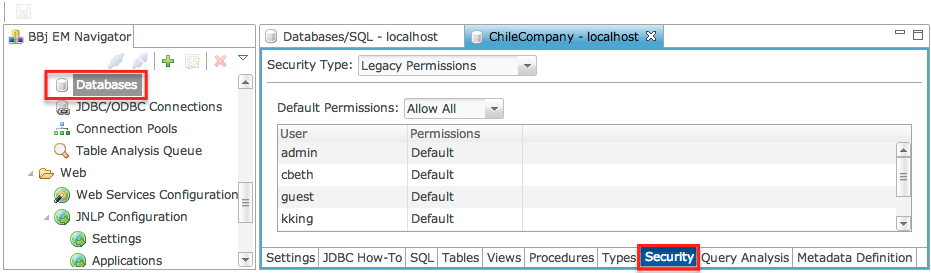
Security Type: Legacy Permissions
The Security Type setting determines which security model is used for the selected database. Legacy Permissions provide the least amount of control over access to databases and are provided for backward compatibility purposes and to make the assignment of permissions very easy to manage. See: Permissions.
Security Type Settings
Compare/Contrast Legacy and Object Level Permissions
|
Legacy Permissions |
Object Level Permissions |
|---|---|
|
Users can have read or read/write permissions. |
Users can have SELECT, UPDATE, INSERT, DELETE, or any combination. |
|
Permissions are the same for every table, view and stored procedure. |
Users can have different permissions for every table, view and stored procedure. |
|
Permissions can only be set from The Enterprise Manager or the Admin API. |
Permissions can be set from The Enterprise Manager, Admin API, or using standard SQL GRANT/REVOKE statements. |
|
No way to group users with similar permissions. |
Supports grouping users using ROLES. |
Default Permissions
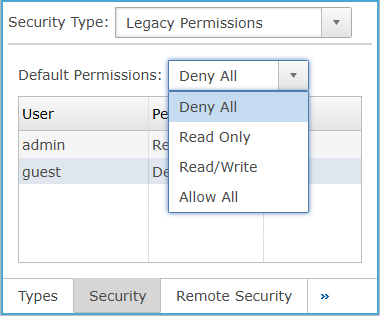
Default access policy for all user accounts on this BASIS DBMS. This means that each user on this BASIS DBMS automatically has this access unless otherwise specified. For example, if read-only is specified, all users have read access to the system. To give certain users write access, they must be added to the read/write list of users (see below). It is recommended that read-only or deny-all be selected for this option. See: Permissions.
Default Permissions Settings
Security: Columns
Legacy Permissions assigns database access levels per listed user, allowing each user entry to inherit or override the default permission. See: Permissions.
Columns Settings
Security Type: Object Level Permissions
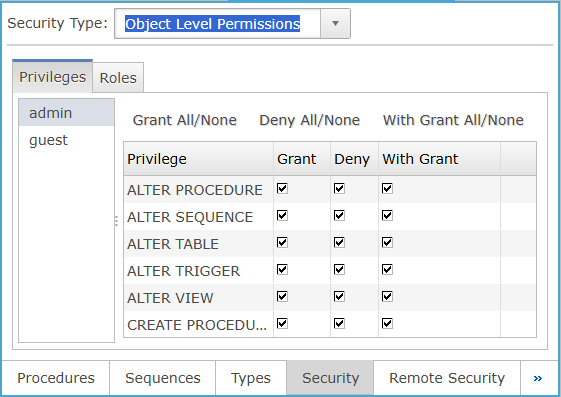
When Security Type is set to Object Level Permissions, the Privileges view opens to manage object-level privilege assignments for the selected user. Selecting the Roles tab switches the interface to role management, where roles and their associated Role Members can be created, selected, and maintained for the selected database. See: Permissions.
Object Level Permissions Settings
Privileges Column
Object-level privilege controls let users apply or clear Grant, Deny, and With Grant selections for all listed privileges of the selected user.
Privileges Column Settings
| Value | Description |
|---|---|
| Grant All/None |
Clicking toggles all checkboxes in the Grant column for the listed privileges on or off. |
| Deny All/None | Clicking toggles all checkboxes in the Deny column for the listed privileges on or off. |
| With Grant All/None | Clicking toggles all checkboxes in the With Grant column for the listed privileges on or off. |
Roles
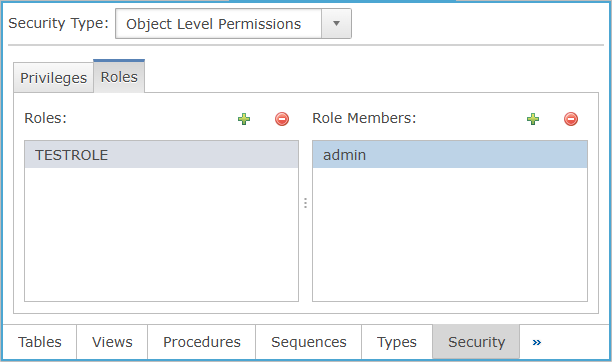
The Roles manages database roles and their assigned members when Security Type is set to Object Level Permissions. Selecting the Roles tab displays the Roles and Role Members columns. New roles are created from the New Role dialog, and selected users are added through the User Selection dialog. See: Permissions.
| Value | Description |
|---|---|
| Roles | Lists the defined database roles, clicking the  opens the New Role dialog to add a role. opens the New Role dialog to add a role. |
| Role Members | Lists the users assigned to the selected role, clicking the opens the User Selection dialog to add members. |