Enterprise Manager logoEM: Databases/SQL: Databases > Connections

Description

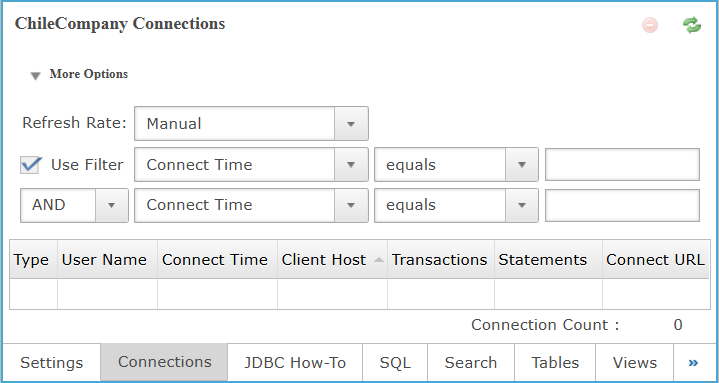
The Connections view provides real-time visibility into active database client sessions, showing connection type, user, connection time, client host, transaction count, executed statements, and the associated connection URL, with filtering and manual refresh controls for monitoring database activity.

Note: selecting a database from Databases name list, opens its configuration interface, enabling access to Connections and other databases.

Location

Enterprise Manager logoEM NavigatorDatabases/SQLDatabasesConnections

Toolbar

Button Function

Deletes/Removes a selected Connection(s) from the list.

Refreshes the Connections in the list.

Connections: More Options

The More Options section controls how connection data is refreshed and filtered, allowing administrators to define refresh behavior and apply conditional filters to narrow displayed connections based on specific criteria such as connection time or user-defined attributes.

More Options Settings

Settings Description
Refresh Rate Define how often the connections list refreshes automatically, allowing manual updates or periodic refresh intervals ranging from seconds to one minute.
Use Filter
  • When unchecked, disables all filter-related fields under More Options, preventing users from selecting criteria, operators, or entering values for connection filtering.

  • When checked, enables all filter-related fields under More Options, allowing users to define filter criteria, choose operators, and enter values for filtering connections.

Filter Field

Allows selecting which connection attribute is used as the primary field for applying filter conditions to the connections table.

Value Description
Type Filters connections by their connection type, such as server or client, depending on how the session is classified.
User Name Filters connections by the authenticated user name associated with each active database connection session.
Connect Time Filters connections based on the time the session was established with the database server.
Client Host Filters connections by the hostname or IP address of the client that initiated the connection.

Transactions

Filters connections based on the number of active or executed transactions associated with each session.
Statements Filters connections by the number of SQL statements executed within each active connection session.
Connect URL Filters connections using the JDBC or connection URL used by the client to establish the session.
Filter Operator

Defines the comparison rule used to evaluate the selected filter field against the provided filter input value.

Value Description
equals Matches records where the selected field value exactly equals the specified filter input without any partial matching.
greater than The selected field value is numerically or chronologically greater than the specified filter value.
less than The selected field value is numerically or chronologically less than the specified filter value.
contains Finds records where the selected field value includes the specified filter text as a substring match.
regex Applies a regular expression pattern to match records whose selected field value satisfies the defined expression.
Filter Value The comparison value used by the selected filter operator to evaluate and match records in the results table.
Logical Operator

Specifies how multiple filter conditions are combined to determine whether records should be included in the results table.

Value Description
None Indicates that no logical operator is applied, so only a single filter condition is evaluated.
AND Combines conditions so that all specified filter criteria must be met for a record to match.
OR Applies conditions so that a record matches when at least one specified filter criterion is met.

Connections: Column Section

This table lists active database connections, showing connection type, user identity, connection time, client host, transaction count, executed statements, and connection URL.

Column Section Settings

Type The connection type, identifying whether the session is internal, client-based, or established through a specific database access mechanism.
User Name The authenticated user name associated with each active database connection session.
Connect Time The timestamp when the connection was established, helping administrators determine session duration and identify long-running or idle connections.
Client Host The hostname or IP address of the client that initiated the connection to the database server.

Transactions

The total number of database transactions executed by the connection since it was established.
Statements The number of SQL statements executed within the connection, providing visibility into query activity and workload intensity.
Connect URL The connection URL used by the client, indicating the database endpoint and parameters applied during session initialization.

Connection Count

The total number of active connections currently listed in the table.

See Also

BBjAdminBase

Databases

JDBC How-To

SQL

Tables

Views

Procedures

Types

Security

Query Analysis

Permissions

Connection Pools

SQL/SELECT Connections

Table Analysis Queue

Index Builders