 EM: Web - App Deployment > SOAP Web Services Configuration
Description
The  SOAP Web Services Configuration pane displays all defined SOAP services and allows administrators to select a service to configure its version, working directory, configuration file, XML namespace, service port, and exposed methods, enabling precise control over service definitions and execution behavior within Enterprise Manager.
Location
EM Navigator →  Web →
Web →  App Deployment → SOAP Web Services Configuration
Toolbar


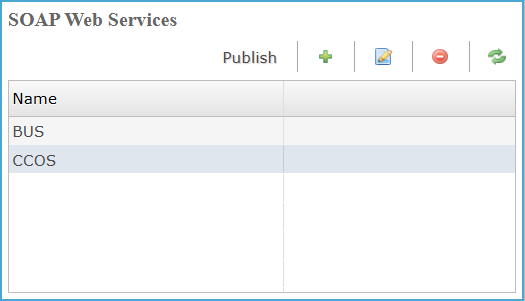
SOAP Web Services
Lists all configured SOAP web services and provides controls to manage, publish, and modify them.
SOAP Web Services Settings
| Value | Description |
|---|---|
| Name | Name of the Web Service(s). |
Adding New Web Service
Clicking the  icon opens the Create New SOAP Web Service dialog, where users enter a service Name, select the service Type, and click Finish to create it. The newly created service immediately appears in the main SOAP Web Services list, and selecting it opens the SOAP Web Service Config pane, where users configure version, working directory, configuration file, XML namespace, service port, and define methods, calls, and parameters required for the service to operate.
SOAP Web Service Information Settings
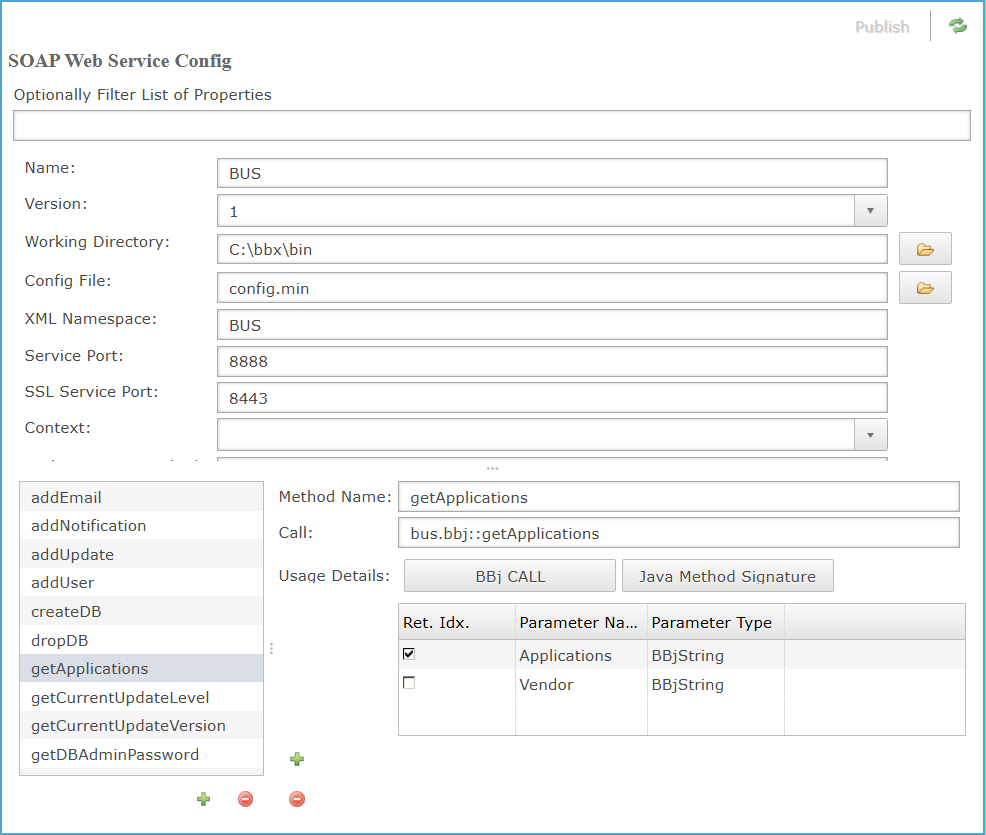
SOAP Web Service Config Settings
The SOAP Web Service Config pane displays the details necessary for running your application, as well as a list of all methods published by this Web Service.
SOAP Web Service Config Settings List
| Settings | Description | ||||||||||||||
|---|---|---|---|---|---|---|---|---|---|---|---|---|---|---|---|
| Name |
Name of the Web Service. |
||||||||||||||
| Version |
The SOAP service definition version to use.
|
||||||||||||||
|
Working Directory |
Clicking the |
||||||||||||||
|
Config File |
The configuration file to use for running the Web Service's interpreter. Clicking the |
||||||||||||||
|
XML Namespace |
The namespace under which the Web Service will be published. |
||||||||||||||
|
Service Port |
The non-secure port for the service, accessible via HTTP. (Should be a number between 1024 and 65535) |
||||||||||||||
|
SSL Service Port |
The secure port for the service, accessible via HTTPS. |
||||||||||||||
|
Context |
The context for the service, configurable via Context Configuration. The default is the root context.
|
||||||||||||||
|
Authentication Method |
The method of a generated Java class that the web service will use for authentication. The method must be defined in either the user's object, subroutine program, or WSDL. It must take a username and password and return a boolean value indicating whether the user has been authorized to use the service. |
||||||||||||||
|
Status |
Specifies whether the service is enabled or disabled. If the service is enabled, it will return HTTP 200 and present a WSDL to the user when its URL is invoked with the wsdl parameter. If it is disabled, the service will return HTTP 404 (File not Found). |
||||||||||||||
|
Exception Class |
A custom exception class for the service. |
||||||||||||||
| SSCP |
The Session-Specific Classpath assigned to the BBj session, enabling the session to load and use application-specific Java classes and libraries. See: Session-Specific Classpath.
|
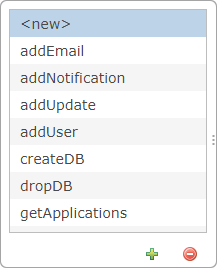
SOAP Web Service Config: Add Method
The Add Method panel manages the list of SOAP service methods. Clicking the icon inserts a <new> entry into the method list for definition, while selecting an existing method(s) and clicking the  icon removes it from the list.
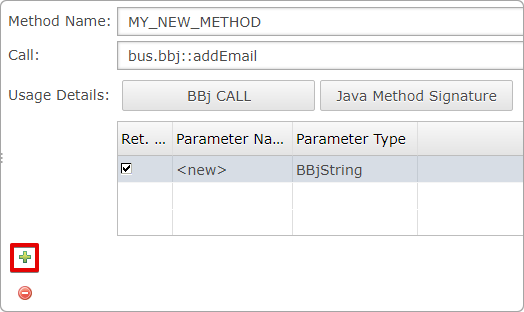
SOAP Web Service Config: Enter the Method Name and Call
The Method configuration section allows defining the method name and call signature for the selected SOAP web service. Clicking the icon inserts a <new> parameter row in the parameters table, enabling users to add and define additional method parameters. Each added entry can be edited to specify the parameter name and type, and selecting an existing parameter from the row then clicking icon removes/deletes it from the list.
Method Name and Call Panel Settings
| Settings | Description |
|---|---|
| Method Name | Selecting a method from the method panel populates the Method Name field, then the name can be edited. |
| Call | Specific call for method, which is populated in the field, when method name is selected, if needed it can be edited. |
SOAP Web Service Config: Usage Details
Selecting BBj CALL opens the Server Invocation String dialog displaying the generated BBj call syntax, while selecting Java Method Signature opens the dialog showing the corresponding Java method signature. Clicking OK in either dialog confirms the selection and saves the displayed invocation details into the Usage Details section for the configured method.
Usage Details
| Value | Description |
|---|---|
| BBj CALL | Generates code that executes your program when the Web Service is invoked. |
| Java Method Signature | Generates code that appears on the public Web Service interface when the Web Service is published. |
Usage Details: Column Settings
The Usage Details parameter table defines return index, parameter names, and data types required by the selected method, enabling precise mapping of inputs and outputs for accurate SOAP service execution.
| Column | Description |
|---|---|
|
Ret. Idx(Return Index) |
Identifies the parameter that will be returned by the SOAP method. Selecting the checkbox marks the corresponding parameter as the return value, and the system automatically assigns its zero-based index based on the parameter’s position in the list. |
|
Name of the parameter. |
|
|
Type of the parameter: BBjString, BBjNumber, BBjInt. |
See Also
From Legacy to Enterprise With BBj Web Services

Enterprise Manager - SOAP Web Services Configuration
To view this topic for the preceding Enterprise Manager, see Enterprise Manager Java App - Web Service Configuration.
Description
The Enterprise Manager allows the administrator to change various configuration
settings for SOAP Web Services.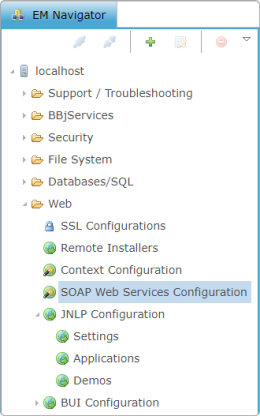
To access SOAP Web Services Configuration, expand the Web folder and double-click SOAP Web Services Configuration in the BBj EM Navigator. The SOAP Web Services tab will open to the right.
SOAP Web Services Configuration
The SOAP Web Services Configuration screen displays all currently configured Web Services.
Selecting from the icons at the top right, the administrator can add, edit, or delete a Web Service.
SOAP Web Service Config
The SOAP Web Service Config screen displays the details necessary for running your application, as well as a list of all methods published by this Web Service.

| Setting | Description |
|---|---|
|
Name |
Name of the Web Service. |
|
Working Directory |
Starting directory of BBj Service. |
|
Config File |
Config file to use for running the Web Service's interpreter. |
|
XML Namespace |
The namespace under which the Web Service will be published. |
|
Service Port |
The non-secure port for the service, accessible via HTTP. (Should be a number between 1024 and 65535) |
|
SSL Service Port |
The secure port for the service, accessible via HTTPS. |
|
Context |
The context for the service, configurable via Context Configuration. The default is the root context. |
|
Authentication Method |
The method of a generated Java class that the web service will use for authentication. The method must be defined in either the user's object, subroutine program, or WSDL. It must take a username and password and return a boolean value indicating whether the user has been authorized to use the service. |
|
Status |
Specifies whether the service is enabled or disabled. If the service is enabled, it will return HTTP 200 and present a WSDL to the user when its URL is invoked with the "wsdl" parameter. If it is disabled, the service will return HTTP 404 (File not Found). |
|
Exception Class |
A custom exception class for the service. |
|
Method Name |
The name of the method. |
|
Call |
Specific call for method. |
|
Usage Details |
Clicking one of these buttons displays the BBj code or Java code for the method. |
|
Ret. Idx(Return Index) |
The zero based index of which call parameter to return. |
|
Parameter Name |
Name of the parameter. |
|
Parameter Type |
Type of the parameter: BBjString, BBjNumber, BBjInt. |
Add Method
Click
the “+” below the left panel to create a <new> method.
Enter the Method Name and Call.
Add parameters to the
method (BBjString, BBjNumber, BBjInt) by clicking the "+" to
the left of the parameters table.
Click [BBj CALL] (shown
below) or [Java Method Signature] to display the code.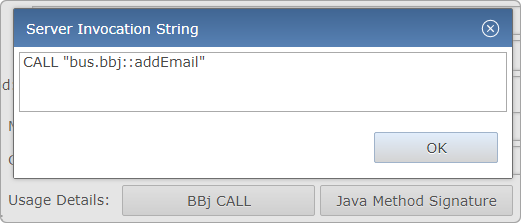
|
BBj Call |
Generates code that executes your program when the Web Service is invoked. |
|
Java Method Signature |
Generates code that appears on the public Web Service interface when the Web Service is published. |
Copy the displayed code and paste where needed.
Close the tab to save
your addition.
Edit Method
Highlight the method in the left panel, and the properties will appear on the right.
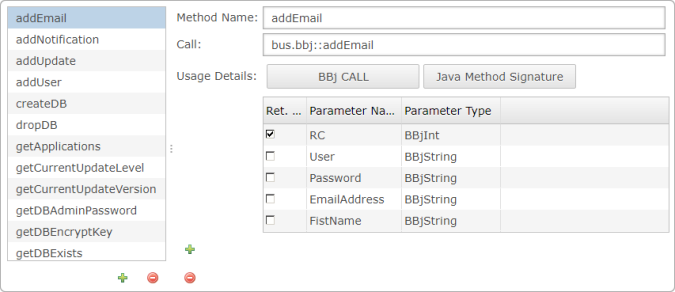
Edit the details of the specific Web Service method.
Close the tab to save your addition.