 EM: BBjServices > Email Services
Description
In BBj 17.00 and higher,  Email Services, found in
 BBjServices, is for configuring outgoing Simple Mail Transfer Protocol (SMTP) clients. An email service allows users to send emails from BBj or Java programs using the Admin API or
 Event Handler notifications.
 EM Navigator → BBjServices → Email Services
Toolbar
| Button | Function |
|---|---|

|
Configures a new email service. |

|
Removes selected email service(s). |

|
Refreshes the email services list. |
Configuring Email Services
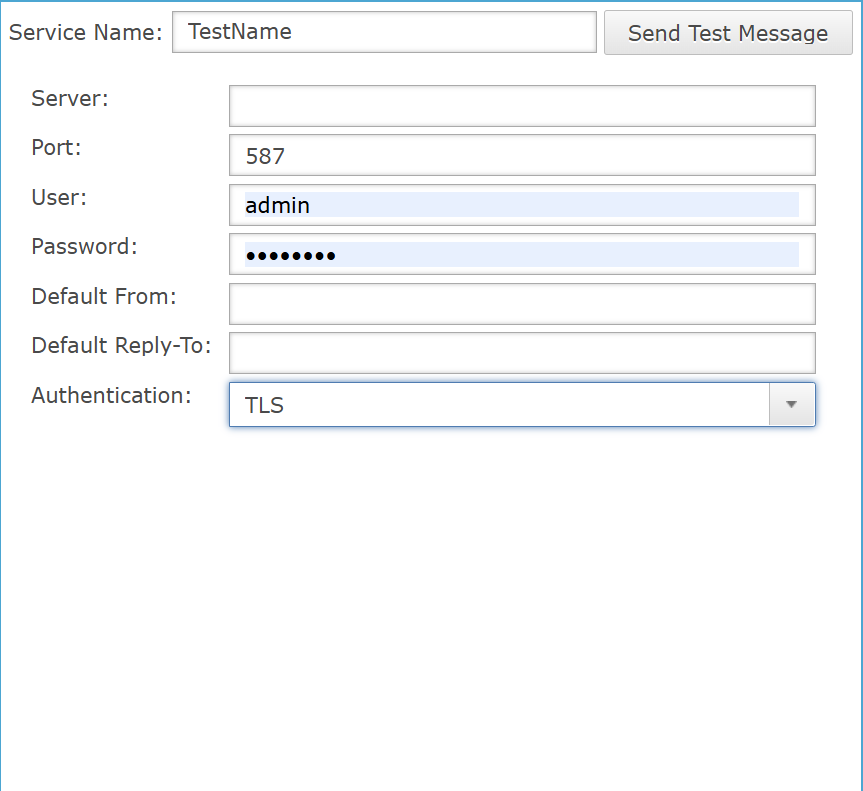
The Email Services page enables configuration of outgoing mail servers for BBj or Java programs using the Admin API or Event Handlers notifications. Clicking the button opens configuration fields for server, port, authentication, and credentials. The Send Test Message button launches a dialog for composing and verifying email functionality.
Email Services Settings List
| Settings | Functionality |
|---|---|
|
The service name is displayed in the email services list and the Admin API selects a specific email service using this field. |
|
|
Sends a test email using the configured service, click Send Test Message, enter To, Subject, and Message, choose OK to deliver or Cancel to dismiss. |
|
|
SMTP Server Address: The hostname or IP address of the mail server (e.g., smtp.example.com). |
|
|
Common ports are 25, 465, and 587. The different ports are usually associated with the authentication types:
|
|
|
Specifies the username credential required for authenticating with the configured email server during outgoing message transmission. |
|
|
The authentication password required for secure login and connection to the configured SMTP mail server. |
|
|
The default sender email address automatically used in the "From" field for outgoing messages. |
|
|
The default reply email address automatically used in the Reply-To field for outgoing messages. |
|
|
There are three different types, choose the one required by your mail server provider.
|
Example Configurations
Gmail
- Server: smtp.gmail.com
- Port: 465 or 587
- User: your full Gmail address (e.g., example@gmail.com)
- Password: your Gmail password
- Authentication: SSL/TLS
Outlook/Hotmail
- Server: smtp-mail.outlook.com
- Port: 587
- User: your full Outlook.com/Hotmail address (e.g., example@outlook.com)
- Password: your Outlook.com/Hotmail password
- Authentication: TLS
Yahoo Mail
- Server: smtp.mail.yahoo.com
- Port: 465 or 587
- User: your full Yahoo email address (e.g., example@yahoo.com)
- Password: your Yahoo email password
- Authentication: SSL/TLS
iCloud Mail
- Server: smtp.mail.me.com
- Port: 587
- User: your full iCloud email address (e.g., example@me.com)
- Password: your iCloud email password
- Authentication: TLS
Remarks
A user can verify that their Email Service has been configured properly by clicking the [Send Test Message] button to send a message to an email of their choice. If the test fails, the user can adjust the configurations as needed.
Admin API
BBjAdminBase.newEmailService creates a new BBjAdminEmailService object, which is used to configure an email service and send emails using BBjAdminEmailMessage. Alternatively, the user can get a list of email services on the server with BBjAdminBase.getEmailServices or specify an existing email service by its service name with BBjAdminBase.getEmailService.
Admin API Example
|