 EM: BBj Services > Log Files
Description
The  Log Files provides centralized access to all BBjServices log files for monitoring, diagnostics, and troubleshooting. Enables administrators to view, filter, and open individual log files. Furthermore, it lists all available logs with file name, modification date, and size. Selecting a log file displays its contents in a detailed viewer pane, allowing quick inspection of startup data, runtime messages, or error traces. This section streamlines log review, helping identify configuration issues, service behavior, or runtime exceptions without requiring external file access.
Location
EM Navigator →  BBjServices → Log Files
Toolbar


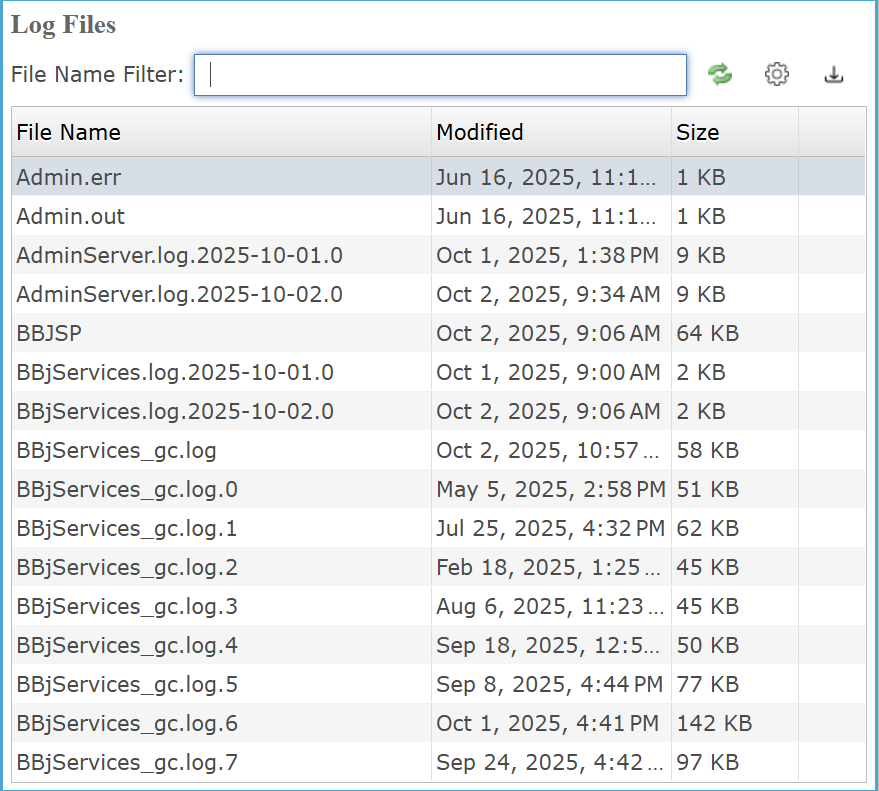
Log Files
The Log Files provides a centralized view of BBjServices log files. Administrators can quickly locate files using the File Name Filter and review modification dates and sizes for efficient monitoring. The page streamlines access to system logs for diagnostics, performance checks, and troubleshooting.
Log Files Settings
| Settings | Description |
|---|---|
|
Filters the log file list by name or partial text using the * wildcard; if no matching logs exist, the list remains empty. Click the |
Log Files Column
The Log Files table organizes available logs into columns for file name, last modified date, and file size, allowing quick identification of recent or large logs. Sorting by any column helps locate specific files efficiently during system monitoring or troubleshooting.
Log Files Columns Settings
| Column | Description |
|---|---|
|
Lists the name of each available log file within BBjServices, allowing quick identification and selection of specific logs for viewing. |
|
|
Shows the exact date and time each log file was last updated, helping identify recent activity or changes for troubleshooting and monitoring purposes. |
|
|
Indicates the storage size of each log file in kb, allowing quick assessment of file volume and potential growth for maintenance or diagnostic purposes. |
View Specific Log File
The log file viewer opens when a file is double-clicked, displaying its full contents in a read-only pane for real-time review and search. Administrators can type directly into the search field to filter entries incrementally, and selecting Matches Only refines the view to show only lines that meet the entered criteria without altering the original log file.
Specific Log File Settings
| Settings | Description |
|---|---|
|
Allows real-time filtering of log file content by entering specific text, updating the displayed results instantly to match search criteria without altering the actual log data. |
|
|
|
|
|
|