 The ResBuilder Interface (Superseded)
ResBuilder has been superseded by the FormBuilder module in the BASIS IDE for BBj. ResBuilder is no longer included in the BBj download package as of version 12.0 but can be downloaded with Visual PRO/5.
Description
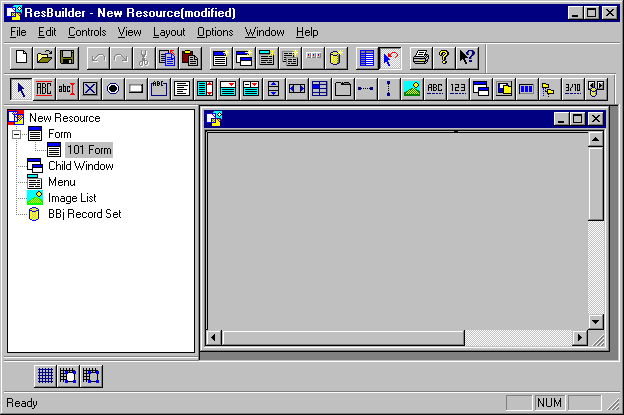
The ResBuilder interface consists of the menu bar, the toolbars, the tree view, the status bar, and the edit area.
Menu Bar
The menu bar occupies the upper boundary of the interface and is used to invoke most ResBuilder commands. For a description of every menu item, see ResBuilder Menus. Context-sensitive menus, which appear when you right-click an item, are described in Context-Sensitive Menus.
Toolbars
The Main, Controls, and Align toolbars provide shortcuts to commonly used commands. For a description of each toolbar, see ResBuilder Toolbars.
Tree View
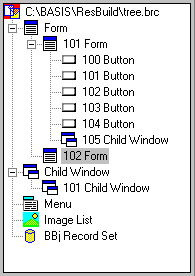
The tree view displays a graphical representation of the structure and contents of the resource file. The tree view can be used to add forms, child windows, image lists, and menus and to define and delete individual resources.
The tree view contains the following items:
Forms and Child Windows
Windows/Forms and Child windows act as placeholders for the controls that are used to execute commands in applications. Windows/Forms are top-level windows that can contain child windows menus, controls, and image lists. Child windows can contain controls, image lists, and other child windows, but cannot contain menus. See Creating Forms and Child Windows.
Menus
The menu window provides the capability to create menus for the program. See Creating a Menu Bar.
Image Lists
An image list is a series of bitmaps that are used to populate tab buttons and grid controls. See Creating and Defining Image Lists.
Edit Area
The edit area occupies the right portion of the interface. It serves as a "work area" for creating and modifying forms, child windows, menus, image lists, and their associated controls and elements.
For a listing of the properties of forms, child windows, menus, image lists, and controls, see ResBuilder Properties.
Status Bar
The Status Bar is positioned at the bottom perimeter of the interface. It provides information about the current menu or toolbar selection.