 EM: Security > Authentication Tokens
Description
The  Authentication Tokens panel in Enterprise Manager provides a centralized view of all active JWT session tokens issued to users within the system. Administrators can filter tokens by expiration criteria, identify the currently active session (highlighted in red), and manage token life-cycles to maintain secure user authentication across the BBj environment. The panel includes an Info String column that displays the value of the JWT payload’s info-string key. Double-clicking a token entry displays the full payload contents; however, the actual JWT value itself is not shown for security purposes. See: BBjAdmin TokenInfo Javadoc.
Location
EM Navigator →  Security → Authentication Tokens
Toolbar
| Button | Function |
|---|---|

|
Adds a new entry and opens new application. |

|
Removes/deletes selected application(s) or files from the system. |

|
Refreshes the displayed list of applications and their status. |
Create Authentication Token
To create an authentication token, click icon to open the Create Authentication Token dialog. The panel provides administrators with a secure method to generate time-bound tokens for JDBC, ODBC, and Admin API connections. Token generation requires valid user credentials, with optional payload parameters to extend functionality through name-value pairs. Expiration settings define the token’s validity period, ensuring controlled access and compliance with security policies. See: BBjAdminRemoteWrapper Javadoc.
Authentication tokens are issued as JWTs (JSON Web Tokens). Optional payload values, including the info-string attribute, may be defined when creating a token through the Enterprise Manager UI or programmatically using the Admin API. When a token entry is double-clicked in the Active Authentication Tokens list, the full payload contents are displayed. For security purposes, the actual encoded JWT value is not visible.
Create Authentication Token Settings
| Settings | Descriptions |
|---|---|
| Username | Specifies the account identifier required to associate the generated authentication token with a valid user. |
| Password | Collects the account password used to authenticate the specified username before generating the authentication token. |
| Expiration(minutes) | Sets the token’s validity period in minutes, after which the generated authentication token automatically expires and is no longer accepted. |
| Optional Payload | Accepts comma-separated name=value pairs to attach application-specific payload attributes to the generated token, which are stored with and retrievable via the Admin API. See: BBjAdmin TokenInfo Javadoc. |
| Authentication Token | Contains the generated authentication token value for use in authorized client connections and Admin API requests. |
| Generate Token | Generates a new authentication token using the supplied username and password, optional payload, and expiration settings for JDBC, ODBC, and Admin API connections. |
Creating Tokens Using the Admin API
Authentication tokens may also be created programmatically using the Admin API. The info-string payload value can be set when generating the token.
An authentication token may be used in place of a username and password when connecting to the Admin API, JDBC Driver, or ODBC Driver. When using a token for authentication, provide the token value as the username and leave the password field empty.
payload! = new Map()
payload!.put("info-string", "My Info String")
token! = BBjAdminFactory.getAuthToken("admin", "admin123", payload!)
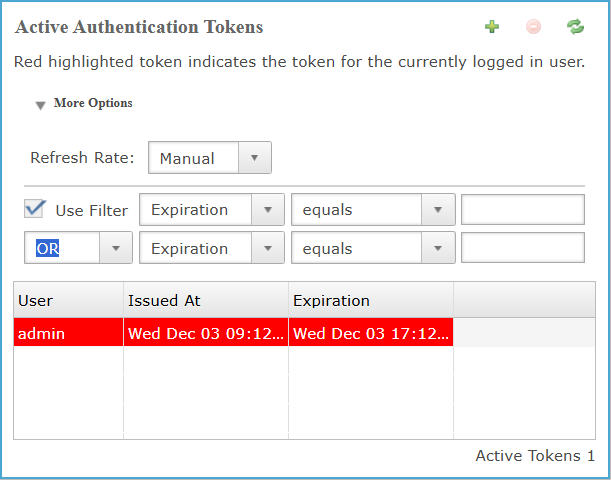
Active Authentication Tokens: More Options Dropdown
To create an authentication token, click the green plus button in the upper-right corner to open the Create Authentication Token dialog. The panel provides administrators with a secure method to generate time-bound tokens for JDBC, ODBC, and Admin API connections. Token generation requires valid user credentials, with optional payload parameters to extend functionality through name–value pairs. Expiration settings define the token’s validity period, ensuring controlled access and compliance with security policies.
Active Authentication Tokens: More Options Dropdown Settings
Active Authentication Tokens: Tokens Detail
The Token Details presents a structured view of generated authentication tokens and their key attributes. Each entry identifies the associated user, the exact issuance time, and the configured expiration to enable precise monitoring of token validity. This information allows administrators to manage session life-cycles effectively and ensure compliance with security controls.
Active Authentication Tokens: Column Settings
| Column | Description |
|---|---|
| User | Identifies the account to which the authentication token is assigned, enabling tracking and management of tokens by user identity. |
| Issued At | Records the timestamp when the authentication token was issued, enabling time-based auditing. |
| Expiration | Indicates the timestamp when the authentication token expires, enabling validity and audit control. |
| Info String | Displays the value of the JWT payload’s info-string key associated with the authentication token. |
Active Tokens
Displays the total number of currently active authentication tokens in the system.