Upgrading BBjGrids for DWC
Overview
DWC supports a subset of the BBjGrid API for applications that use BBj grid controls. Applications that require functionality beyond the supported DWC grid features, particularly more complex grids or grids that work with larger data sets, can use the BBjGridExWidget plug-in as an alternative. This page describes a migration path using BBjGridExWidget, including installing the plug-in, working with DataRow and ResultSet data, creating a basic grid for DWC, and loading data into the grid. For detailed installation, features, and API information, see BBjGridExWidget - Getting Started.
BBjStandardGrid and BBjGridExWidget Data Models
BBjStandardGrid is commonly populated cell-by-cell or from BBjVector-based structures, while BBjGridExWidget uses a record-oriented data model based on ResultSet and DataRow. Each DataRowrepresents a record, and its fields define the values available to the grid.
BBjGridExWidget is optimized for larger data sets and provides built-in client-side functionality such as sorting, filtering, grouping, column reordering, pinning, and conditional styling. For detailed feature and API information, see: BBjGridExWidget - Getting Started and the BBjGridExWidget Official Documentation.
Installing and Exploring BBjGridExWidget
Before using BBjGridExWidget, install the plug-in on the BBj server with the BBj Plugin Manager. For step-by-step installation and plug-in management instructions, see: the BBj Plugin Manager Usage Guide.
Installing BBjGridExWidget also installs demo programs that demonstrate its features. The demos can be launched from the Installed Plugins tab in the Plugin Manager, and their source files are available under <bbj_home>/plugins/BBjGridExWidget/demo/.
For additional implementation examples, see: the BBjGridExWidget GitHub repository. For class, constructor, and method details, see: the BBjGridExWidget JavaDoc.
Working with DataRow and ResultSet
BBjGridExWidget uses BASIS Components, DataRow and ResultSet objects to represent grid data. A DataRow represents a single record and stores values in named fields, while a ResultSet contains a collection of DataRow records that can be passed directly to the grid.
This record-oriented model is the foundation for loading data into BBjGridExWidget. The grid’s setData() method accepts a ResultSet and uses its fields to define the available row data and columns. For API details, see: the BBjGridExWidget JavaDoc.
Creating a DataRow in Code
A DataRow can be created directly in BBj and populated with named fields by using setFieldValue(). If a field does not already exist, setFieldValue() creates it, allowing the row structure to be built dynamically. Fields can also store attributes with setFieldAttribute().
The following example creates a row with first name, last name, and date-of-birth fields, then assigns a display attribute to the date field:
|
|
The PRINT statements demonstrate how to retrieve field values from the DataRow and access the DATEMASK attribute assigned to the DOB field.
Converting BBx Templated Strings to DataRow
Existing BBx templated strings can be converted to DataRow objects with DataRow.fromTemplate(). This provides a migration path for applications that already store records in templated strings and need to supply record-oriented data to BBjGridExWidget.
The fromTemplate() method accepts the string template and the corresponding record string, then creates a DataRow containing the converted field values.
|
This approach lets existing templated-string records be reused without manually rebuilding each field with setFieldValue().
Combining DataRows into a ResultSet
To load multiple records into a grid, combine the individual DataRow objects in a ResultSet. Create the ResultSet, then use its add() method to append each row.
The following example creates three records and adds them to a single ResultSet:
|
The resulting ResultSet contains the three records and can be supplied to BBjGridExWidget as grid data. The next subsection shows how to load the ResultSet with setData().
Loading a ResultSet from SQL
Database query results can be loaded directly into a ResultSet by using SqlQueryBC. Create the SqlQueryBC with a JDBC connection, then call retrieve() with the SQL statement. The returned ResultSet can be passed to BBjGridExWidget with setData().
|
The resulting ResultSet can be supplied directly to the grid with BBjGridExWidget::setData(). For a complete example that retrieves data from the CDStore database and loads it into a BBjGridExWidget, see: the CDStore Sample.
Creating a BBjGridExWidget in DWC
The following complete example creates a DWC window, adds a BBjGridExWidget, builds a ResultSetcontaining three DataRow records, and loads the data into the grid with setData().
|
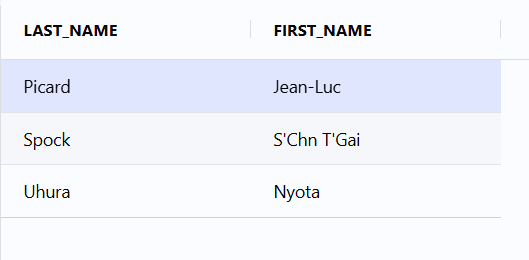
The BBjGridExWidget is created in the child window, and setData() loads the ResultSet into the grid. The fields in each DataRow become the grid columns, and each DataRow becomes a row in the grid.
The following screenshot shows the tested example running in DWC with the LAST_NAME and FIRST_NAME fields displayed as grid columns.
See the BBjGridExWidget DWC sample source for the complete example.
Additional Grid Configuration Examples
For examples of common BBjGridExWidget styling and configuration options, see: the BBjGridExWidget demos on GitHub.
See Also
DWC FAQ: Frequently Asked Questions about the Dynamic Web Client