Using ARC Files with DWC
Overview
DWC can run BBj applications that use ASCII Resource .arc files, but layouts based on fixed pixel positions may need adjustment for responsive DWC display. This page explains how to enable flow layout for ARC-based windows and how the order of controls in the ARC source can affect their layout in DWC. For general information about creating and editing ARC files, see: Resource Files and the Resource Editor and Creating a WindowBuilder Project.
Enabling Flow Layout in an ARC File
Windows defined in an ARC file can use DWC flow layout by adding the GRAVITY keyword to the window properties in the ARC source. In DWC, GRAVITY corresponds to the $00100000$ Automatic Layout creation flag, which causes the window to ignore absolute control positions and sizes and arrange its contents using dynamic flow layout. For the creation-flag details, see: BBjTopLevelWindow.
To edit the ARC source in WindowBuilder, open the .arc file and select the ARC Source tab. The current WindowBuilder documentation confirms that the ARC source can be edited directly from this view.
When flow layout is enabled, the order of controls in the ARC source becomes important because that order determines how the controls are added to the DWC document. If the resulting visual order is not appropriate, reorder the controls in WindowBuilder or apply CSS layout rules to position them as needed.
The same ARC-based window can produce different layouts depending on the client and layout behavior. In GUI/SysGui, the controls retain the pixel-based positions defined in the ARC file. When GRAVITY enables flow layout in DWC, those fixed positions are no longer used and the controls are arranged according to their order in the ARC source. CSS layout rules can then be used to arrange the controls for the intended DWC presentation.
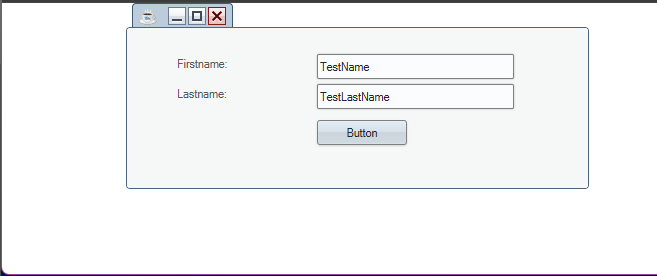
The following screenshot shows ArcSample.bbj running as a GUI/SysGui application. The controls retain the original pixel-based positions defined in ArcSample.arc.
When the same ARC-based window runs in DWC with GRAVITY, the controls participate in flow layout rather than using their original pixel positions. Because the button is defined before the other controls in the ARC source, it appears first in the DWC layout.
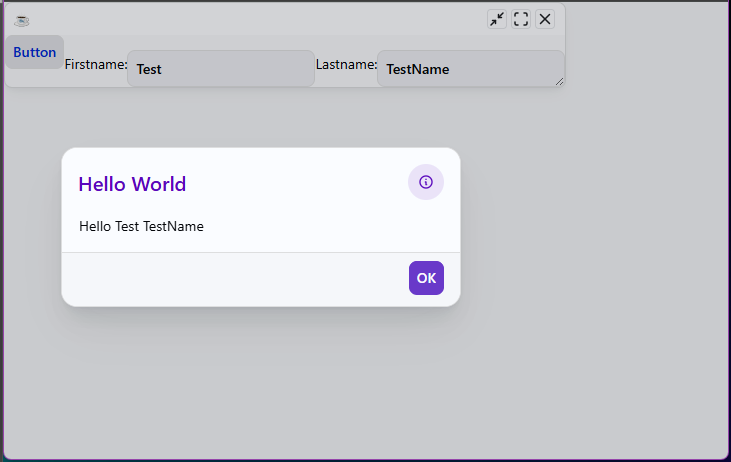
The sample remains functional after the layout change; selecting the button uses the entered first and last name values as expected.
The DWC-specific DWCArcSample.bbj, program applies CSS layout rules to arrange the controls in the intended order while retaining the flexible DWC layout.
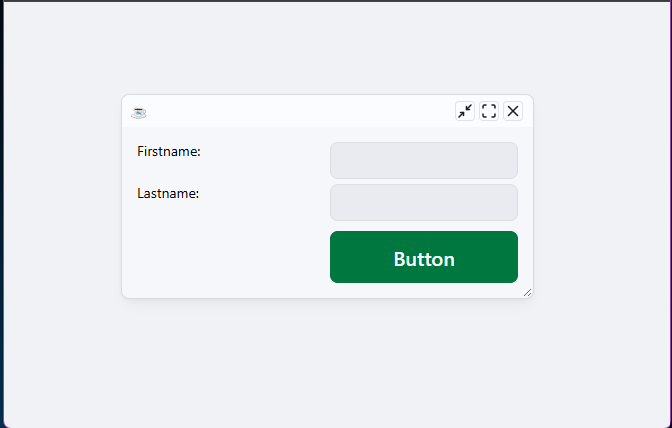
This comparison shows why control order becomes important when an ARC-based window is moved from fixed pixel positioning to DWC flow layout. If the resulting order is not appropriate, reorder the controls in the ARC source or use CSS layout rules to position them as needed.
See Also
Registering and Launching a DWC App
DWC FAQ: Frequently Asked Questions about the Dynamic Web Client