DWC Embedding Third Party Components
Overview
DWC applications can embed third-party components such as charts, maps, and widgets that are written in JavaScript or TypeScript and run in the browser. These components can be integrated into BBj applications to extend the user interface with functionality provided by external web libraries.
Using the BBjHTMLView to Embed Third-Party Components
Third-party components can be embedded in BBj applications using the BBjHTMLView control. BBjHTMLView acts as an embedded browser that can display HTML, execute JavaScript, and communicate events from JavaScript back to the BBj program. This approach can be used in DWC, BUI, and the GUI client.
Embedding a third-party HTML component generally involves the following steps:
-
Add a BBjHTMLView to the BBj window.
-
Load the HTML view with any necessary static HTML code.
-
Load the required JavaScript library.
-
Execute JavaScript to initialize the component.
-
Optionally, register events that the component can fire in that JavaScript code, and add callback routines for them to your BBj program.
The loading sequence is important. The JavaScript library should be loaded only after the initial HTML is available, and component initialization should occur only after the library finishes loading. The following example registers callbacks for both events:
|
The callback routines create a sequence in which BBjHtmlView::injectUrl loads the external JavaScript library after the page loads, and BBjHtmlView::injectScript executes the JavaScript needed to initialize the component after the library finishes loading:
|
This callback sequence ensures that each operation that depends on a previous loading step runs only after that step has completed.
Embedding a JavaScript Chart Component
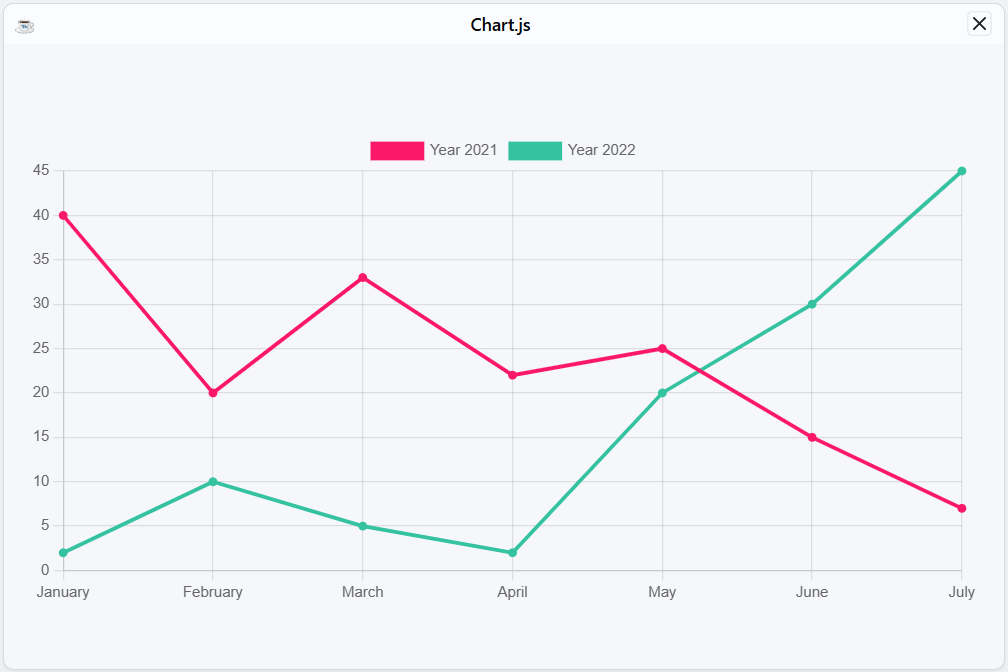
A JavaScript chart can be embedded in DWC using the Chart.js library. This example follows the Chart.js Getting Started guidance by creating a <canvas> element that provides the target where the chart is rendered.
The canvas should have a unique ID so that the JavaScript can locate it. If multiple components are embedded on the same page, assign a different ID to each one.
|
Setup
-
Include the Chart.js library
-
Create a container element
-
Initialize the chart with data
Example: Chart.js Integration
The following code shows the complete Chart.js integration demonstrated by ChartJS_NoEventFromJavaScript.bbj.
|
The sample loads the Chart.js library after the HTML page is available. When the library finishes loading, ON_SCRIPT_LOADED fires, and BBjHtmlView::injectScript executes the JavaScript that initializes the chart with its data.
The sample uses fixed data for demonstration. In an application, the chart data can instead be generated dynamically before the JavaScript is executed.
The following image shows the tested ChartJS_NoEventFromJavaScript.bbj sample rendering the Chart.js line chart in DWC.
Receiving Events from JavaScript in BBj
Some components provide user interactivity that needs to trigger actions in the BBj program. A JavaScript component can send events back to BBj so the application can respond to those interactions.
For Chart.js, BASIS recommends using BBjHTMLView because Chart.js is not directly a web component. The BBjNativeJavaScriptEvent::getEventMap sample demonstrates the same event communication concept with standard HTML components and injected JavaScript functions.
In the enhanced Chart.js example, clicking a chart legend item creates a custom JavaScript event and sends it back to BBj:
|
The key statement is basisDispatchCustomEvent, which passes the customEvent object back to BBj. The BBjHTMLView.ON_NATIVE_JAVASCRIPT event receives the JavaScript event as a BBjNativeJavaScriptEvent. In the callback, BBjAPI::getLastEvent() retrieves the event, and BBjNativeJavaScriptEvent::getEventMap() provides access to the key/value data reported by the JavaScript event.
|
This handler displays the contents of the event object's detail data in a MSGBOX for illustration.
Setting Up Event Communication
To respond to a browser event in BBj, register a callback for the event name with BBjWebManager::setCallback. In BBj 24.11 and higher, setCallback() accepts a string event type and associates it with the BBj callback routine that handles the event.
|
Callback Handler
When the registered web event fires, the callback retrieves the current event with BBjAPI::getLastEvent. The returned BBjWebEvent can then be inspected to process the data supplied by the browser event.
|
The BBjWebEvent::getEventMap method provides the key/value data reported by the web event so the callback can process the information associated with the user interaction.
Working with Slots
Slots allow content to be inserted into specific locations within web components. When embedding a web component or third-party library, a BBj control may need to appear within a particular area of that component.
For example, components such as tabs or accordions can expose different areas depending on their state. In a BBj application, these areas can contain a BBjChildWindow, allowing BBj to manage the controls placed within them.
Using Slots
The following example defines a web component with named header and content slots, then adds the component markup to a BBjHTMLView:
|
The slot attributes identify where the corresponding content is placed within the web component.
Example for Slots: a Splitter Component from Shoelace
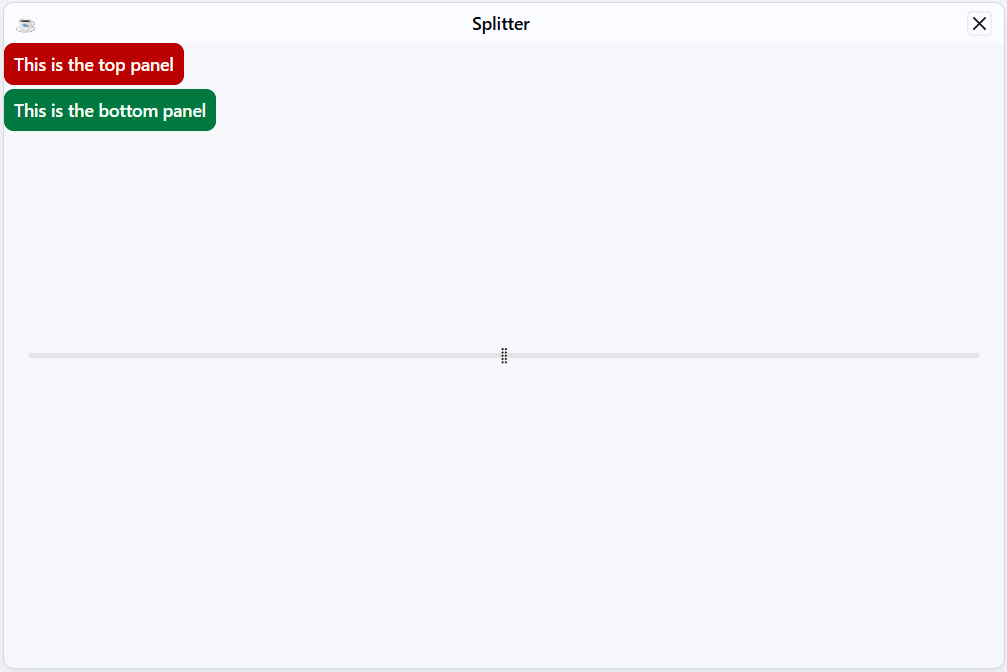
The Shoelace library provides web components that can be combined with BBj applications. The ShoelaceSplitter.bbj sample demonstrates using a Shoelace split panel with BBj child windows in DWC.
A split panel divides an area into two sections separated by a movable divider. The sample uses BBjChildWindow controls for the BBj content associated with those sections.
The sample uses the following steps to place the child windows into the splitter:
-
Add two child windows as you always do.
-
Call
getAttribute("id")to get their IDs in the HTML DOM. -
Call
appendChildto move each child window into the other element, which you created with a UUID as its ID.
The sample performs the DOM placement with JavaScript executed from BBj. If an id must be assigned explicitly before it is retrieved, BBjControl::setAttribute() can be used to set the control attribute.
The following image shows the current tested ShoelaceSplitter.bbj sample in DWC, including the two labeled BBj controls and the splitter divider.
Popular Libraries to Embed
The following third-party JavaScript libraries can be embedded using the techniques described in the previous sections:
| Library | Use Case |
|---|---|
| Chart.js | Charts and graphs |
| Leaflet | Interactive maps |
| DataTables | Enhanced data tables |
| FullCalendar | Calendar widgets |
| Quill | Rich text editor |