 EM: Security > Users
Description
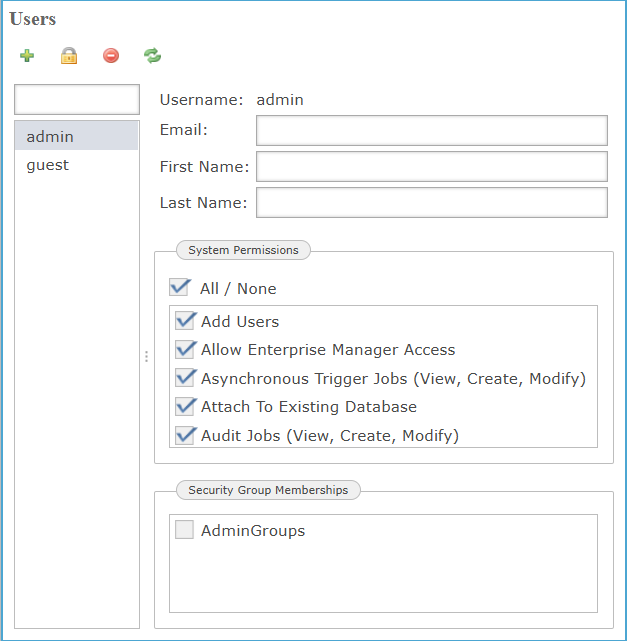
In BBj 19.20 and higher, the  Users provides a control panel for creating, editing, and managing user authentication credentials and system-level privileges within Enterprise Manager. Administrators can define individual user properties, such as username, email, and display name while assigning granular permissions across core EM operations including replication, SQL session management, password policies, and trigger configuration. Permission flags are applied through a dynamic checklist interface, and user entries can be grouped using predefined security roles to enforce consistent access control policies across distributed environments.
Location
EM Navigator →  Security → Users
Toolbar


New User Dialog
To access the New User Dialog, click the  icon, and the dialog prompts administrators to define a new user account by specifying a unique case-sensitive username and a secure password, which must be re-entered for confirmation. It enforces direct input validation and secure credential setup during account creation. The interface defaults to the admin account in the user list column unless additional users are defined.
| Settings | Description |
|---|---|
|
Specifies the case-sensitive identifier for the new user, used as the unique key for login and permission control within Enterprise Manager. |
|
|
Accepts a secure, case-sensitive password string required to authenticate the user during login and associate credentials with the defined username. |
|
|
Ensures the re-entered password exactly matches the initial entry to complete account creation and prevent credential mismatch. |
User Profile Details
The User Profile Details section defines core identity fields: email, first name, and last name, associated with the selected user account. These values enable administrative identification and system mapping, while the static Username field reflects the currently selected account in the user list.
| Settings | Description |
|---|---|
|
Serves as the immutable identifier for the selected user account and cannot be modified once the user is created. |
|
|
Serves as the primary contact field associated with the user account, supporting notification delivery and user identity mapping within the Enterprise Manager. |
|
|
Accepts the given name associated with the user account for identification in system logs, audit records, and user-facing interfaces. |
|
|
Defines the user’s Last Name for account identification, record association, and administrative referencing across Enterprise Manager. |
System Permissions List
The System Permissions List defines the scope of operational privileges assignable to each user or group, including administrative actions such as creating databases, managing BBj processes, configuring JDBC/ODBC connection pools, and enabling access to Enterprise Manager. Each permission is granted individually through an interactive checklist, ensuring granular control over system-level functionality.
| Settings | Description |
|---|---|
|
|
|
|
|
|
|
|
|
|
|
|
|
|
|
|
|
|
|
|
|
|
|
|
|
|
|
|
|
|
|
|
|
|
|
|
|
|
|
|
|
|
|
|
|
|
|
|
|
|
|
|
|
|
|
|
|
|
|
|
|
|
|
|
|
|
|
|
|
|
|
|
|
|
Security Group Memberships
Defines the administrative access scope by assigning the user to one or more security groups configured within the Enterprise Manager. Group membership determines the user's permissions across EM-managed tasks, including database operations, system configuration, and job control. Membership in AdminGroups enables elevated privileges managed by system policy.
| setting | Description |
|---|---|
|
AdminGroups |
|