 EM: Security > Groups
Description
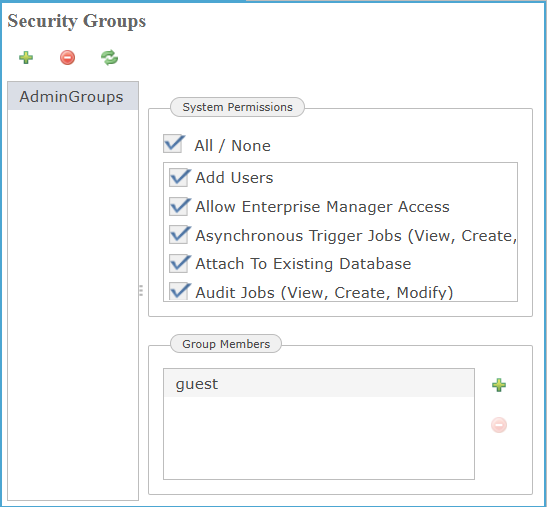
In BBj 19.20 and higher, the  Groups panel provides a centralized interface for creating, modifying, and managing user security groups within the Enterprise Manager. Each group, such as AdminGroups, contains an associated set of System Permissions, which control access to specific administrative and operational functions across the Enterprise Manager environment. These permissions include privileges such as database management, file access, job control, and Enterprise Manager administrative rights. Additionally, the Group Members panel at the bottom allows administrators to assign or remove users from the selected group. This ensures role-based access control is consistently enforced throughout the system.
Location
EM Navigator →  Security → Groups
Toolbar
| Button | Function |
|---|---|

|
Adds a new entry and opens new application. |

|
Removes/deletes selected application(s) or files from the system. |

|
Refreshes the displayed list of applications and their status. |
Creating New Security Group
Administrators use the Groups interface to create custom access groups with specific system permissions. Clicking the opens a prompt requiring a unique group name. Once created, the group can control access to various EM functions, ensuring secure role-based management.
| Setting | Description |
|---|---|
|
Prompts the user to enter a unique name for the new security group, this field is mandatory and cannot be left blank to proceed with group creation. |
System Permissions List
The System Permissions List defines the scope of operational privileges assignable to each user or group, including administrative actions such as creating databases, managing BBj processes, configuring JDBC/ODBC connection pools, and enabling access to Enterprise Manager. Each permission is granted individually through an interactive checklist, ensuring granular control over system-level functionality.
| Settings | Description |
|---|---|
|
|
|
|
|
|
|
|
|
|
|
|
|
|
|
|
|
|
|
|
|
|
|
|
|
|
|
|
|
|
|
|
|
|
|
|
|
|
|
|
|
|
|
|
|
|
|
|
|
|
|
|
|
|
|
|
|
|
|
|
|
|
|
|
|
|
|
|
|
|
|
|
|
|
Group Members
The Group Members panel enables administrators to assign specific users to a security group by launching a user selection dialog by clicking the icon. Users added through this interface, such as admin or guest gain the group’s defined permissions, ensuring precise access control within the BBj Services environment.
| Settings | Description |
|---|---|
|
Grants full administrative privileges within the Enterprise Manager environment, including permission to modify security settings, users, and system-level configurations. |
|
|
Assigns minimal access limited to viewing permissions, without authorization to alter settings or perform administrative tasks. |