Shop Floor Control - Schedule Work Order
Function
The Schedule Work Order
task is accessed from the  option on the Work Order Entry form. This option determines, based upon your
scheduling method
option on the Work Order Entry form. This option determines, based upon your
scheduling method The type of method that you use to schedule your production. See also Backwards Scheduling, Forward Scheduling, and Manual Scheduling., the
date that the order will be ready and the date that each operation A process in the production of an item, component, or finished good. and subcontract should be
completed. Information from this option is also used in theBottleneck An operation that is scheduled for more labor hours than that resource has the capacity to complete. A resource that has demand that exceeds capacity is considered to be a bottleneck.
Analysis,Dispatch A document that lists all jobs to be worked on for the day, week or some period of time. AddonSoftware provides a dispatch inquiry as well as a report.
Inquiry,Operation Requirements, and
other status reports. This option is automatically displayed when creating
inventory The components, items, and raw material purchased or produced for resale or used to support production. or non-stock A special type of work order that describes the manufacture of an item that is not normally stocked as a part number. Non-stocks can describe a custom manufacturing job or any job where a standard bill of material is not followed. Or, items that are needed from subcontracts or purchase requisitions that are part of the manufacturing of a product. work orders.
The type of method that you use to schedule your production. See also Backwards Scheduling, Forward Scheduling, and Manual Scheduling., the
date that the order will be ready and the date that each operation A process in the production of an item, component, or finished good. and subcontract should be
completed. Information from this option is also used in theBottleneck An operation that is scheduled for more labor hours than that resource has the capacity to complete. A resource that has demand that exceeds capacity is considered to be a bottleneck.
Analysis,Dispatch A document that lists all jobs to be worked on for the day, week or some period of time. AddonSoftware provides a dispatch inquiry as well as a report.
Inquiry,Operation Requirements, and
other status reports. This option is automatically displayed when creating
inventory The components, items, and raw material purchased or produced for resale or used to support production. or non-stock A special type of work order that describes the manufacture of an item that is not normally stocked as a part number. Non-stocks can describe a custom manufacturing job or any job where a standard bill of material is not followed. Or, items that are needed from subcontracts or purchase requisitions that are part of the manufacturing of a product. work orders.
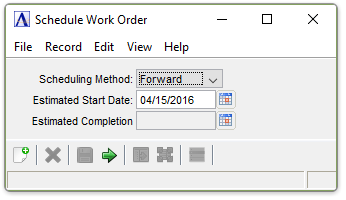
Schedule Work Order
About the Fields
Scheduling can be calculated either in forward
or backward modes. Backward scheduling A scheduling method that determines, by calculating backwards from the required completion date and the processing and lead times, what the start date of a production must be in order to meet the final due date.
will define the complete A finished job. By contrast, work order can be partially closed. That is, a portion of the production is closed, but some still remains to be processed.
schedule in total elapsed days by backing up from the scheduled completion
date to determine
the starting date. Schedules can be rescheduled at any time if a schedule
changes due to different dates, queue
time A record of the average amount of time material will wait in line for the next operation., run time, or move
time The amount of time allocated by the scheduling system after an operation but before the products are ready to move to the next operation. It may represent cooling time, drying time, or any time required before an item can be physically moved..
Operations and subcontracts
are both scheduled. Each operation work
center A group of like machines or processes that have similar capabilities. Work centers are scheduled together. has a calendar identifying the number of hours available The quantity of materials available for use in production or sales. Available is calculated by subtracting Committed from On Hand. for each date. The Purchase
Calendar will be used to calculate the date required for subcontracts.
If any calendars are missing a warning prompt is issued. Scheduling can
be done manually at any time.
From the Scheduling Method dropdown...
-
Select Forward, Backward, or Manual
In the Estimated Start Date field...
If Backward is selected in the Scheduling Method field, the system will bypass this field. The Estimated Start Date will be determined after entering the date in the Estimated Completion Date field.
-
Enter the estimated date that production will begin.
-
Select the Display Calendar button
 to use
the tool to select the date.
to use
the tool to select the date. -
Press Tab or Enter to accept the default of today’s date.
In the Estimated Completion field...
If Forward is selected in the Scheduling Method field, the system will determine this date.
-
Enter the estimated production completion date for manual or backward scheduling.
-
Press Tab or Enter to accept the default lead time established in Bill of Materials
A listing of materials, operations, and subcontracts used to describe the manufacture of an item..
If
a date for an operation code has not been set up in Shop Floor Calendar
Maintenance, or a date for a subcontract requirement has not been scheduled,
the system will issue To relieve on-hand inventories and charge those materials to a job. an error.
If a subcontract date changes after a purchase order or purchase requisition has been generated for this work order, the system issues a warning.
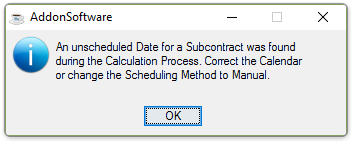
An unscheduled Date for a Subcontract was found during the Calculation Process.
The system cannot determine the date until all operations and subcontract requirements have been scheduled. Subcontract calendars are set up through the Create Purchase Calendar task of the Purchase Order Maintenance menu; operation calendars through the Create Shop Floor Calendar task of the Shop Floor Maintenance menu.