GUIBuilder Menus (Superseded)
GUIBuilder has been superseded by the AppBuilder module in the BASIS IDE for BBj. Includes support for both the READRECORD Event Queue and PROCESS_EVENTS/CALLBACK paradigm. Integrates tightly with FormBuilder, the BBj replacement for ResBuilder.
Description
The menu bar occupies the upper boundary of the interface and is used to invoke most GUIBuilder commands. It is divided into the File, Edit, Program, Tools, Window, and Help menus. Each menu is illustrated below, followed by a description of each of its items.
File Menu
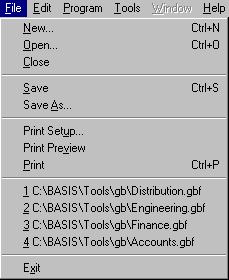
|
Menu Item |
Shortcut |
Description |
|---|---|---|
|
Ctrl+N |
Creates a new file. See Creating New GUIBuilder Files. |
|
|
Ctrl+O |
Opens an existing .gbf file. See Opening Existing GUIBuilder Files. |
|
|
Closes the current file. |
||
|
Ctrl+S |
Saves the current file. See Saving GUIBuilder Files. |
|
|
Displays the Save As dialog, providing the capability to save a file under a new name. See Saving GUIBuilder Files. |
||
|
Displays the standard Windows Print Setup dialog that contains printer properties, paper size and source, and print orientation settings, and provides the capability to print the GUIBuilder file according to the selections made in the dialog. See Printing GUIBuilder Files. |
||
|
Displays the contents of the current .gbf file in a Print Preview window. See Printing GUIBuilder Files. |
||
|
Ctrl+P |
Prints a copy of the current .gbf file according to the system default printer settings. See Printing GUIBuilder Files. |
|
|
Lists the most recently used files, which can be opened by selecting the desired file. |
||
|
Exits GUIBuilder. See Exiting GUIBuilder. |
Edit Menu
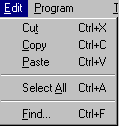
|
Menu Item |
Shortcut |
Description |
|---|---|---|
|
Ctrl+X |
Removes the current selection and places it on the clipboard. |
|
|
Ctrl+C |
Copies the current selection to the clipboard. |
|
|
Ctrl+V |
Pastes the clipboard contents into the window at the cursor location. |
|
|
Ctrl+A |
Selects all text in the current window. |
|
|
Ctrl+F |
Displays the Find dialog, providing the capability to search for text. |
Program Menu
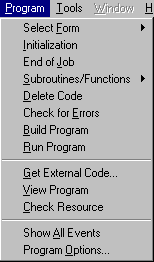
|
Menu Item |
Shortcut |
Description |
|---|---|---|
|
Displays a listing of the forms contained in the current .gbf file. |
||
|
Displays the Initialization code block for editing. See Defining Initialization Code. |
||
|
Displays the End of Job code block for editing. See Defining End of Job Code. |
||
|
Displays the Subroutines/Functions code block. See Defining Subroutines/Functions. |
||
|
Deletes the current code block. See Deleting Code Blocks. |
||
|
Checks the current code block for syntax errors. See Checking Code Blocks for Errors. |
||
|
Initiates the program building process, which creates and names a tokenized .bbx file from the resource file and its corresponding .gbf file. See Building Programs in GUIBuilder. |
||
|
Runs the tokenized program created in GUIBuilder. See Running GUIBuilder Programs. |
||
|
Gets external code, which can be ASCII text or a tokenized program. See Getting External Code. |
||
|
Displays the View Code window, which displays either the gb.txt readme file or the currently loaded tokenized program. See Viewing GUIBuilder Programs. |
||
|
Checks the .gbf file against the contents of the corresponding resource file. See Checking Resources. |
||
|
Shows all possible events that pertain to the selected control. |
||
|
Displays the Program Options dialog, providing the capability to set program options for the tokenized program in GUIBuilder. See Setting Program Options. |
Tools Menu
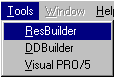
|
Menu Item |
Shortcut |
Description |
|---|---|---|
|
Invokes ResBuilder and disables GUIBuilder until ResBuilder is closed. See Invoking ResBuilder from GUIBuilder. |
||
|
Invokes DDBuilder. See Invoking DDBuilder from GUIBuilder. |
||
|
Invokes an additional Visual PRO/5 console window. See Invoking a Visual PRO/5 Console Window in GUIBuilder. |
Window Menu
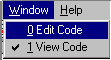
|
Menu Item |
Shortcut |
Description |
|---|---|---|
|
Displays the Edit Code window. |
||
|
Displays the View Code window, which displays either the gb.txt readme file or the current program loaded via the View Program command. See Viewing GUIBuilder Programs. |
Help Menu
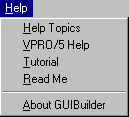
|
Menu Item |
Shortcut |
Description |
|---|---|---|
|
Displays GUIBuilder Online Help. |
||
|
Invokes Visual PRO/5 online help. |
||
|
Invokes the Screen Cam utility that provides a tutorial of GUIBuilder. |
||
|
Displays the readme.txt file that accompanies the GUIBuilder. |
||
|
Displays GUIBuilder version and copyright information. |