 EM: Security > Public/Private Keys
Description
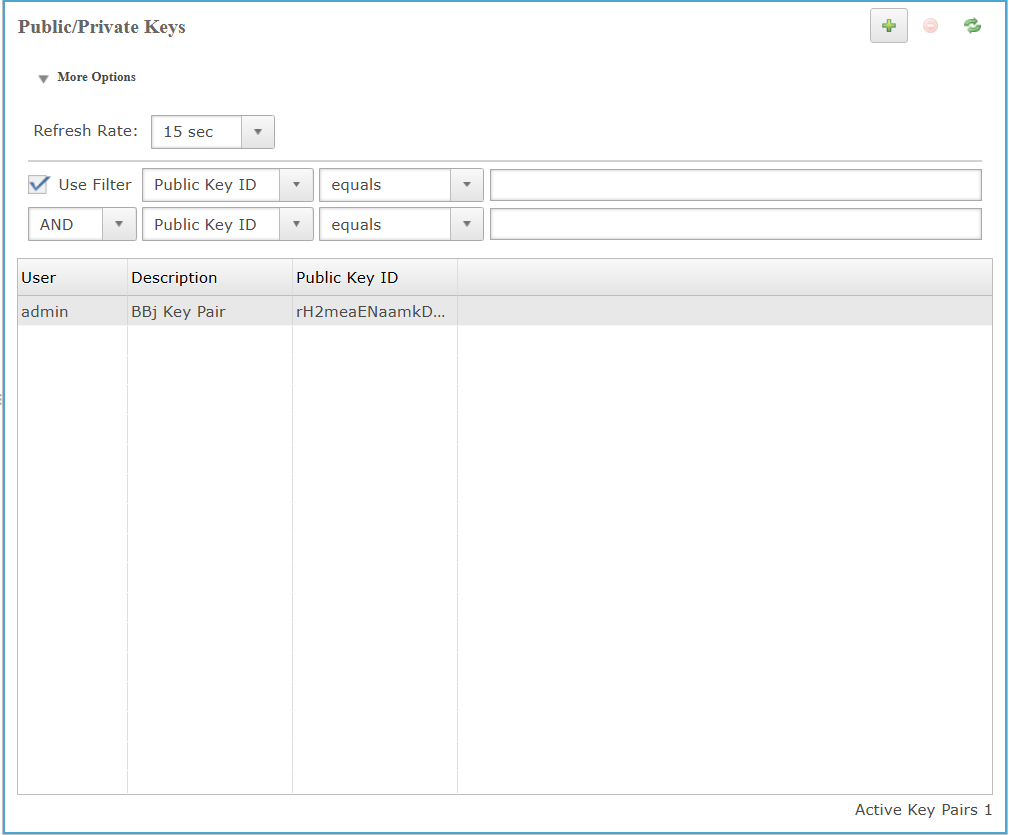
In BBj 19.20 and higher, the  Public/Private Keys is utilized for BBj security and authentication purposes. Each row lists a user along with an associated key pair identifier and description. Filtering options allow refined search based on the Public Key ID using logical conditions. The Use Filter checkbox enables/disables filter application, while the Refresh Rate dropdown controls how frequently the table auto-updates. The section supports key pair creation, deletion, and management for secure authentication workflow.
Location
EM Navigator →  Security → Public/Private Keys
Toolbar
| Button | Function |
|---|---|

|
Adds a new entry and opens new application. |

|
Refreshes the displayed list of applications and their status. |

|
Removes/deletes selected application(s) or files from the system. |
Public/Private Keys: More Options Dropdown
The More Options dropdown in the Public/Private Keys panel enables advanced filtering and refresh control. The Refresh Rate dropdown defines how often the key list refreshes, ranging from Manual to timed intervals such as 3 to 15 seconds. Enabling Use Filter activates dynamic query rows that support compound logic (AND, OR) and filtering by key field Public Key ID, comparison operator (equals), and value. Multiple filters can be used to refine the displayed key list.
Public/Private Keys: More Options Settings List
| Settings | Description | ||||||||||||
|---|---|---|---|---|---|---|---|---|---|---|---|---|---|
|
Sets the automatic refresh interval for the data table. Selecting a time value (3, 5, 10, or 15 seconds) updates the data at the specified interval. Selecting Manual disables auto-refresh, requiring the user to manually reload the data. |
|||||||||||||
|
|
|||||||||||||
|
Specifies the filter column used to narrow results in the |
|||||||||||||
|
Conditional operator(s) used to evaluate the selected column against the input value in the filtering row. Options include equals, greater than, less than, contains, and regex. Used together with the field selector and value input to build precise filter expressions when the Use Filter checkbox is enabled.
|
|||||||||||||
|
Defines the user-specified target value that must match the selected filter column and comparison condition when the filter is applied. |
|||||||||||||
|
Defines the logical relationship between multiple filter conditions in the filter panel, available options: None, AND, and OR.
|
Public/ Private Keys Column List
The Public/Private Keys table lists active key pairs and includes three columns; User, which identifies the account associated with the key pair; Description, which provides a user-defined label for the key; and Public Key ID, which shows the unique identifier assigned to the public key.
Public/ Private Keys Column Settings List
| Column | Description |
|---|---|
|
Identifies the authenticated BBjServices user account associated with the listed public/private key pair in the table. |
|
|
Identifies the user-defined label or explanatory text associated with a given public/private key pair, typically indicating its purpose or context of usage within the system. |
|
|
Identifies the unique Base64-encoded public key string associated with a stored key pair entry, used for BBj authentication and encryption purposes. |
Create Public/Private Key Pair
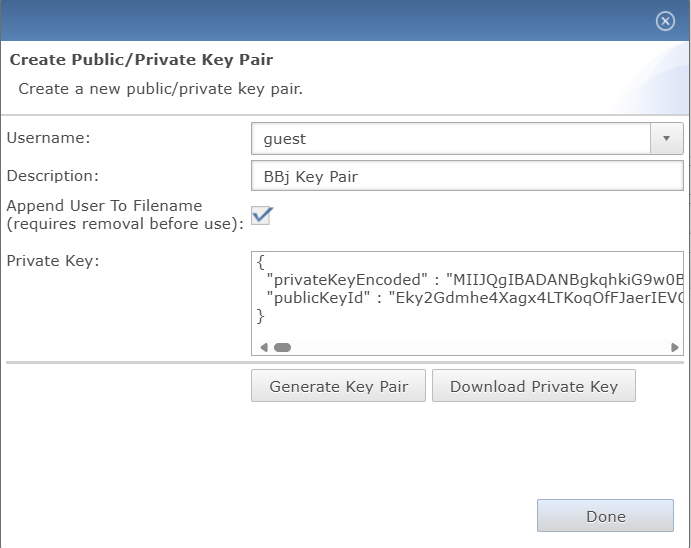
Accessed by clicking the button in the Public/Private Keys section, this panel enables the creation of a new cryptographic key pair by specifying a target username(admin or guest), optional description, and private key, either manually entered or automatically generated. Includes an option to append the username to the key file name, which must be removed before the key can be used. Once generated, the private key is presented in JSON format and can be downloaded securely. The Done button finalizes and exits the creation process once all required fields are validated.
Create Public/Private Key Pair Settings List
| Settings | Description |
|---|---|
|
Specifies the target system user for whom the public/private key pair is being created, selected from a predefined dropdown list(guest or admin) of existing usernames. |
|
|
Defines a brief, user-assigned label for the key pair to aid identification within the |
|
|
|
|
|
Accepts a generated or user-provided JSON-formatted private key object containing privateKeyEncoded and publicKeyId fields, used for BBj application authentication and key-based access control. |
|
|
Generates a new public/private key pair for the selected user using the provided parameters, populating the private key field with the encoded key and enabling the option to download it. |
|
|
Initiates the download of the generated private key in JSON format, which contains both the encoded private key and associated public key ID. This action becomes enabled only after a valid key pair has been created and the private key field is filled. |
|
|
Finalizes and exits the Create Public/Private Key Pair dialog after a key pair is generated and all necessary fields are completed. |