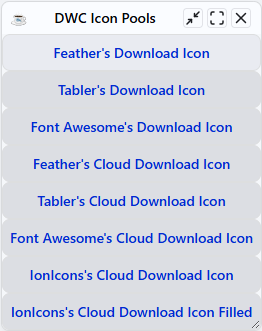
DWC Icon Pools
Overview
DWC icon pools provide reusable Scalable Vector Graphics (SVG) icons that can be added to BBj controls that support HTML content. Using an icon pool avoids the need to maintain individual image files and provides a consistent way to reference, size, and style icons throughout a DWC application.
DWC includes built-in icon pools and also supports custom icon pools for loading icons from other sources, such as a Content Delivery Network (CDN) or a local directory.
Scalable Vector Graphics
Scalable Vector Graphics (SVG) are vector-based graphics that can scale to different sizes without losing image quality. This makes SVG well suited for DWC icons that may need to adapt to different control sizes and display resolutions.
SVG icons can also be styled using CSS and component attributes, allowing properties such as size and color to be adjusted as part of the application interface.
Built-In Icon Pools
DWC provides built-in icon pools that make it possible to use SVG icons from established icon libraries without maintaining individual icon files in the application. The built-in pools provide access to Tabler, Feather, and the free Font Awesome icons.
Using icons from the same library helps maintain a consistent visual style throughout an application. Controls that support HTML content can reference an icon by specifying its icon pool and icon name.
Adding a Download Icon to a Button
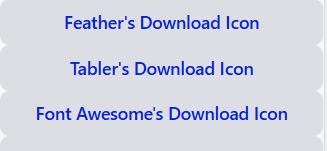
The DownloadButton.bbj sample demonstrates adding download icons from the built-in Feather, Tabler, and Font Awesome icon pools to BBj buttons.
An icon is referenced by specifying its icon pool and icon name in the HTML content used for the button title. The sample uses the download icon from Feather and Tabler and the corresponding Font Awesome download icon.
The following image shows the three built-in icon-pool button examples from the tested DownloadButton.bbj sample.
Icons can also be styled using component attributes and CSS. The sample uses cloud-download icons to demonstrate differences in icon size, theme, and color.
Adding Icons From a Custom Icon Pool Hosted by a CDN
A custom icon pool can provide icons from a library that is not included in DWC's built-in icon pools. The DownloadButton.bbj sample demonstrates this by using the Ionic IonIcons library and loading its SVG files from cdnjs. The IonIcons files available through cdnjs can be viewed here.
The sample defines an ionicons custom pool with a resolver URL that contains ${name}. When an icon is requested, DWC replaces ${name} with the specified icon name to construct the URL for the corresponding SVG file.
iconLibraryName! = "ionicons"
resolverPathCdn! = "https://cdnjs.cloudflare.com/ajax/libs/ionicons/6.0.2/svg/${name}.svg"
myIconPool! = "(window.BBj ??= {}).IconsPools ??= []; window.BBj.IconsPools.push({ name: '" + iconLibraryName! + "', resolver: name => `" + resolverPathCdn! + "` });"
BBjAPI().getSysGui().executeScript(myIconPool!)
After registering the custom pool, icons can be referenced by using ionicons as the pool name and specifying the desired icon name. The sample uses cloud-download-outline and cloud-download.
<bbj-icon pool='ionicons' name='cloud-download-outline'></bbj-icon>
<bbj-icon pool='ionicons' name='cloud-download'></bbj-icon>
The following image shows the two IonIcons button entries from the tested DownloadButton.bbj sample.

The following image shows the complete tested DownloadButton.bbj sample, including the built-in Feather, Tabler, and Font Awesome button examples and the custom IonIcons button examples.