Configurator Menu Descriptions
Description
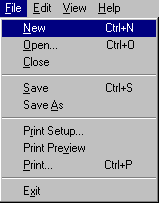
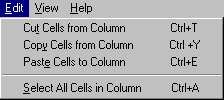
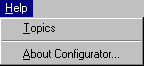
The Configurator contains the File, Edit, View, and Help menus. Each menu is illustrated below, followed by a description of each of its items.
File Menu
|
Menu Item |
Shortcut |
Description |
|---|---|---|
|
Ctrl+N |
Creates a new configuration file. See Creating New Configuration Files. |
|
|
Ctrl+O |
Opens an existing configuration file. See Opening Existing Configuration Files. |
|
|
Closes the current configuration file. |
||
|
Ctrl+S |
Saves the current configuration file. See Saving Configuration Files. |
|
|
Displays a dialog that provides the capability to save the current configuration file under a new name and/or path. See Saving Configuration Files. |
||
|
Displays the Print Setup dialog, providing the capability to set printer options such as default printer and number of copies. See Printing Configuration Files. |
||
|
Displays the contents of the configuration file in a Print Preview window. See Printing Configuration Files. |
||
|
Ctrl+P |
Prints the current configuration file. See Printing Configuration Files. |
|
|
Exits Configurator. See Exiting Configurator. |
Edit Menu
|
Menu Item |
Shortcut |
Description |
|---|---|---|
|
Ctrl+T |
Removes the contents of the selected cells in the current column. |
|
|
Ctrl+Y |
Copies the contents of the selected cells in the current column. |
|
|
Ctrl+E |
Inserts the clipboard contents at the cursor position in the current column. |
|
|
Ctrl+A |
Selects all cells in the current column. |
View Menu

|
Menu Item |
Shortcut |
Description |
|---|---|---|
|
Toggles the toolbar display. A check indicates the toolbar is displayed. |
||
|
Toggles the status bar display. A check indicates the status bar is displayed. |
Help Menu
|
Menu Item |
Shortcut |
Description |
|---|---|---|
|
Invokes the Configurator online Help system. |
||
|
Displays Configurator version and copyright information. |