Upgrading to JasperReports Version 7
Background
In BBj 25.xx, the BBJasper utility continues to use JasperReports Version 6, but provides a way to preview JasperReports Version 7. Please be aware that for BBj 26.00 and higher, the BBJasper utility only uses JasperReports 7 because Jaspersoft typically only offers two-year long-term support for each version.
Since JasperReports 7 is, by design, not backward-compatible, this document serves as a guide for developers to upgrade and test reports in BBj 25.xx before upgrading to BBj 26.00.
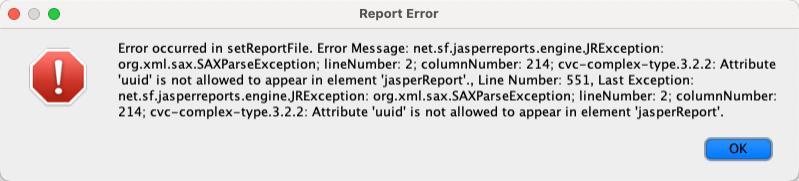
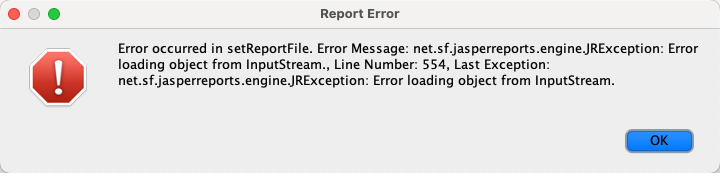
Attempting to run reports that are older than JasperReports 7 in BBj 26.00 or higher will result in report errors similar to the following:
Note:
For BBj 26.00 and higher, developers only need to follow step 1, Resave and Recompile Reports with Jaspersoft Studio 7.
Resave and Recompile Reports with Jaspersoft Studio 7
JasperReports 7 is not backward compatible, so resave and recompile all reports with Jaspersoft Studio 7, both
.jrxml (source) and .jasper (compiled).
Download Jaspersoft Studio 7 from the Jaspersoft community edition page. Be aware that one needs to register in order to complete the download. To prevent conflicts, match the version of Jaspersoft Studio with the jasperreports-javaflow JAR package that you download in the next step. If you’re on BBj 26 or higher, it ships with the necessary JARS but you should match the version of Jaspersoft Studio to the version of the JasperReports Library Javaflow 7 JARs bundled with BBj 26.xx
Download JARs
JasperReports 7 and higher is modulized, so several package JARs need to be installed, a primary Library JAR package and additional module JAR packages. The BBJasper utility for BBj 25.xx defaults to JasperReports 6, but uses JasperReports 7 if one employs an SSCP to include its package JARs.
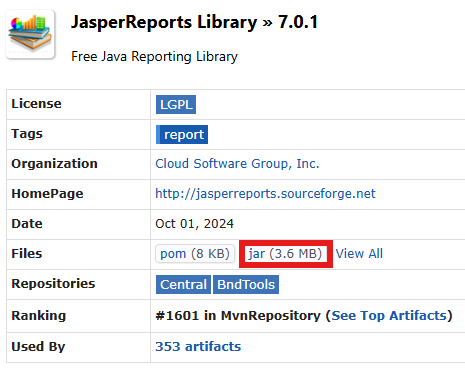
All JasperReports packages, which contain the JARs, are available from the JasperReports Maven Repository list. Each package has a download page for each version that includes a download link for the jar, for example, the required Javaflow variant of the JasperReports 7 Library package is shown in the following image:
At the time of writing this document, the JasperReports Maven repository lists approximately 44 individual packages, each with its own downloadable JAR file. Each package page provides version-specific downloads for that module.
Note:
The Maven repository includes a package named: JasperReports Library. Do not download or use this package.This is the standard JasperReports Library, which will not work with BBj due to the way threads are handled.
Instead, BBj uses the Javaflow variant of JasperReports 7. Therefore, the correct package to use is: JasperReports Library Javaflow.
In addition to the core jasperreports-javaflow jar, the following additional modulized JAR packages must be downloaded for BBj 25.xx :
-
jasperreports-data-adapters (used by excel-poi).
-
jasperreports-jdt (for compiling jrxml) .
-
jasperreports-json(used by data-adapters).
Note:
Ensure the compile dependencies are also installed for each package. Check the BBj 25.x Classpath Overview for the JARs in BBj 25.x.
Session-Specific Classpath (SSCP)
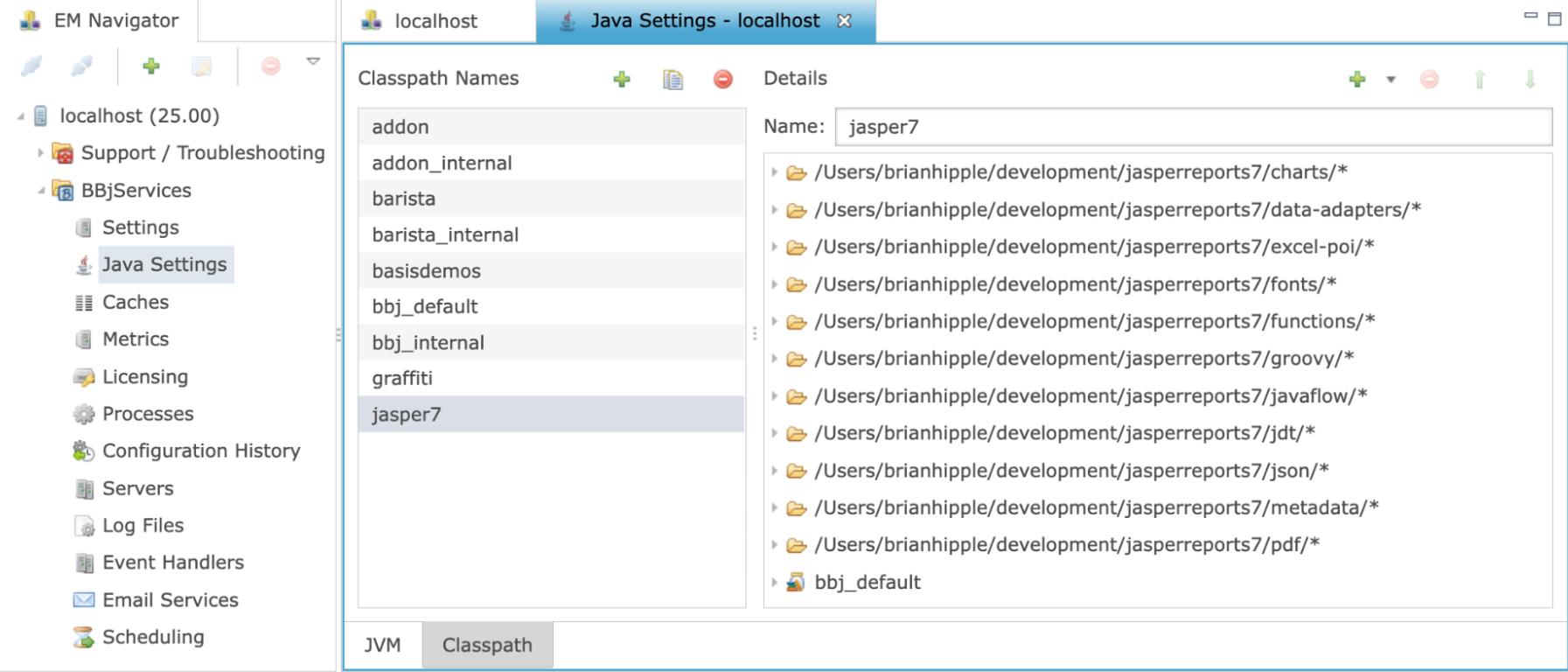
After downloading the JARs, create a Session-Specific Classpath (SSCP) to run BBj programs using the BBJasper utility. A Session-Specific Classpath is an alternate classpath that a BBj session can use. It allows a BBj session to load a different set of libraries from the ones provided by default by BBj. Administrators can use SSCPs to give different interpreters different libraries.
Example
The following is an example of using the SSCP to run the BBJasper Utility demo. A similar command line can be used to run BBj programs that use the BBJasper Utility:
bbj -CPjasperreports7 bbjasper.bbj
Edit all BBj interpreter session launches to include the SSCP
After creating the Session-Specific Classpath (SSCP) containing the JasperReports 7 JARs, all BBj interpreter sessions that execute reports through the BBJasper utility must be updated to use this SSCP. If the SSCP is not applied, BBj will continue to use the default JasperReports Library 6, and JasperReports 7 compiled reports may fail at runtime.
Key Points
- The SSCP must be applied only to interpreter sessions that run JasperReports 7.
- Existing non-report BBj programs can continue to use the default classpath.
- Mixing JasperReports 6 and 7 within the same interpreter session is not supported.
- Each BBj interpreter launch must explicitly reference the SSCP using the -CP option.
JasperReports 7 API Changes
Developers who have custom Java integrations, BBJasper modifications, or applications that directly reference JasperReports APIs should be aware of several API changes introduced in JasperReports 7.
The JRExporterParameter class has been deprecated in 6 and removed in version 7. There's a Jaspersoft Community forum post that discusses potential solutions.
The following classes are supported in both JasperReports 6 and 7 and should be used when upgrading existing code with the USE verb:
- net.sf.jasperreports.export.SimpleCsvReportConfiguration
- net.sf.jasperreports.export.SimpleDocxReportConfiguration
- net.sf.jasperreports.export.SimpleExporterInput
- net.sf.jasperreports.export.SimpleHtmlExporterOutput
- net.sf.jasperreports.export.SimpleHtmlReportConfiguration
- net.sf.jasperreports.export.SimpleOdsReportConfiguration
- net.sf.jasperreports.export.SimpleOdtReportConfiguration
- net.sf.jasperreports.export.SimpleOutputStreamExporterOutput
- net.sf.jasperreports.export.SimplePptxReportConfiguration
- net.sf.jasperreports.export.SimplePrintServiceExporterConfiguration
- net.sf.jasperreports.export.SimplePrintServiceReportConfiguration
- net.sf.jasperreports.export.SimpleReportExportConfiguration
- net.sf.jasperreports.export.SimpleRtfReportConfiguration
- net.sf.jasperreports.export.SimpleTextReportConfiguration
- net.sf.jasperreports.export.SimpleXlsReportConfiguration
- net.sf.jasperreports.export.SimpleTxtExporterOutput
- net.sf.jasperreports.export.SimpleXmlExporterOutput
- net.sf.jasperreports.export.SimpleWriterExporterOutput
- net.sf.jasperreports.export.SimpleXlsxReportConfiguration