Shop Floor Control - Traveler Printing
Function
This task creates copies of all work orders for which a traveler A document that travels with a job throughout the shop floor. Typically, a the traveler reflects all processes and comments about how to manufacture the job, materials, and subcontracts. was requested in the Release A process that converts a planned or quoted work order to the Open status. The process “releases” the job to the shop floor. It approves the work order for transactions and commits the materials to manufacturing process. Work
Order A document or group of documents that describes a job. A work order can also be a computer file that retains all job information. option of the Work Order Entry task. The traveler is
a complete list of required materials, labor steps, subcontract requirements,
and special comments. Printed ‘Non-Stock A special type of work order that describes the manufacture of an item that is not normally stocked as a part number. Non-stocks can describe a custom manufacturing job or any job where a standard bill of material is not followed. Or, items that are needed from subcontracts or purchase requisitions that are part of the manufacturing of a product.’
and ‘R’ category work orders should be reviewed carefully for accuracy
before material commitment Material that has been promised to a transaction. Materials can be committed to a job or to a sales order. Releasing a work order will commit materials to it.
takes place.
A document that travels with a job throughout the shop floor. Typically, a the traveler reflects all processes and comments about how to manufacture the job, materials, and subcontracts. was requested in the Release A process that converts a planned or quoted work order to the Open status. The process “releases” the job to the shop floor. It approves the work order for transactions and commits the materials to manufacturing process. Work
Order A document or group of documents that describes a job. A work order can also be a computer file that retains all job information. option of the Work Order Entry task. The traveler is
a complete list of required materials, labor steps, subcontract requirements,
and special comments. Printed ‘Non-Stock A special type of work order that describes the manufacture of an item that is not normally stocked as a part number. Non-stocks can describe a custom manufacturing job or any job where a standard bill of material is not followed. Or, items that are needed from subcontracts or purchase requisitions that are part of the manufacturing of a product.’
and ‘R’ category work orders should be reviewed carefully for accuracy
before material commitment Material that has been promised to a transaction. Materials can be committed to a job or to a sales order. Releasing a work order will commit materials to it.
takes place.
To access this task...
Select Traveler Printing from the Shop Floor Control main menu.
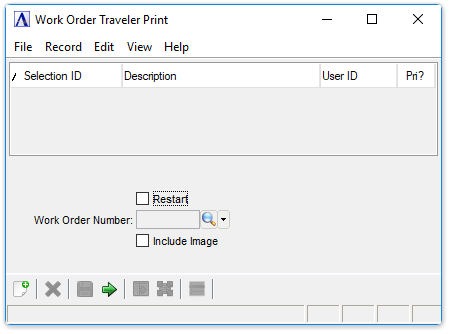
Work Order Traveler Print
About the Fields
Restart checkbox...
-
Mark the box to restart printing from a specific work order. If there is a paper jam or other printer malfunction during the printing of the travelers, or if the travelers printed incorrectly, printing can be restarted.
-
Unmark the box to begin with the first work order on file.
In the Work Order Number field...
This field is inactive when the Restart checkbox is unchecked.
-
Enter the number of the work order from where you want to restart the printing.
-
Click
 to select from a list of work orders.
Include Image checkbox...
-
Mark the box to add an image of the inventory item for the Work Order's Bill of Materials to the traveler.
-
Unmark the box to not add the image(s)
When finished making entries to the fields...
-
Select
 to
run the report.
to
run the report. -
Click
 to clear entries.
 -
Click
 to save the selection for future
runs.
to save the selection for future
runs. -
Click
 to view the record for the entered
work order number.
to view the record for the entered
work order number.
The traveler printing task creates a report ordered by bill number and
displays the required operations first and then lists the materials required
for each operation A process in the production of an item, component, or finished good..
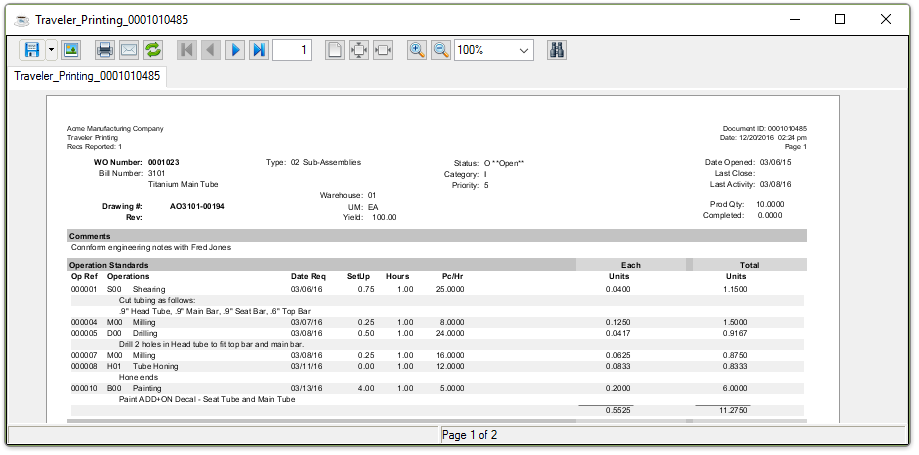
Sample Work Order Traveler Print
See Output Options.