Shop Floor Control - Dispatch Report
Function
The Shop Floor Dispatch
Report lists all work orders with outstanding production requirements
by scheduling priority (as assigned in the Work
Order Entry task). It can be used to identify which jobs are to
be worked on for each work center. Within each operation A process in the production of an item, component, or finished good.,
work orders are listed in required date sequence with daily requirements
totals and totals by week.
A process in the production of an item, component, or finished good.,
work orders are listed in required date sequence with daily requirements
totals and totals by week.
In the AddonSoftware Shop Floor Control module, a work order’s critical
ratio The actual time remaining to complete an operation divided by the scheduled time remaining. 1.0 indicates a job is on schedule. Greater than 1.0 means ahead of schedule. Jobs with a Critical Ratio that is less than 1.0 are behind schedule. Critical Ratio is used to prioritize the workload. is calculated by dividing the number of hours until
the scheduled completion date by the number of standard hours of uncompleted
work. Work orders that are behind schedule will show lower critical ratios
than work orders that are ahead of schedule.
To access this task...
Select Shop Floor Dispatch Report from the Reports menu.
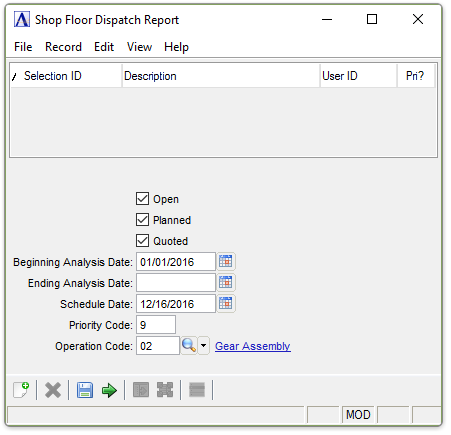
Shop Floor Dispatch Report
About the Fields
Checkboxes...
Enter any combination of the following:
-
Mark Open to create a report for open work orders.
-
Mark Planned to create a report for planned work orders.
In the Beginning/Ending Analysis Date field...
-
Enter the first/last date that is to appear on the report.
-
Press Tab or Enter to use the first/last date on file.
-
Click
 to use the tool to select the date.
In the Schedule Date field...
-
Enter the date as of when the schedule is to be calculated.
-
Press Tab or Enter to use the current date.
-
Click
to use the tool to select the date.
In the Priority Code field...
-
Enter the minimum priority code to include.
In the Operation Code field...
-
Enter a valid operation code.
-
Press Tab or Enter to include all.
-
Click
 to select from a list of all valid
operation codes.
to select from a list of all valid
operation codes.
When finished making entries to the fields...
-
Click
 to run the report.
 -
Click
 to save the selections.
 -
Click
 to clear all selections.
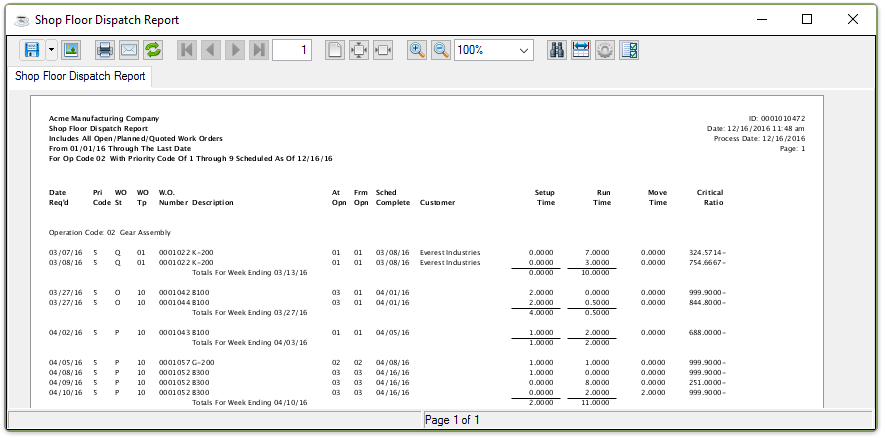
Sample Shop Floor Dispatch Report
See Output Options.