Shop Floor Control - Closed Recurring WO Detail Report
Function
This report provides a copy
of each recurring work order A type of work order that automatically closes and expenses itself each month by using the Close Recurring Work Orders processing tasks. Those tasks close and reopen this type of work order for additional transaction processing. Recurring work orders are convenient for tracking indirect labor expense.
that is being closed. The report is very similar to the Work
Order Detail Report.
A type of work order that automatically closes and expenses itself each month by using the Close Recurring Work Orders processing tasks. Those tasks close and reopen this type of work order for additional transaction processing. Recurring work orders are convenient for tracking indirect labor expense.
that is being closed. The report is very similar to the Work
Order Detail Report.
To access this task...
Select Closed Recurring WO Detail Report from the Period End Processing menu.
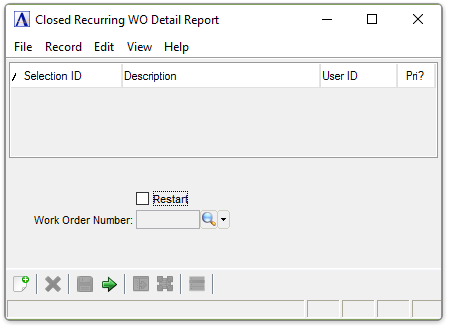
Closed Recurring WO Detail Report
About the Fields
Restart checkbox...
-
Mark the box to restart the printing with a certain work order.
-
Unmark the box to create the report from the beginning record.
If a printing problem occurs, this report may be restarted at the work order number in which the problem began.
In the Work Order Number field...
This field is only active when the Restart field is checked.
-
Enter the number of the work order to start printing.
-
Click
 to select
from a list of all work orders.
to select
from a list of all work orders.
When finished making entries to the fields...
-
Click
 to run the report.
 -
Click
 to save the selections.
 -
Click
 to clear the form and begin again.
If no data is available to create the report, the following message is issued:
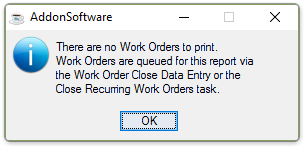
There are no Work Orders to print.
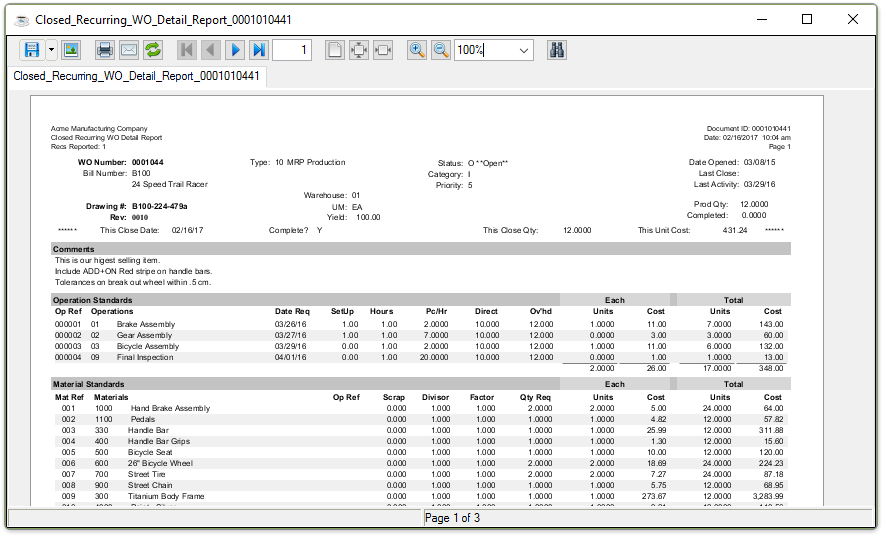
Sample Closed Recurring WO Detail Report
See Output Options.