Payroll - Title Codes
Function
The Title Codes maintenance task is used to define and maintain occupational title ID codes. These codes are assigned to each employee in the Employee Masterfile and categorize employee earnings on the daily Distribution Report, the Periodic Payroll, and Labor Distribution reports. The Display additional options... button provides additional features.
To access this task...
Select Title Codes from the Inquiry and Maintenance menu.
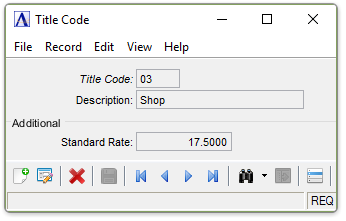
Title Codes maintenance
About the Fields
In the Title Code field...
-
Enter a 2-character code to identify this title.
-
Click
 to select from a list of all valid title
codes.
to select from a list of all valid title
codes. -
Click the record navigating buttons;
 to view the first record,
  to view the previous record,
  to view the next record, and
  to view the last record.
When the code exists, the current information is displayed.
In the Description field...
This description will print on the Payroll Distribution Report and the Payroll Distribution History Report.
-
Enter a description of up to 20 characters for this title ID (e.g., manager, supervisor, clerical, etc.).
In the Standard Rate field...
The standard rate is the default rate for any new employees added to the module. Whether or not there is a standard rate defined for this title, any rate assigned in the employee’s masterfile will override the default.
-
Enter the standard pay rate for this job title.
When finished entering Title Code Information...
-
Click
 to save the record.
 -
Click
 to clear the form and begin again.
 -
Click
 to delete the record selected.
If the Window is closed without saving the record, the module issues this confirmation prompt:
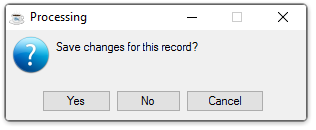
Save changes for this record?
-
Click Yes to save the changes.
-
Click No to return to the Payroll Maintenance Menu without saving the record.
-
Click Cancel to return to the Title Code being edited.
Selecting
the Display additional options button  presents the option to create a listing of all Total Codes:
Selecting this option creates the report:
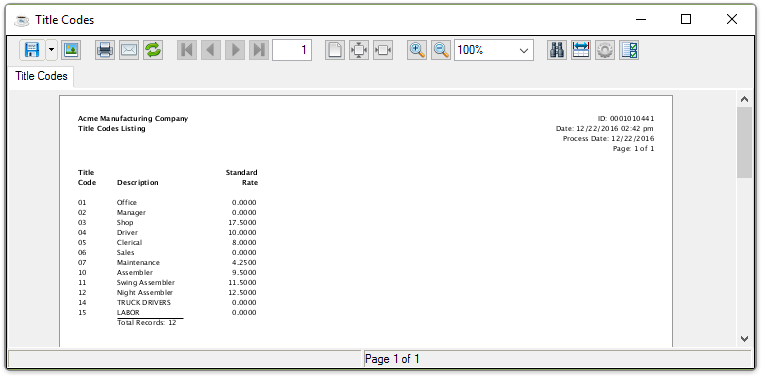
Sample Title Codes Listing
See Output Options