NetBeans IDE: PROGRESSION/4 Compiler Options (Superseded)
In BBj 15.00 and higher, the NetBeans IDE has been superseded by the BDT Eclipse plug-in. See BASIS and the IDE.
Description
Expanding Building->BBxPROGRESSION/4 Settings in the Options dialog presents a list of the options and parameters for compiling with bbx4cpl, as shown in the image below. With the exception of the BBxPRORGRESSTION/4 Compiler Location and the Strip Output File Extension options, these options represent command line parameters given directly to bbx4cpl.
Click on an area of the image below to see a pop-up window containing the item's description.
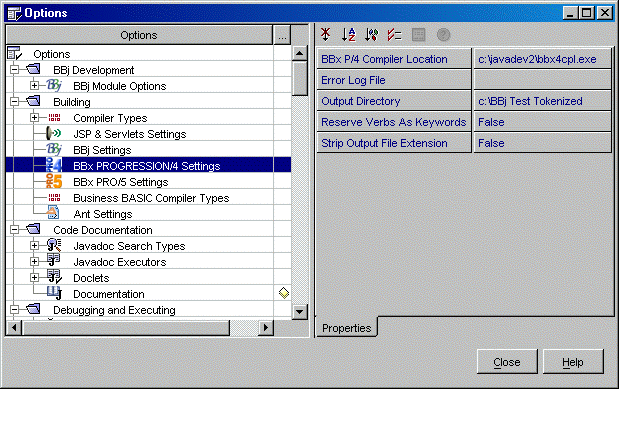
Properties
BBx P/4 Compiler Location
Path and filename of the bbx4cpl compiler. If BBxPROGRESSION/4 is not installed, no bbx4cpl will be available and it will not be possible to create PROGRESSION/4 tokenized files.
Error Log File
This option corresponds to the –e parameter. If an error log is specified, the compiler errors will be written to a disk file instead of being displayed in the Compiler Output Window in NetBeans. In order to display compiler errors in NetBeans as hyperlinks connected to the original source, leave this option blank.
Output Directory
This option is the –d parameter and represents the path to the directory where the complier places the tokenized files. For best results, the output directory listed in this option should already have been created and mounted in the NetBeans Explorer. If the directory does not exist, the compiler (BBjCpl, bbx4cpl or pro5cpl) will create it and populate it with tokenized files, but the results will not be visible in the Explorer. In order to create tokenized files in the same directory as the source files, leave this option blank.
Reserve Verbs As Keywords
The –k parameter.
Strip Output File Extension
This option removes the last file extension from the name of the compiled file, but only when the developer specifies an output directory and gives no extension. If the output directory was left blank, this option becomes non-applicable.
The following is a summary of the rules applying to tokenized file names and extensions in BBxPROGRESSION/4:
Case 1: No output directory supplied.
If the source file has an extension, the tokenized file will be located in the same directory as the source file and will have the same name as the source file, minus the last extension of the source file. If the source file has no extension, the tokenized file will be located in the same directory and will have the same name as the source file, with the extension '.bbx' appended. The Strip Output File Extension parameter has no effect in either case.
Case 2: Output directory specified. Strip Output File Extension set to 'false'.
The tokenized file will be placed in the output directory, and will have the same name and file extension as the source file.
Case 3: Output directory specified. Strip Output File Extension set to 'true'.
The tokenized file will be placed in the output directory, and will have the same name as the source file, minus the last extension of the source file.