NetBeans IDE: BBj Compiler Options (Superseded)
In BBj 15.00 and higher, the NetBeans IDE has been superseded by the BDT Eclipse plug-in. See BASIS and the IDE.
Description
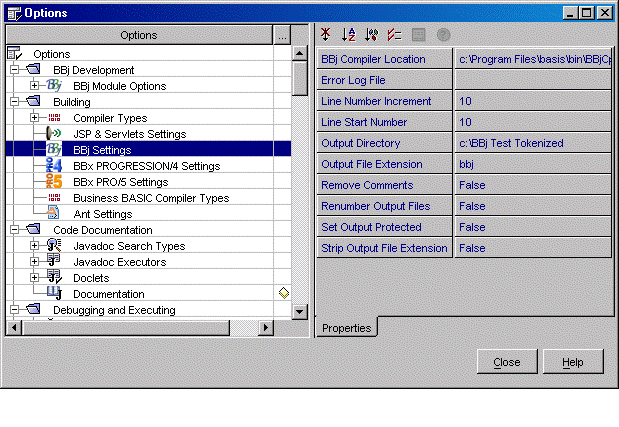
Expanding Building > BBj Settings in the Options dialog displays a list of the options and parameters for compiling with BBjCpl, as shown in the image below. With the exception of the BBj Compiler Location and the Strip Output File Extension options, these options represent command line parameters given directly to BBjCpl. This example does not use the –R Recursive Compiling parameter. Recursive compiling in NetBeans depends on selection of Compile All or Build All to start compiling (not on using the –R switch).
Properties
BBj Compiler Location
Path and filename of the BBjCpl compiler.
Error Log File
This option corresponds to the –e parameter. If an error log is specified, the compiler errors will be written to a disk file instead of being displayed in the Compiler Output Window in NetBeans. In order to display compiler errors in NetBeans as hyperlinks connected to the original source, leave this option blank.
Line Number Increment
Represents the –i parameter.
Line Start Number
Represents the –s parameter.
Output Directory
This option is the –d parameter and represents the path to the directory where the complier places the tokenized files. For best results, the output directory listed in this option should already have been created and mounted in the NetBeans Explorer. If the directory does not exist, the compiler (BBjCpl, bbx4cpl or pro5cpl) will create it and populate it with tokenized files, but the results will not be visible in the Explorer. In order to create tokenized files in the same directory as the source files, leave this option blank.
Output File Extension
The –x parameter represents the extension added to the end of tokenized files. The extension is not limited to a certain number of characters. If the extension used here has been registered as a BBj module extension, the compiled files will be assigned a special icon in the Explorer to distinguish them from all other file types. Leaving this option blank triggers the same file naming behavior discussed in Strip Output File Extension.
Remove Comments
Setting the –r parameter option to 'true' gives the respective switch to the compiler. When set to 'false', it is not included in the command used to start the compiler.
Renumber Output Files
Setting the –n parameter option to 'true' gives the respective switch to the compiler. When set to 'false', it is not included in the command used to start the compiler.
Set Output Protected
Setting the –p parameter option to 'true' gives the respective switch to the compiler. When set to 'false', it is not included in the command used to start the compiler.
Strip Output File Extension
This option removes the last file extension from the name of the compiled file, but only when the developer specifies an output directory and gives no extension. If the output directory was left blank, this option becomes non-applicable.
The following is a summary of the rules applying to tokenized file names and extensions:
Case 1: Output file extension supplied.
The tokenized file is named with the specified extension. The Output Directory and Strip Output File Extension options do not affect file naming.
Case 2: No output file extension supplied. No output directory supplied.
The tokenized file is located in the same directory as the source file and has the same name as the source file, minus the last extension of the source file.
Case 3: No output file extension supplied. Output directory specified. Strip Output File Extension set to 'false'.
The tokenized file is placed in the output directory, and has the same name and file extension as the source file.
Case 4: No output file extension supplied. Output directory specified. Strip Output File Extension set to 'true'.
The tokenized file is placed in the output directory, and has the same name as the source file, minus the last extension of the source file.