Taking an App From GUI to BUI and to DWC
Overview
This page explains how to adapt an existing BBj GUI application for the Dynamic Web Client (DWC). It begins with an application that can run in the thin client, BUI, and DWC, then demonstrates DWC-specific improvements such as enabling automatic layout, applying CSS Grid layout rules, styling BBj controls with DWC attributes, optimizing the window for browser deployment, and using the DWC console to inspect diagnostic output.
Original GUI Application
The GUISample.bbj program creates a top-level window containing First Name and Last Name edit controls and a Say Hello button. The window and its controls use explicit position and size values, resulting in a fixed layout.
GUISample.bbj
|
The program registers callbacks for closing the window and selecting Say Hello. When the button is selected, the program retrieves the entered first and last names and displays them in a message box.
Output in GUI, BUI, and DWC
The program uses BBj functionality supported by all three clients and runs without modification in the thin client, BUI, and DWC. Its behavior remains consistent, although each client renders the window and controls according to its own user interface implementation.
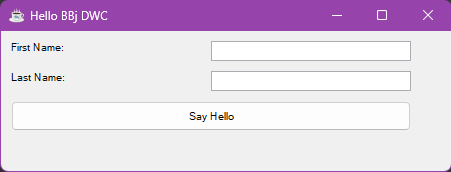
GUI Output
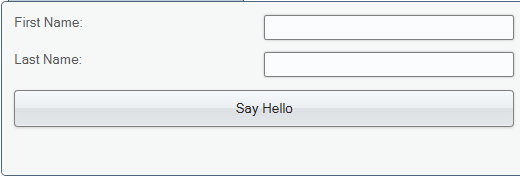
BUI Output
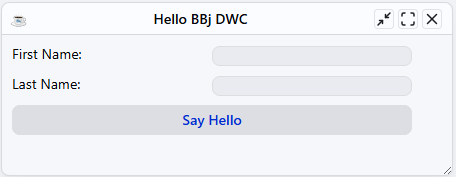
DWC Output
For example, entering John in the First Name field and Dear in the Last Name field, then selecting Say Hello, displays the following message:
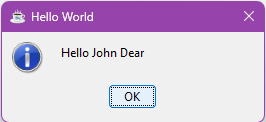
Greeting Output
Enabling Automatic Layout
The original application creates its window and controls using fixed position and size values. To enable automatic layout in DWC, include the $00100000$ automatic-layout flag when creating the window. This flag causes DWC to ignore the controls’ specified x, y, width, and height values and arrange them using dynamic flow layout.
The following window-creation statement uses $00100083$, which includes the $00100000$ automatic-layout flag:
|
Changing the code to specify that flag when creating the window causes the program to use a flow layout instead of absolute positions, resulting in a window like this:

When the application runs in DWC, the controls flow from left to right in the order in which they were added. Because CSS layout rules have not yet been applied, the controls appear consecutively without designed spacing.
Applying CSS Grid Layout
After automatic layout is enabled, CSS layout properties can be applied to the window’s content panel with BBjWindow::setPanelStyle. The following statements configure the sample application to use a two-column CSS Grid layout:
|
After these styles are applied, the application appears as follows:
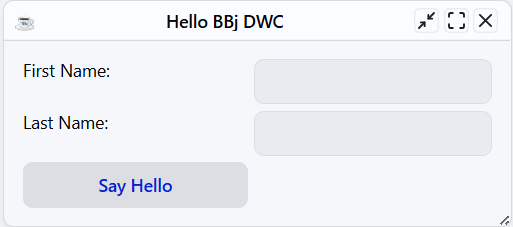
The display property enables CSS Grid. The grid-template-columns property creates a 180-pixel first column and an automatically sized second column. The gap property adds spacing between rows and columns, and the padding property adds spacing around the window content.
The labels and edit controls are arranged in two columns. Because the Say Hello button is the fifth control added to the window, it occupies the first column of the third row.
BBjWindow::setPanelStyle applies CSS properties to the window’s content panel, which contains the window’s controls. Applying CSS Grid to this panel therefore determines how its child controls are arranged. In comparison, BBjControl::setStyle applies a CSS property directly to an individual control, as demonstrated by positioning the Say Hello button in the second grid column.
Positioning the Button in the Grid
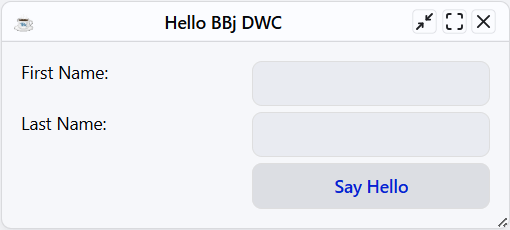
By default, the Say Hello button occupies the first column of the third grid row. To position it beneath the edit controls, apply the CSS grid-column property to the button with BBjControl::setStyle:
|
The value 2 places the button in the second grid column.
After this style is applied, the application appears as follows:
Styling the Button with DWC Attributes
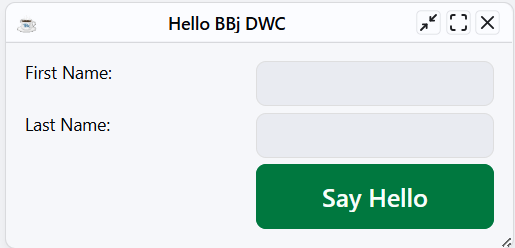
DWC components support attributes that control their appearance and behavior. The BBjControl::setAttribute method can apply these component-specific attributes to a BBj control. The following statements increase the size of the Say Hello button and apply the success theme:
|
The expanse attribute controls the button’s overall size. The xl value increases its font size, height, and padding. The theme attribute applies a predefined component theme; the success value displays the button using the success color.
After these attributes are applied, the application appears as follows:
Optimizing the Window for Browser Deployment
A traditional BBj top-level window includes desktop-style window controls. For a dedicated DWC application, the window can be created without its title bar and initially maximized by changing its creation flags:
|
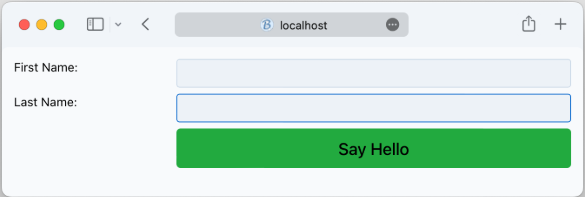
Compared with $00100083$, the $01101083$ value adds the $01000000$ No Title Bar flag and the $00001000$ Maximized flag. The remaining flags continue to provide automatic layout and the existing window behavior. See BBjSysGui::addWindow for the complete list of creation flags.
After these flags are applied, the application fills the browser’s content area without displaying a DWC window title bar:
Refining the Responsive Grid
When a maximized window uses display: grid, its content panel occupies the available browser width, which can make the input controls unnecessarily wide. Using an inline grid keeps the form compact, while fractional column units provide proportional sizing:
|
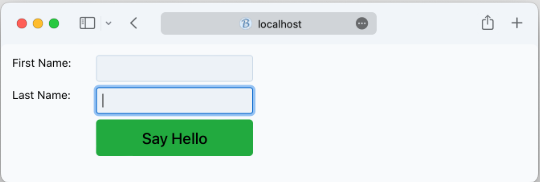
The inline-grid value prevents the grid container from expanding across the browser’s full width. The 1fr 2fr column definition assigns one fraction of the available space to the labels and two fractions to the input controls. The existing gap and padding values continue to provide spacing within and around the form.
After these changes are applied, the application displays a more compact, proportionally sized form:
Simplifying Control Creation for DWC
When automatic layout is enabled, DWC ignores the explicit position and size values assigned to controls. For applications intended only for DWC, the corresponding BBjWindow method overloads can create controls without specifying control IDs, positions, or dimensions:
|
When the control ID is omitted, BBj assigns one automatically. Removing the unused position and size arguments makes the code more concise and keeps it focused on the responsive DWC layout. Retain the complete method signatures when the same program must preserve a fixed layout in GUI or BUI.
Debugging DWC Applications
During development, the DWC console can be used to inspect program state and evaluate BBj expressions. A PRINT statement displays the value of an object or variable, while the ESCAPE verb pauses execution and opens the BBj console:
|
When this code runs, the DWC console displays the BBjButton object and a READY prompt.
Note: Remove debugging statements such as ESCAPE before deploying the application. For information about inspecting variables, executing commands, and resuming program execution, see Debugging BBj in the Console.
See Also
Dynamic Web Client (DWC) Overview