 DDBuilder: Defining Indices (Superseded)
DDBuilder has been superseded by the BASIS DBMS Data Dictionary module accessible from the BASIS IDE or the Enterprise Manager. Recommended for usage with ODBC/JDBC access to PRO/5, Visual PRO/5, BBj application data. DDBuilder is no longer included in the BBj download package as of version 12.0 but can be downloaded with Visual PRO/5.
Although multiple indices can be defined for multi-keyed MKEYED and C-ISAM file tables, only one index should be defined for DIRECT, SORT, or single-keyed MKEYED tables.
Although the initial index is the primary unique key of the file, DDBuilder can be used to define as many indices as needed. However, PRO/5 and TAOS limit multi-keyed MKEYED files to 16 keys and a total of 48 segments within those keys. A segment can consist of a single column or portion of a column.
Up to 16 indices can be defined for an MKEYED table. The total size of an index cannot exceed 120 bytes. Each index must contain one or more segments, but the table cannot contain more than 48 segments. Each segment can be made up of a single column or part of a column. The indices must appear within the first 1024 bytes of the record.
To define the index, or key structure for a table, do the following:
-
In the tree view, select the desired index.
-
Select the index segment to display the General Index properties page.
-
Enter data into the appropriate fields (each field is described under Fields).
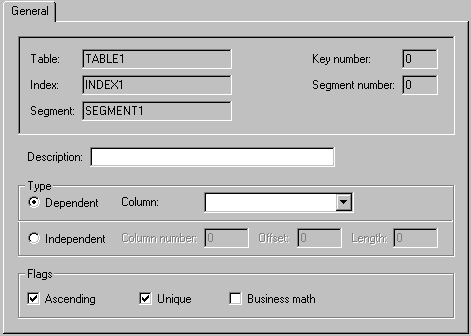
Fields
Description
Provide a brief description of the index segment.
Type
Indicate whether the index segment is dependent or independent.
A dependent segment is based on a named column. This is the default and preferred method of defining segments. Select a column in the Column field and indicate whether the index is ascending or descending. Dependent segments must be used with SQL-based applications, and should be used with other applications whenever possible.
An independent segment is based on a specific byte position within a record. Enter the values in the Column #, Offset, and Length fields.
Column
For dependent segments only, select the index base column. When it is selected, the Column #, Offset, and Length fields are obtained from the existing data dictionary parameters of the column.
Column #, Offset, and Length
The following fields can be edited for independent segments only.
|
Field |
Description |
|---|---|
|
Column # |
Define the areas of the record delimited by line feed characters (i.e., physical columns). If the record is made up exclusively of fixed-length columns, enter 0, which indicates the complete record and ignores delimiters. |
|
Offset |
Define the offset from the beginning of the named index segment. An offset of 0 indicates the beginning of the segment. |
|
Length |
Define the length of the segment (maximum 64 bytes). The total size of an index cannot exceed 120 bytes. An index must be located in the first 1024 bytes of the record. |
Flags
|
Flag |
Description |
|---|---|
|
Ascending |
Check this box to set the collating sequence of the segment in ascending order. Otherwise, the index will be set in descending order. |
|
Unique |
Check this box to indicate that the segment is unique. The primary index must be unique. This parameter is meaningful only for single-segment keys or the first segment of a concatenated index. |
|
Business Math |
Check this box to indicate that the segment uses business math sorting or if a column of this type is specified as an index. Leaving the box unchecked defines alphabetic rather than numeric sorting. |