 DDBuilder: Defining General Column Attributes (Superseded)
DDBuilder has been superseded by the BASIS DBMS Data Dictionary module accessible from the BASIS IDE or the Enterprise Manager. Recommended for usage with ODBC/JDBC access to PRO/5, Visual PRO/5, BBj application data. DDBuilder is no longer included in the BBj download package as of version 12.0 but can be downloaded with Visual PRO/5.
To define the attributes (i.e., data type, column length, and numeric precision) for each column in a table, do the following:
-
In the tree view, select the desired column to display the General Column properties page.
-
Enter data into the appropriate fields (each field is described under Fields).
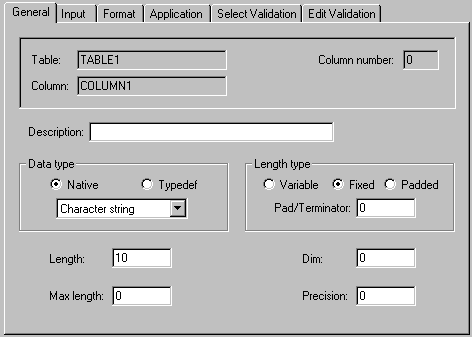
Fields
Description
Provide a short description of the column contents.
Data Type
Select the column's data type (Native PRO/5 or typedef) by clicking on the appropriate item.
After the data type is selected, the list box below displays the defined types for the given group. (In Visual PRO/5 2.0, the maximum size for Integer and Unsigned Integer fields has been expanded from 4 to 6 bytes.)
|
Data Type |
Description |
|---|---|
|
Character string |
Default data type. |
|
Numeric |
Free-format numbers. |
|
Integer |
Stored in fixed-length field of 1 to 6 bytes. |
|
Unsigned integer |
Similar to Integer, but values are always interpreted as positive numbers. |
|
IEEE float |
Industry-standard floating point format (8 bytes). |
|
BCD float |
Binary Coded Decimal representation. |
|
Business math |
Stored in fixed-length field of 8 bytes. |
|
C float |
Standard single precision floating point format for the current machine. |
|
C double |
Standard double precision floating point format for the current machine. |
Length Type
Indicate whether the column has a variable length, fixed length or a padded length.
Traditional PRO/5 data formats are typically made up of variable-length character string and numeric columns that are terminated by the $0A$ line-feed character. The decimal equivalent of $0A$ is 10.
For existing record structures that contain several line-feed delimited columns containing substrings, define all but the last substring as fixed-length. Define the final substring in the record as variable-length, with a terminator of 10.
If a padded length is selected, specify the pad character in the Pad/Terminator box.
Length
Define the internal or stored size of the column. The size is based on the data type.
|
Data Type |
Size |
|---|---|
|
Character String |
Up to 32,767 bytes. |
|
Numeric |
Up to 32,767 bytes. |
|
Integer |
1, 2, 3, or 4 bytes. |
|
Unsigned integer |
1, 2, 3, or 4 bytes. |
|
IEEE float |
N/A (always 8 bytes). |
|
BCD float |
N/A (always 8 bytes). |
|
Business math |
N/A (always 8 bytes). |
|
C float |
N/A (always 4 bytes). |
|
C double |
N/A (always 8 bytes). |
Dim
If the column contains a repeating field (array), define the number of elements, up to 255. The default is 1, which implies an ordinary non-repeating field. (Only one- dimensional arrays are supported.)
Max Length
If the column has a variable length, define a length of up to 32,767 bytes.
Precision
Define the number of decimal places in a numeric column. Although the default is 2 decimal places, an integer between -1 and 16 can be specified. A value of -1 indicates floating point, or maximum precision. Precision takes effect when a value is assigned to the column upon inserting a record. For a data dictionary to be used by BBxPROGRESSION/4, the maximum precision is 14.