ESQL Overview
Description
BASIS first introduced ESQL (Exclusive SQL) tables with the release of BBj 6.00. As the name suggests, ESQL tables are only accessible via SQL statements so the traditional verbs like OPEN() and READ() do not apply to these files. Instead, developers can create these files via SQL "Create Table" statements and add or read rows by SQL "Insert" and "Select" statements. Additionally, ESQL also offers true SQL data types such as DECIMAL with a defined precision and scale, DATE, and TIMESTAMP, to name a few. ESQL tables offer a host of other features as well, such as variable length records and dynamic index creation.
The previous paragraph is an excerpt from the BASIS International Advantage article ESQL Files: Constraining Your Data to Guarantee Integrity. Read the article in its entirety for a comprehensive understanding of ESQL.
ESQL tables now support standard SQL transactions using the standard transaction API of both JDBC and ODBC allowing third party SQL tools to use BBj databases seamlessly. The new transaction support defaults to auto-commit, so that users who do not use transactions do not have to make any changes. Third party tools will already have support for transactions built in. Developers who would like to write code using transactions should check the documentation of their development tool for how to do so. For example, the JDBC API documentation describes how to use transactions directly from Java.
ESQL tables support standard SQL constraints (such as PRIMARY KEY, CHECK, NOT NULL), computed columns, default values, and identity fields, enabling data integrity rules to be enforced at the database level rather than in application logic.
Character Type Columns and Index Collation
In BBj 9.00 and higher, ESQL tables provide a powerful feature not present in the other BBj data file types - true locale-specific index collation on character column values. Traditional BBj file types store values for keys in their natural byte order which means that the letter "A" comes before "B", etc. However, note that lowercase "a" comes after upper case "Z" due its ASCII byte value. To remedy this, ESQL tables by default store key values for indexes using a locale-specific collation key. This means that the values are stored in "dictionary order" according to the specific locale. The only side effect is that this significantly increases the size of ESQL files because the collation key is much larger than a simple UTF-16 value (which ESQL uses to store key values).
If ordering is not important, but the size of the file is, the Enterprise Manager provides a setting to disable the use of collation keys when creating new ESQL tables. This setting must be set to the desired setting at the time the table is created. The image below shows the setting in the database properties in the Enterprise Manager.
Location
 EM Navigator →
  Databases/SQL →
  Databases → Settings
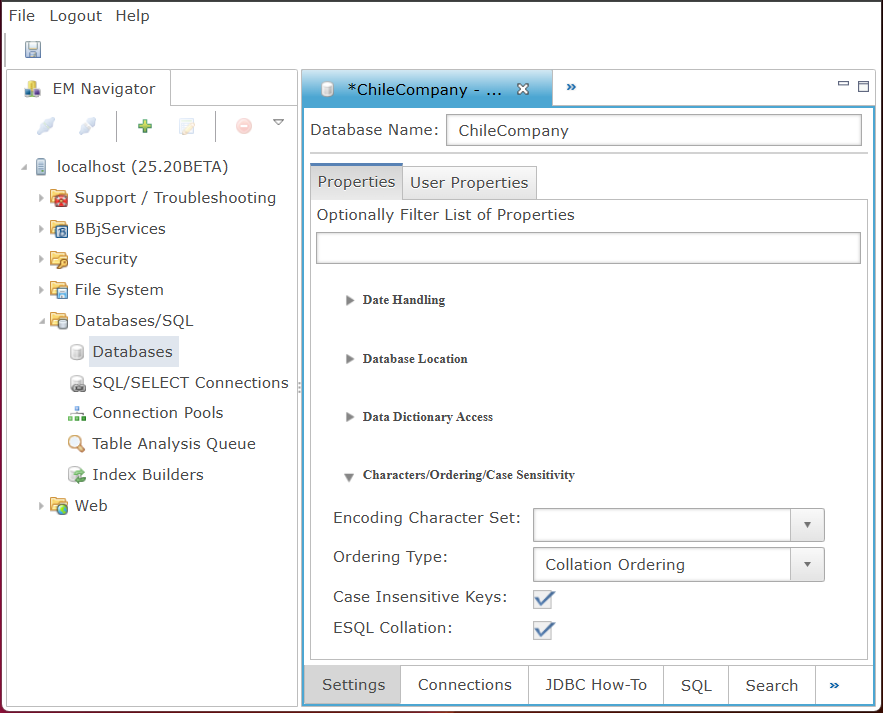
Characters/Ordering/Case Sensitivity
The Characters/Ordering/Case Sensitivity section configures encoding, sorting behavior, case handling, and collation options, controlling how text values are interpreted, indexed, compared, and ordered during SQL processing and query execution.
Characters/Ordering/Case Sensitivity Settings
| Settings | Description | ||||||
|---|---|---|---|---|---|---|---|
|
Character set to use for encoding/decoding values in the database. The dropdown provides supported BASIS and standard encodings such as Big5, CESU-8, EUC-JP, and x-BASIS variants. |
|||||||
|
Keys on non-ESQL BBj data files order character values based on byte (ASCII) value instead of “collation” order based on the alphabetizing rules of the English language. Because of this, lower case letters sort after all capital letters. This option allows user to specify the way ordering should be handled by ORDER BY. With collation order enabled, ORDER BY sorts values according to alphabetizing rules. With byte order enabled, it sorts according to ASCII character values. With collation order enabled, the SQL engine cannot rely on the key order for optimization purposes on sorting operations. However, this may not impact any of your queries since the SQL engine can still optimize on WHERE clauses and always chooses WHERE clause optimization over ORDER BY optimization when it has a choice between to the two.
|
|||||||
|
|
|||||||
|
|
ESQL Table Creation Behavior
ESQL tables are a special case that follow standard SQL table creation and management practices. They do not use BBj-specific file engine types or CREATE TABLE/VIEW configuration options. Unlike traditional BBj file formats (Indexed, MKeyed, XKeyed, etc.), ESQL tables are created and managed through SQL statements and adhere to standard SQL data definition, storage, and constraint behavior.
Transactions and Foreign Keys
-
ESQL Foreign Keys - a simple way to codify information in a database where the values of columns "a" and "b" actually refer to the values of columns "c" and "d" in another table. The term "foreign" means that it refers to a different table and "key" indicates that the columns in the other table have defined keys in order to use them. The syntax follows standard SQL. For more information, refer to Wikipedia.
ESQL Data Types
|
Data Types |
Description |
|---|---|
|
bigint |
Integer data from -2^63 through 2^63-1. |
|
binary |
No maximum number of bytes. |
|
bit |
Integer data with either a 1 or 0 value. |
|
boolean |
Integer data with either a 1 or 0 value. |
|
char |
No maximum number of characters. |
|
datetime |
Date and time data from January 1, 1753, through December 31, 9999, with an accuracy of 3.33 milliseconds. |
|
decimal |
Fixed precision and scale numeric data from -10^38 +1 through 10^38 -1. |
|
double |
Floating precision number data from -1.79E + 308 through 1.79E + 308. |
|
float |
Floating precision number data from -1.79E + 308 through 1.79E + 308. |
|
integer |
Integer data from -2^31 through 2^31 - 1. |
|
long varbinary |
Variable-length data with arbitrary length. |
|
long varchar |
Variable-length data with arbitrary length. |
|
numeric |
Fixed precision and scale numeric data from -10^38 +1 through 10^38 -1. |
|
real |
Floating precision number data from -3.40E + 38 through 3.40E + 38. |
|
smallint |
Integer data from -2^15 through 2^15 - 1. |
|
timestamp |
Date and time data from January 1, 1753, through December 31, 9999, with an accuracy of 3.33 milliseconds. |
|
tinyint |
Integer data from -128 through 127. |
|
varbinary |
Variable-length binary data with a maximum length of 255 bytes. |
|
varchar |
Variable-length data with a maximum of 255 characters. |