Shop Floor Control - Work Order Detail
The Work Order Detail report
is accessed from the Display
additional options dropdown of the Work Order Entry task. The Work Order A document or group of documents that describes a job. A work order can also be a computer file that retains all job information. Detail creates
a report recapping the information about the work order. You may
choose to print the labor, material, and subcontract standards The sum of the materials, operations, and subcontracts, together with their costs, that make up the definition of the work order. Standards can be used to reference standard costs or standards of performance.
for the work order; a list of transactions against the work order that
is similar to the Transaction The value added activity to the work order. Transactions include materials issues, labor and subcontract receipts.
History display; a breakdown of the work order’s costs that is similar
to the Cost Summary display; and the Comments.
A document or group of documents that describes a job. A work order can also be a computer file that retains all job information. Detail creates
a report recapping the information about the work order. You may
choose to print the labor, material, and subcontract standards The sum of the materials, operations, and subcontracts, together with their costs, that make up the definition of the work order. Standards can be used to reference standard costs or standards of performance.
for the work order; a list of transactions against the work order that
is similar to the Transaction The value added activity to the work order. Transactions include materials issues, labor and subcontract receipts.
History display; a breakdown of the work order’s costs that is similar
to the Cost Summary display; and the Comments.
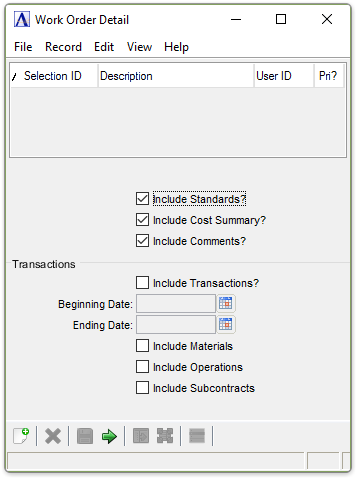
Work Order Detail
Include Standards? checkbox...
-
Mark the box to include a detailed breakdown of the labor, material, and subcontract standards for this work order.
Include Cost Summary? checkbox...
-
Mark the box to include a detailed breakdown of the cost summary for this work order.
Include Comments? checkbox...
-
Mark the box to include the work order comments.
Include Transactions? checkbox...
-
Mark the box to include transactions made against the work order.
In the Beginning/Ending Date field...
This field is bypassed if transactions will not be included .
-
Enter the first/last date for which transactions are to be displayed.
-
Click
 to use the tool to select the date.
 -
Press Tab or Enter to accept the first/last date any activity was recorded on this work order.
Include Materials checkbox...
-
Mark the box to include a history of all materials
Include Operations checkbox...
-
Mark the box to include a history of all operation
A process in the production of an item, component, or finished good.
time sheets.
Include Subcontracts checkbox...
-
Mark the box to include a purchase orders for all subcontracts.
When finished making entries to the fields...
-
Click
 to process.
 -
Click
 to save the entries.
 -
Click
 to clear entries.
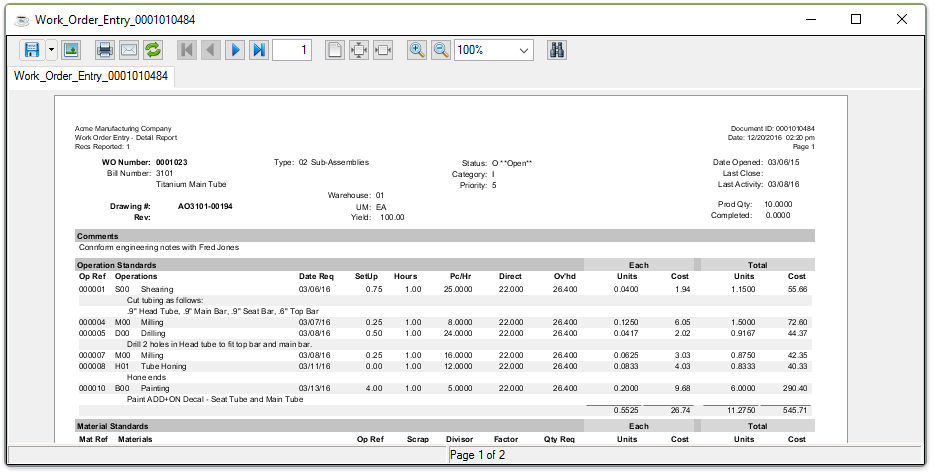
Sample Work Order Detail Report
See Output Options.