Shop Floor Control - Transaction History
Function
The Transaction History
task is accessed from the Display additional
options dropdown
on the Work Order Entry form. This task allows viewing of transactions
that have been made against a work order A document or group of documents that describes a job. A work order can also be a computer file that retains all job information.,
such as labor hours and charges, material issues, and subcontract receipts.
Totals are shown by number of labor hours, total labor cost, total material
cost, total subcontract cost, and the total of labor plus material
plus subcontracts.
A document or group of documents that describes a job. A work order can also be a computer file that retains all job information.,
such as labor hours and charges, material issues, and subcontract receipts.
Totals are shown by number of labor hours, total labor cost, total material
cost, total subcontract cost, and the total of labor plus material
plus subcontracts.
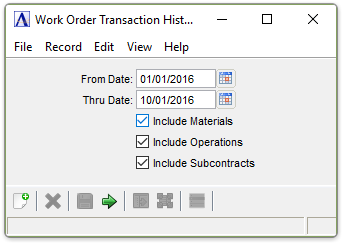
Work Order Transaction History
In the From Date field...
-
Enter the beginning date for the history.
-
Select the Display Calendar button
 to use the tool to select the date.
In the Thru Date field...
-
Enter the ending date for the history.
-
Select the Display Calendar button
to use the tool to select the date.
Include Materials checkbox...
-
Mark the box to view a history of all material entries.
Include Operations checkbox...
-
Mark the box to view a history of all time sheet entries.
Include Subcontracts checkbox...
-
Mark the box to view purchase orders for all subcontracts.
When finished making entries to the fields...
-
Click
 to run the report.
 -
Click
 to save the selections.
 -
Click
 to clear all selections.
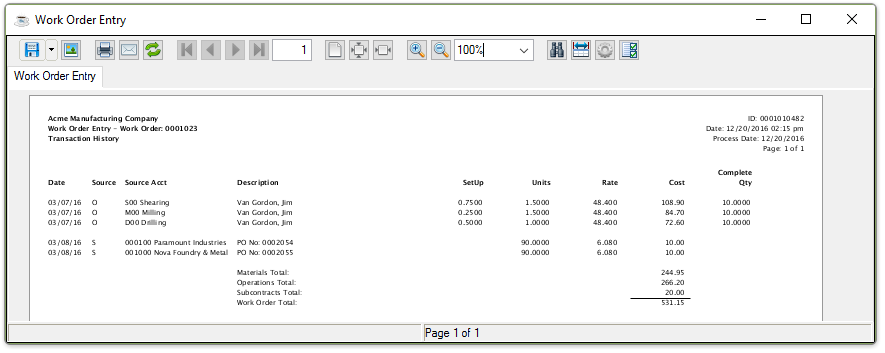
Sample Work Order Transaction History Report
See Output Options.
About the Report
In the Date column...
Displays the date of the transaction.
In the Source column...
Displays the source of the transaction type.
-
M = Material Issue: The work order sequence number, item number, unit of measure
The unit of which an item is stocked or consumed. Examples are each, case, dozen, foot, etc., and item description will be displayed. -
O = Time Sheet Entry (operations): The work order sequence number, operation
A process in the production of an item, component, or finished good. code, operation description, employee number, and employee name will be displayed -
S = Purchase Order Receipts (subcontracts): The vendor number and name, purchase order and detail line number, and subcontract service description will be displayed.
In the Source Acct column...
Displays
the transaction source by material/inventory The components, items, and raw material purchased or produced for resale or used to support production.
number, operation code, or subcontract code.
In the Description column...
When the Source field is M – Material Issue, the inventory item (material) description is displayed. When the Source field is O – Time Sheet Entry, the employee name on the entry is displayed. When the source code is S – PO Receipts, the purchase order number for the subcontract is displayed.
In the Set Up column...
Displays the set up time for the operation.
In the Units column...
If Material Issue is selected in the Source field, the quantity issued of this item is displayed. If Time Sheet Entry, the number of labor hours worked by this employee is displayed. If Purchase Order Receipts, the number of completed units (or hours) received in Purchase Order Receipt Entry for subcontracts is displayed.
In the Rate column...
If Material
Issue is selected in the Source field, the cost per unit of
this item is displayed. If Time Sheet Entry, the direct rate The dollars per hour for labor that a particular operation costs. plus overhead Overhead reflects charges that are not attributable to a specific job. Overhead will include charges such as rent, utilities, and depreciation and those costs are allocated to jobs by an hourly rate. rates for this operation is
displayed. If Purchase Order Receipts is
selected, the subcontract cost per unit or per hour is displayed.
In the Cost column...
Displays the Units times Rate.
In the Complete Qty column...
Displays completed operations as reported in the Time Sheet Entry task.
When all transactions have been displayed, the current total accumulated cost in the work order is shown. The totals shown represent all transactions that have been made against the work order. The totals are not affected by the selection criteria for the display.