Shop Floor Control - Release Work Order
Function
The Release Work Order task
is accessed from the Display additional
options dropdown on the Work Order Entry form. In order to select
the Release Work Order function, the Work Order form must be in edit mode
- select the Edit icon  .
.
Materials required for
production will not be committed until work orders are released. Use this
option when it is time to release A process that converts a planned or quoted work order to the Open status. The process “releases” the job to the shop floor. It approves the work order for transactions and commits the materials to manufacturing process.
any planned or quoted work orders to the shop floor or to view component A single part or item that is a portion of an assembly for the bills of material. shortages. Optionally, a traveler A document that travels with a job throughout the shop floor. Typically, a the traveler reflects all processes and comments about how to manufacture the job, materials, and subcontracts. can be printed with the work order A document or group of documents that describes a job. A work order can also be a computer file that retains all job information. to show all operations, materials,
and subcontracts that are needed to produce the product.A pick list will also optionally print for all released orders for each step
of the operation A process in the production of an item, component, or finished good..
A process that converts a planned or quoted work order to the Open status. The process “releases” the job to the shop floor. It approves the work order for transactions and commits the materials to manufacturing process.
any planned or quoted work orders to the shop floor or to view component A single part or item that is a portion of an assembly for the bills of material. shortages. Optionally, a traveler A document that travels with a job throughout the shop floor. Typically, a the traveler reflects all processes and comments about how to manufacture the job, materials, and subcontracts. can be printed with the work order A document or group of documents that describes a job. A work order can also be a computer file that retains all job information. to show all operations, materials,
and subcontracts that are needed to produce the product.A pick list will also optionally print for all released orders for each step
of the operation A process in the production of an item, component, or finished good..
NOTE:
This option is automatically displayed when creating inventory The components, items, and raw material purchased or produced for resale or used to support production.
or non-stock A special type of work order that describes the manufacture of an item that is not normally stocked as a part number. Non-stocks can describe a custom manufacturing job or any job where a standard bill of material is not followed. Or, items that are needed from subcontracts or purchase requisitions that are part of the manufacturing of a product. work orders.
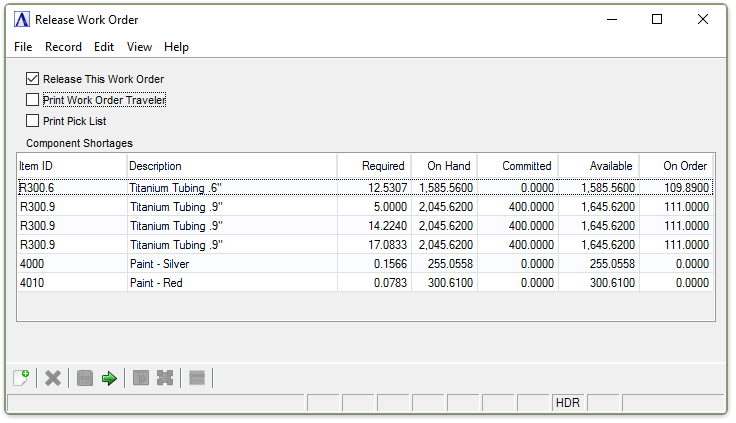
Release Work Order
About the Fields
When a work order is released the material necessary for the production of the work order is committed from inventory and will not be available for other production. All components of the work order are displayed and any shortages (Required quantity being greater than Available quantity) are shaded red.
Release This Work Order checkbox...
-
The box is already marked by default for Open work orders, though it may be selected for Planned work orders.
Print Work Order Traveler checkbox...
-
Mark the box to print a traveler for this work order.
When checked, this work order will be combined with other work orders when the next batch of travelers is printed in the Traveler Printing task.
Print Pick List checkbox...
-
Mark the box to print a pick list
A list of materials required for a job that is used to guide someone in the warehouse. In the context of shop floor, the Pick List allows for gathering the materials needed for each operation.
for this work order.
When checked, this work order will be combined with other pick lists when the next batch of pick lists is printed.
When finished making entries to the fields...
-
Click
 to release the work order.