Shop Floor Control - Lot/Serial Numbers
Function
The Work Order Lot and
Serial Numbers maintenance is accessed from the Display additional options dropdown
in the Work Order Entry task and is only selectable when a work order A document or group of documents that describes a job. A work order can also be a computer file that retains all job information. has items that are serialized/lotted
and inventoried. Use this option to assign serial/lot numbers before
closing a work order.
A document or group of documents that describes a job. A work order can also be a computer file that retains all job information. has items that are serialized/lotted
and inventoried. Use this option to assign serial/lot numbers before
closing a work order.
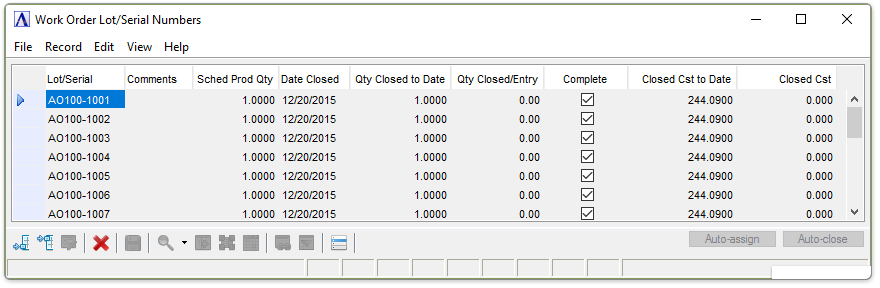
Work Order Lot/Serial Numbers Maintenance
About the Fields
When first accessing this option any previously entered serial/lot numbers and other information is displayed; or if serial/lot numbers have not been assigned these fields will be blank.
Adding or Changing Work Order Lot/Serial Numbers
-
Click
 to edit the form.
 -
Click
 to add an additional requirement
to the list.
to add an additional requirement
to the list. -
Click
 to insert a new requirement
into the list.
to insert a new requirement
into the list.
In the Lot/Serial field...
-
Enter a serial/lot number for the item.
In the Comments field...
-
Enter any comments you want to associate with the item.
In the Sched Prod Qty field...
Display only
. Displays
a check mark if the work order was pulled complete A finished job. By contrast, work order can be partially closed. That is, a portion of the production is closed, but some still remains to be processed..
In the Date Closed field...
Display only. Shows the date when the item was closed.
In the Qty Closed to Date field...
Display only. Shows the quantity that was closed.
In the Qty Closed/Entry field...
Display only. Shows the quantity closed with this entry.
In the Complete field...
Display only. Displays a check mark if the work order was pulled complete.
In the Closed Cst to Date field...
Display only. Shows the total cost of the item at closing.
In the Closed Cst field...
Display only. Shows the total closed cost.
When finished making entries to the fields...
Click  to
save.
to
save.
Auto-Assign Lot/Serial Numbers
The system
can automatically generate Lot
and Serial
Numbers using the  button
and selecting Auto-assign.
If all items have
been assigned,
this function is
inactive.
button
and selecting Auto-assign.
If all items have
been assigned,
this function is
inactive.
NOTE:
Serial/lot numbers may be a mix of both alpha and numeric characters. If, while generating the next higher number, an alpha character is found, the system ignores that character and continues to search to the left for the numeric character to increment. For example, your first serial number is A1B2C9 and the number to generate is 2. The generated numbers will be A1B2C9 and A1B3C0.
Auto-Close Lot/Serial Numbers
The system
can automatically close The process that finishes a work order from an accounting standpoint. Once a work order is closed, no other transactions can be posted to it.
work orders using the
button and selecting Auto-close.