Shop Floor Control - Labor Efficiency Analysis Report
Function
Use this report to analyze
the efficiency of the labor force by the operation A process in the production of an item, component, or finished good..
It will review the performance of each operation in comparison to the
standards The sum of the materials, operations, and subcontracts, together with their costs, that make up the definition of the work order. Standards can be used to reference standard costs or standards of performance. defined. Use
information obtained from closed work orders to get a historical perspective,
open work orders to gain a perspective of the current situation, or as
an analysis of both. The report can sort the information by work order A document or group of documents that describes a job. A work order can also be a computer file that retains all job information. type.
A process in the production of an item, component, or finished good..
It will review the performance of each operation in comparison to the
standards The sum of the materials, operations, and subcontracts, together with their costs, that make up the definition of the work order. Standards can be used to reference standard costs or standards of performance. defined. Use
information obtained from closed work orders to get a historical perspective,
open work orders to gain a perspective of the current situation, or as
an analysis of both. The report can sort the information by work order A document or group of documents that describes a job. A work order can also be a computer file that retains all job information. type.
To access this task...
Select Labor Efficiency Analysis Report from the Reports menu.
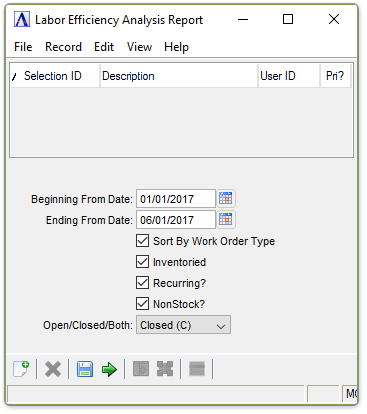
Labor Efficiency Analysis Report
About the Fields
In the Beginning/Ending From Date field...
-
Enter the first/last date to analyze.
-
Press the Tab or Enter keys to select the first/last date on record.
-
Click
 to use the tool to select the
date.
to use the tool to select the
date.
Checkboxes...
Select any combination of the following:
-
Mark Sort By Work Order Type to sort within the operations by work order type.
-
Mark Inventoried to include all inventory
The components, items, and raw material purchased or produced for resale or used to support production.
categories. -
Mark Recurring? to include all recurring categories.
-
Mark Non-Stock? to include all non-stock
A special type of work order that describes the manufacture of an item that is not normally stocked as a part number. Non-stocks can describe a custom manufacturing job or any job where a standard bill of material is not followed. Or, items that are needed from subcontracts or purchase requisitions that are part of the manufacturing of a product.
categories.
From the Open/Closed/Both Dropdown...
-
Closed (C) to analyze only closed work orders.
-
Open (O) to analyze only open work orders.
-
Both (B) to analyze both open and closed work orders.
When finished making entries to the fields...
-
Select
 to
run the report.
to
run the report. -
Click
 to save the selections.
 -
Click
 to clear all selections.
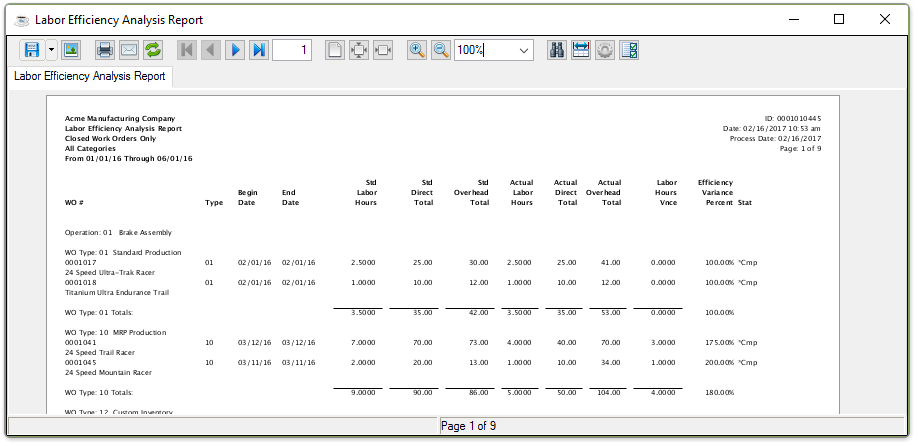
Sample Labor Efficiency Analysis Report
See Output Options.