Shop Floor Control - Job Status Summary
Function
To access this task...
Select Job Status Summary from the Reports menu.
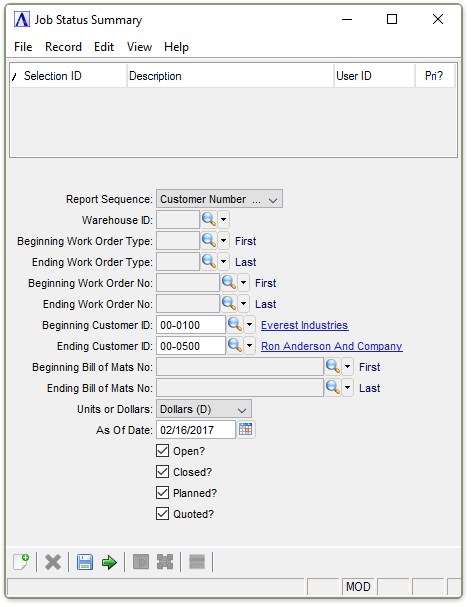
Job Status Summary Report
About the Fields
From the Report Sequence dropdown...
-
Customer Number to sort by customer number.
-
Work Order (W) to sort the report by work order number.
-
WO Type (T) to sort by work order type.
-
Bill Number to sort by bill number.
In the Warehouse ID field...
This field is active when Bill Number is selected from the Report Sequence dropdown.
-
Enter a valid warehouse code number.
-
Click
 to select from a list of all
valid warehouse IDs.
to select from a list of all
valid warehouse IDs.
In the Beginning/ending Work Order Type fields...
These fields are active when WO Type (T) is selected from the Report Sequence dropdown.
-
Enter the first/last work order type with which to begin the report.
-
Press Tab or Enter to select the first/last work order type.
-
Click
to select from a list of all
valid work order types.
In the Beginning/Ending Work Order No fields...
These fields are active when Work Order (W) is selected from the Report Sequence dropdown.
-
Enter the first/last work order number with which to begin the report.
-
Press Tab or Enter to select the first/last work order on record.
-
Click
to select from a list of all
valid work order numbers.
The requested information differs depending on what you entered in the selected Report Sequence field. For Work Order (W), enter the lowest work order number that is to appear on the report. For WO Type (T), enter the lowest work order type code that is to appear on the report. For Customer Number, enter the lowest customer number that is to appear on the report. For Bill Number, enter the lowest item code that is to appear on the report. Numbers sort before letters.
In the Beginning/Ending Customer ID fields...
These fields are active when Customer Number is selected from the Report Sequence dropdown.
-
Enter the first/last customer ID with which to begin the report.
-
Press Tab or Enter to select the first/last customer ID.
-
Click
to select from a list of all
valid customer IDs.
In the Beginning/Ending Bill of Mats No fields...
These fields are active when Bill Number is selected from the Report Sequence dropdown.
-
Enter the first/last bill number with which to begin the report.
-
Press Tab or Enter to select the first/last bill number.
-
Click
to select from a list of all
bill of materials.
From the Units or Dollars dropdown...
-
Dollars (D) to create a report based on dollar value.
-
Units (U) to create a report based on units.
In the As Of Date field...
-
Enter the date for the report.
-
Clear the field to include all dates.
-
Press Tab or Enter to use the default of today’s date.
-
Click
 to use the tool to select the
date.
to use the tool to select the
date.
Checkboxes...
Mark any combination of the following:
-
Mark Open? to create a report for open work orders.
-
Mark Closed? to create a report for closed work orders.
-
Mark Planned? to create a report for planned work orders.
-
Mark Quoted? to create a report for quoted work orders.
When finished making entries to the fields...
-
Select
 to
run the report.
to
run the report. -
Click
 to save the selections.
 -
Click
 to clear all selections.

Sample Job Status Summary Report
See Output Options.