Shop Floor Control - Job Status
Function
The Job Status report
is accessed from the Display additional options dropdown
of the Work Order Entry task. The Job Status reports the different operations
required to complete A finished job. By contrast, work order can be partially closed. That is, a portion of the production is closed, but some still remains to be processed.
the production of a work order A document or group of documents that describes a job. A work order can also be a computer file that retains all job information..
It also shows the date in which each operation A process in the production of an item, component, or finished good.
must be performed in order for the production to be completed on time.
A finished job. By contrast, work order can be partially closed. That is, a portion of the production is closed, but some still remains to be processed.
the production of a work order A document or group of documents that describes a job. A work order can also be a computer file that retains all job information..
It also shows the date in which each operation A process in the production of an item, component, or finished good.
must be performed in order for the production to be completed on time.
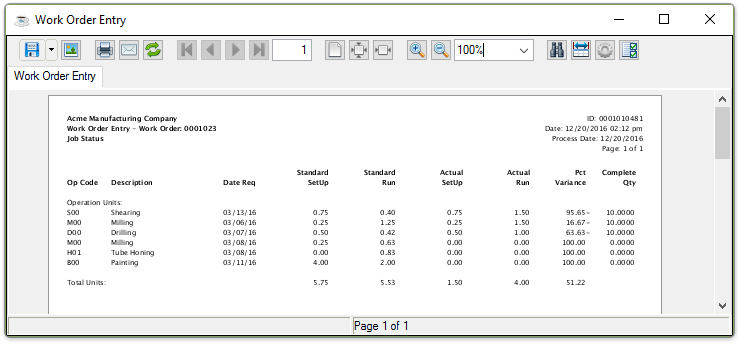
Sample Job Status Report
See Output Options.
About the Fields
In the Op Code field...
Displays the operation code.
In the Description field...
Displays the description of the operation code entered.
In the Date Req field...
Displays the date each operation is required to be finished in order for the production to be completed on time.
In the Standard Setup Cost field...
Displays the setup and run times of the standard operation.
In the Standard Run field...
Displays the standard number of units run.
In the Actual Setup Cost field...
Displays the actual setup and run times of the actual operation.
In the Actual Run field...
Displays the actual number of units run.
In the Pct Variance field...
Displays the difference in the percentage of the standard and actual setup costs and run times. Negative variances are shown when actual setup cost is greater than standard setup cost
In the Complete Qty field...
Displays the quantity of the finished goods that have been completed as entered in the Time Sheet Entry task.