Shop Floor Control - Closed Work Order Detail Report
Function
This report provides a
report of each work order A document or group of documents that describes a job. A work order can also be a computer file that retains all job information.
that is being closed. The first portion of the Closed Work Order Detail
Report is similar to the Work Order Entry report. However, this report
also incorporates the Work
Order Close Data Entry information and a summary of general ledger
postings for each work order that is being closed.
A document or group of documents that describes a job. A work order can also be a computer file that retains all job information.
that is being closed. The first portion of the Closed Work Order Detail
Report is similar to the Work Order Entry report. However, this report
also incorporates the Work
Order Close Data Entry information and a summary of general ledger
postings for each work order that is being closed.
To access this task...
Select Closed Work Order Detail Report from the Transaction Processing menu.
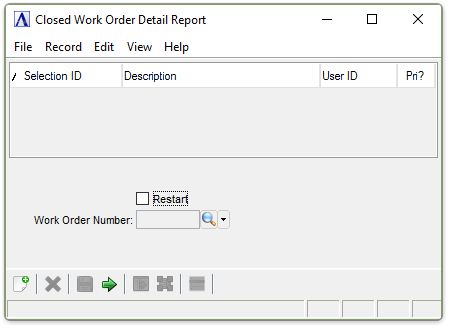
Closed Work Order Detail Report
About the Fields
Restart checkbox...
-
Mark the box to restart with a specific work order number.
-
Unmark the box to begin from the first work order being closed.
In the Work Order Number field...
This field is onlyactiveif theRestart checkbox is checked.
-
Enter the number of the work order from which you want to restart printing.
-
Click
 to select from a list of
all valid Work Order Numbers.
to select from a list of
all valid Work Order Numbers.
When finished making entries to the fields...
-
Click
 to run the report.
 -
Click
 to save the selections.
 -
Click
 to clear all selections.
 -
Click
 to display the master record for the Work Order Number entered.
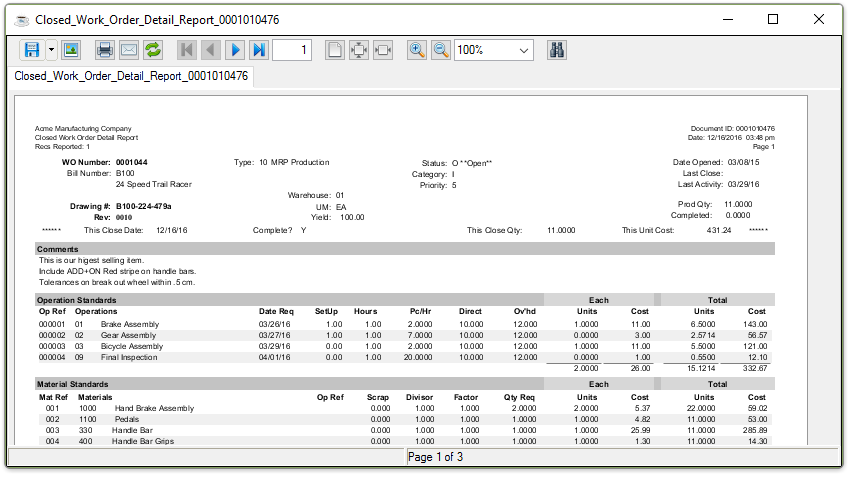
Sample Closed Work Order Detail Report
See Output Options.