Shop Floor Control - Bottleneck Analysis Report
Function
Use this report to determine
where scheduled production will cause a bottleneck An operation that is scheduled for more labor hours than that resource has the capacity to complete. A resource that has demand that exceeds capacity is considered to be a bottleneck..
Base the report on whatever utilization is necessary and run it for only
certain operations and through a set range of dates. A resource
that has demand that exceeds capacity is considered to be a bottleneck.
The estimated starting date, actual start, and estimated completion dates are shown, along with
the date required.
An operation that is scheduled for more labor hours than that resource has the capacity to complete. A resource that has demand that exceeds capacity is considered to be a bottleneck..
Base the report on whatever utilization is necessary and run it for only
certain operations and through a set range of dates. A resource
that has demand that exceeds capacity is considered to be a bottleneck.
The estimated starting date, actual start, and estimated completion dates are shown, along with
the date required.
To access this task...
Select Bottleneck Analysis Report from the Reports menu.
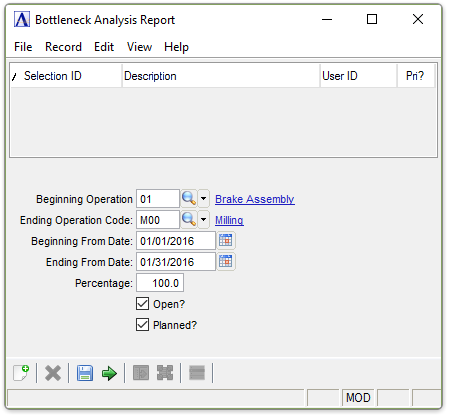
Bottleneck Analysis Report
About the Fields
In the Beginning/Ending Operation Code field...
-
Enter a valid operation
A process in the production of an item, component, or finished good. code.
-
Select TaborEnter to use the first/last operation code on record.
-
Click
 to select from a list of all valid operation codes.
In the Beginning/Ending From Date field...
-
Enter the first/last date for the report.
-
Select Tab or Enter to use the first/last date of operations.
-
Click
 to use the tool to select the date.
In the Percentage field...
Enter the minimum percent of utilization to report.Any operation that is scheduled beyond this utilization will be considered a bottleneck.
Open? checkbox...
-
Mark the box to include open work orders.
-
Unmark the box to exclude open work orders.
Planned? checkbox...
-
Mark the box to include planned work orders.
-
Unmark the box to exclude planned work orders.
When finished making entries to the fields...
- Click
 to save the selections.
 -
Click
 to clear the form and begin again.
 -
Click
 to run the report.
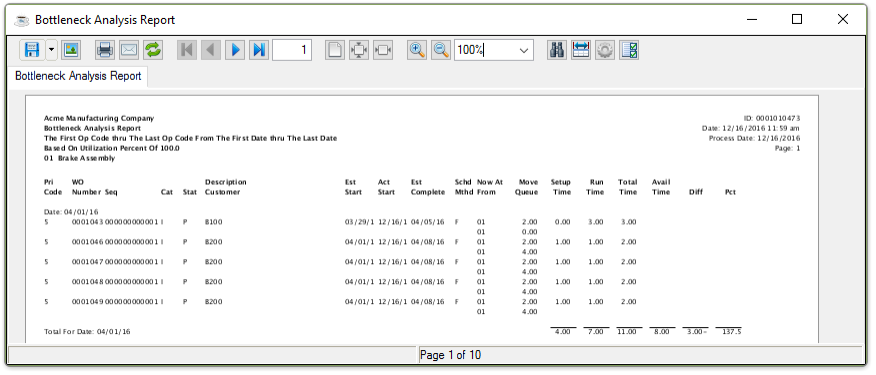
Sample Bottleneck Analysis Report
See Output Options.