Sales Analysis - By Non-Stock Item
Function
This task enables an inquiry into sales history of units, sales, and cost for items not kept in stock. Depending on the Sales Analysis By Non-Stock Item parameter settings, this inquiry can display sales analysis of product and non-stock item.
To access this task...
Select By Non-Stock Item from the Sales Analysis main menu.
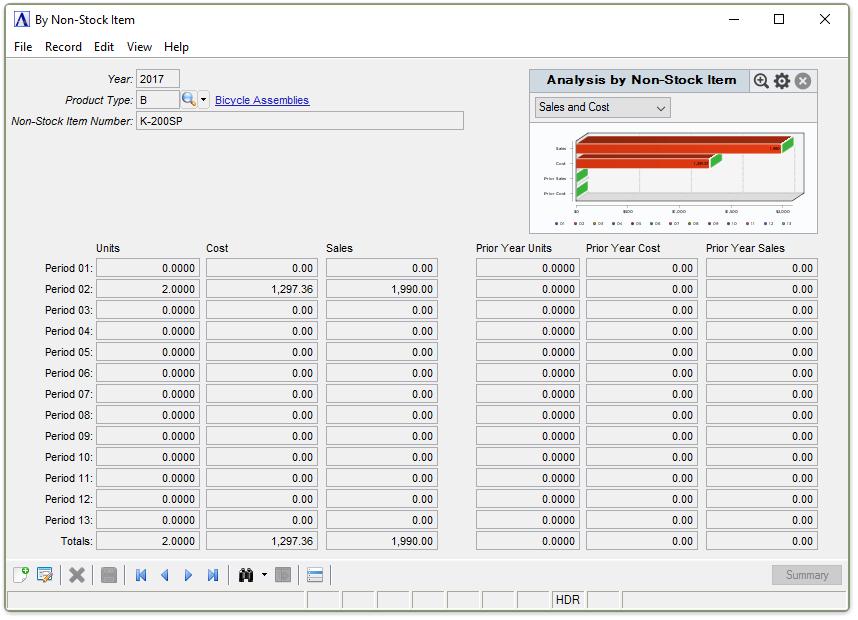
Sales Analysis by Non-Stock Item
About the Fields
The fields displayed on the screen are those pertaining to the level of detail set for analysis in the Parameter Maintenance task. Screens may display one or both of the fields below.
Click the record navigating buttons...
-
Click the record navigating buttons;
 to view the first record,
  to view the previous record,
  to view the next record, and
  to view the last record.
In the Year field...
-
Enter the year for the analysis. Skipping this field will cause a default year to appear.
In the Product Type field...
-
Enter a valid product type.
-
Click
 to select from product types with sales analysis.
 -
Click
 to select from a list of product types.
In the Non-Stock Item Number field...
-
Enter a valid non-stock item number.
-
Click
to select from non-stock items with sales analysis.
The inquiry for the product/non-stock item is displayed.
-
Click
 to clear the selections on
the window.
to clear the selections on
the window. -
Click
 to save the selections for future
inquiries.
to save the selections for future
inquiries.