Purchase Order Processing - Replenishment Selection Options
Function
Use this task to specify which vendor/buyer/review dates are applied for the Replenishment Register task. Selections can be made for one or more buyer/vendor combinations, along with a date range into which the vendor/buyer’s next review date must fall.
To access this task...
Select Replenishment Selection Options from the Purchase Order Processing main menu.
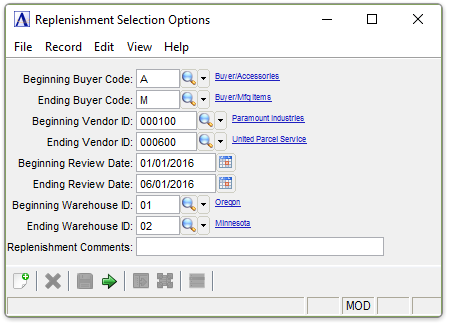
Replenishment Selection Options
About the Fields
After entering the parameters for replenishment analysis in the following fields, select the Replenishment Register to display what items should be purchased from which vendors and in what quantities. Additional selections can be made by repeating the selection process for different buyer codes, stocking vendors, and/or review dates.
In the Beginning/Ending Buyer Code field...
-
Enter the number of the first/last buyer code to review.
-
Press Tab to accept the default first/last buyer code record.
-
Click
 to select
from a list of buyer codes.
to select
from a list of buyer codes.
In the Beginning/Ending Vendor ID field...
-
Enter the number of the first/last vendor to review.
-
Press Tab to accept the default first/last vendor record.
-
Click
to select
from a list of vendors.
In the Beginning/Ending Review Date field...
-
Enter the beginning/ending date to review.
-
Press Tab to select the first/last date record.
-
Click
 to select a date by using the calendar tool.
In the Beginning/Ending Warehouse ID field...
-
Enter a valid warehouse code.
-
Press Tab to accept the default first/last warehouse record.
-
Click
to select
from a list of all warehouse ID codes.
In the Replenishment Comments field...
-
Enter up to 50 characters to appear on the register.
When finished making entries to the fields...
-
Click
 to run the Replenishment Selection process.
 -
Click
 to clear the selections and begin again.