Purchase Order Processing - PO Return Of Goods Entry
Function
Use this task to return goods to the vendor they were purchased from. The goods being return must have been received on an existing PO receipt. The PO receipt can be currently open, or it may have been previously updated.
To access this task...
Select PO Return Of Goods Entry from the Purchase Order Processing main menu.
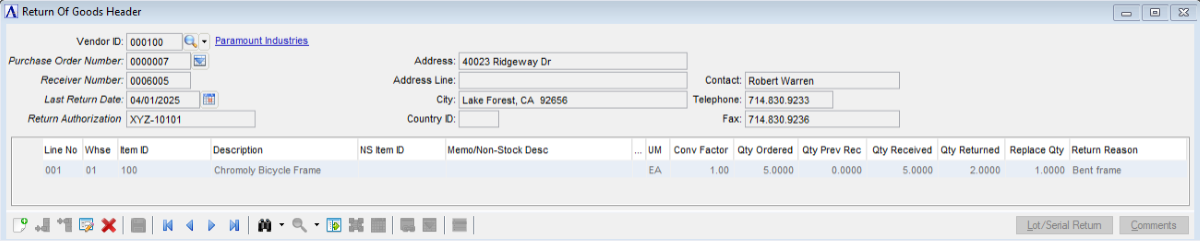
Return of Goods Header
About the Fields
In the Vendor ID field...
-
Click
 to select an entry already in PO Return Of Goods.
 -
Enter a valid vendor number.
-
Click
 to select from a list of Vendor IDs.
In the Purchase Order Number field...
-
Click
to select an entry already in PO Return Of Goods for the vendor. -
Enter an existing purchase order number.
-
Click
 to select from a list of existing purchase orders and receipts for the vendor.
In the Receiver Number field...
The Receiver Number defaults to the earliest Receiver Number for the entered Purchase Order Number.
-
Press Tab or Enter to accept the default, or enter a different Receiver Number if there are more than one receiver for the entered Purchase Order Number.
In the Last Return Date field...
The Last Return Date defaults to the current processing date.
-
Press Tab or Enter to accept the default, or enter a different date if needed.
-
Click
 to select a date by using the calendar tool.
In the Return Authorization field...
-
If a Return Authorization Code was obtained from the vendor, enter it here.
Note:
The vendor address and contact information are display only.
PO Return Of Goods Entry Detail Grid
The detail grid lists the items that were received with the entered Purchase Order Number and Receiver Number.
In the Qty Returned field...
-
Enter the quantity of the item being returned to the vendor.
-
The Return Of Goods Lot/Serial Detail grid launches automatically for lotted/serialized items.
In the Replace Qty field...
-
Enter the quantity of the returned item that will be replaced by the vendor.
In the Return Reason field...
-
Enter the reason(s) the item is being returned.
Buttons
The Lot/Serial Return button...
Use the Lot/Serial Return button to launch the Return Of Goods Lot/Serial Detail grid that lists the lot/serial numbers that were received with the entered Purchase Order Number and Receiver Number.
The Comments button...
Use the Comments button to enter a comment (memo) on the detail row that has focus.
Return Of Goods Lot/Serial Detail Grid
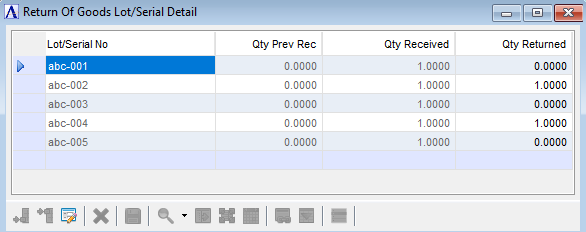
Return of Goods Lot/Serial Detail
In the Qty Returned field...
-
Enter the quantity of the lot/serial number being returned to the vendor.