Purchase Order Processing - PO Receipt Variance
Function
Use this task to create a report showing the variance between received dates and required and promised dates. The report may be created based on an exact variance amount.
To access this task...
Select PO Receipt Variance from the Reports menu.
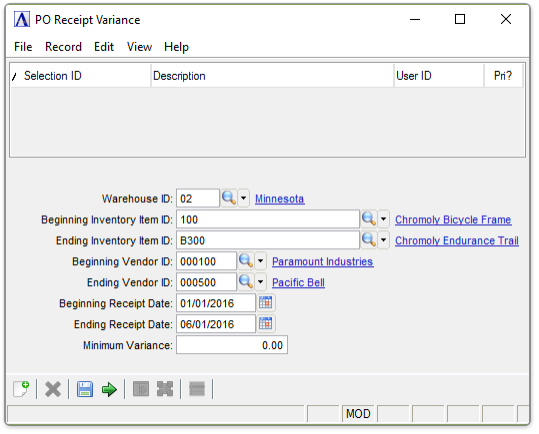
PO Receipt Variance Report
About the Fields
In the Warehouse ID field...
-
Enter a valid warehouse ID.
-
Press Tab to select all warehouses.
-
Click
 to
select from a list of warehouses.
to
select from a list of warehouses.
In the Beginning/Ending Inventory Item ID field...
-
Enter the number of the first/last item to appear on the report.
-
Press Tab to select the first/last item record.
-
Click
to select from a list of item numbers.
In the Beginning/Ending Vendor ID field...
-
Enter the number of the first/last vendor to appear on the report.
-
Press Tab to select the first/last vendor record.
-
Click
to
select from a list of vendor numbers.
In the Beginning/Ending Receipt Date field...
-
Enter the first/last date to appear on the report.
-
Press Tab to select the first/last date record.
-
Click
 to select a date by using the calendar tool.
In the Minimum Variance field...
-
Enter the minimum variance in days to appear on the report.
When done making selections...
-
Click
 to run the PO Receipt Variance
Report process.
to run the PO Receipt Variance
Report process. -
Click
 to save the record.
 -
Click
 to
clear entries on the form and begin again.
to
clear entries on the form and begin again.
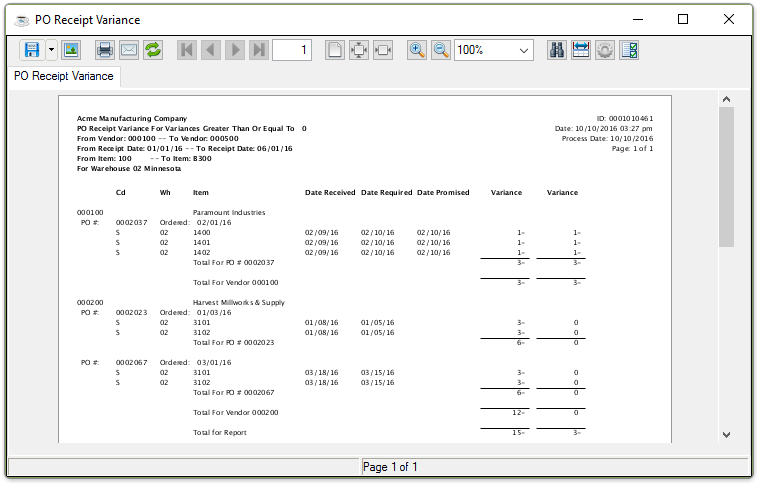
Sample PO Receipt Variance
See Output Options.