Purchase Order Processing - PO Receipt Cost Variance
Function
Use this task to create a report showing the cost variance of stock and non-stock line items between items ordered and items received. The variance is determined by the order value and the receipt value. A variance and variance ratio is displayed. The report can be generated based on a “greater than” percentage.
To access this task...
Select PO Receipt Cost Variance from the Reports menu.
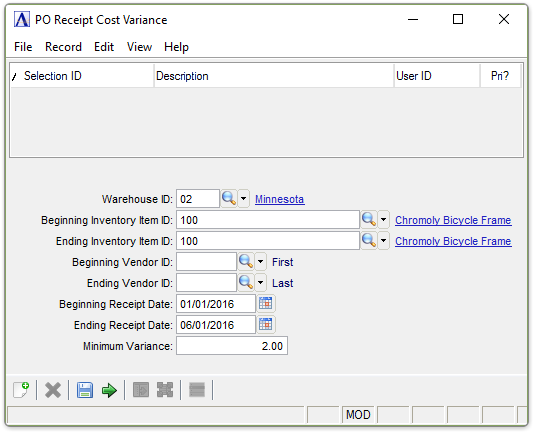
PO Receipt Cost Variance Report
About the Fields
In the Warehouse ID field...
-
Enter a valid warehouse ID.
-
Press Tab to select all warehouses.
-
Click
 to select from a list of warehouses.
In the Beginning/Ending Inventory Item ID field...
-
Enter the number of the first/last item to appear on the report.
-
Press Tab to select the first/last item record.
-
Click
to select from a list of item numbers.
In the Beginning/Ending Vendor ID fields...
-
Enter the number of the first/last vendor to appear on the report.
-
Press Tab to select the first/last vendor record.
-
Click
to select from a list of vendor numbers.
In the Beginning/Ending Receipt Date field...
-
Enter the first/last date to appear on the report.
-
Press Tab to select the first/last date record.
-
Click
 to select a date by using the calendar tool.
In the Minimum Variance field...
-
Enter the minimum percentage on which to base the variance that appears on the report.
When done making selections...
-
Click
 to run the PO Receipt Cost
Variance process.
to run the PO Receipt Cost
Variance process. -
Click
 to save the record.
-
Click
 to clear entries on the form and begin again.
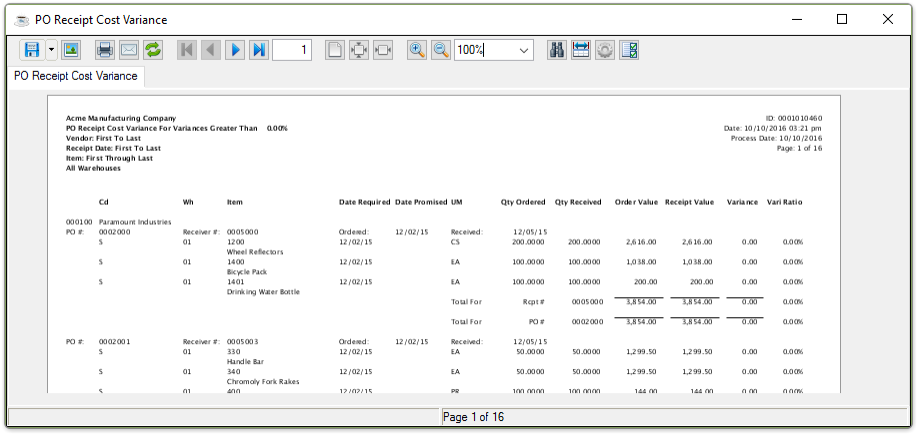
Sample PO Receipt Cost Variance Report
See Output Options.