Purchase Order Processing - PO Cash Requirements Report
Function
Use this task to create a report showing the cash requirements of outstanding purchase orders by estimated due date (the date required plus the terms' due days).The purchase orders are categorized into time periods corresponding to general ledger accounting periods or to a specified number of days. The report can be summarized with only the totals for each purchase order displayed for each vendor or expanded to include all detail.
To access this task...
Select PO Cash Requirements Report from the Reports menu.
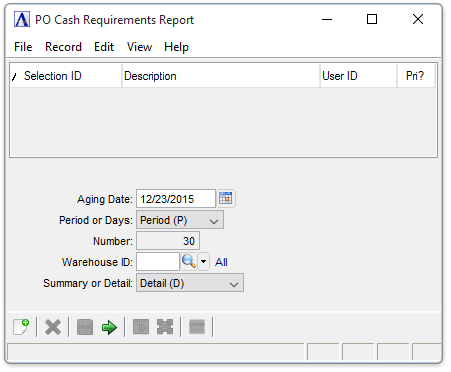
PO Cash Requirements Report
About the Fields
A determining factor on whether purchase orders and detail line items display on this report is made by your selection in the Warehouse field. If all warehouses are selected, all purchase orders matching the criteria are displayed. But if a single warehouse is selected, all purchase order headers from that warehouse are listed, with or without line items; line items matching the criteria are only listed when they come from the selected warehouse and are S, N, or O line types.
In the Aging Date field...
-
Enter the first date to appear on the report.
-
Press Tab to select the current date.
-
Click
 to select a date by using the calendar tool.
In the Period or Days field...
-
Select Period (P) to base the report on general ledger accounting periods.
-
Select Days (D) to base the report on a specified number of days.
In the Number field...
This field is accessible when Days (D) is selected in the Period or Days field.
-
Enter the number of days in the period.
In the Warehouse ID field...
-
Enter a valid warehouse ID.
-
Click
 to select
from a list of warehouse IDs.
to select
from a list of warehouse IDs.
From the Summary or Detail dropdown...
-
Select Summary (S) to create a summarized report.
-
Select Detail (D) to create a detailed report.
When done making selections...
-
Click
 to run the PO Cash Requirements
Report process.
to run the PO Cash Requirements
Report process. -
Click
 to save the record.
-
Click
 to clear entries on the form and begin again.
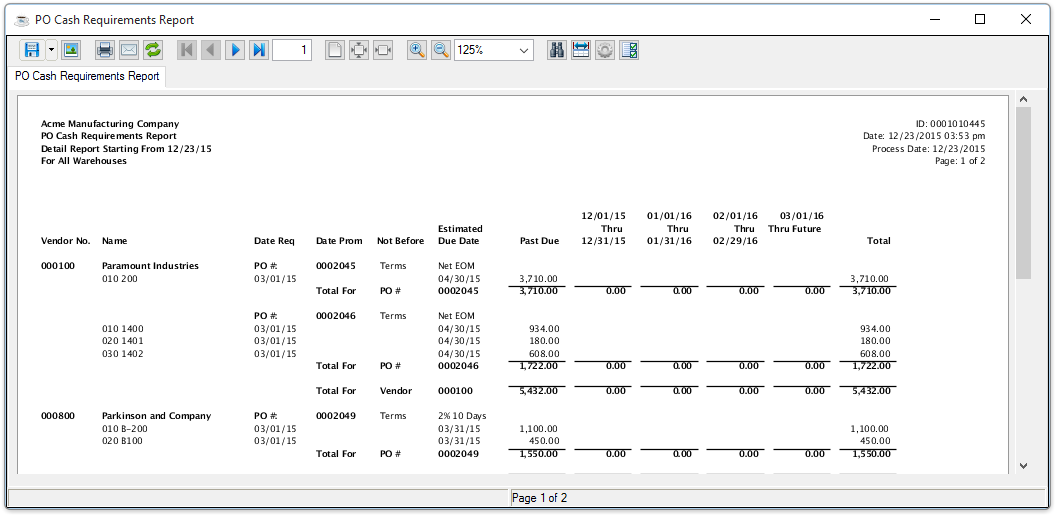
Sample PO Cash Requirements Report
See Output Options.